At a glance
| scrollandlearn | Obsidian | |
|---|---|---|
| What it is | A private web app that turns saved posts into lessons | A note app that keeps notes as plain text Markdown files on your device |
| What you add | A link to a public post from 15+ platforms, a note or quote, a photo with printed text, a voice memo, or a video or audio file up to 50 MB | Notes you write, plus web pages saved with the free Web Clipper |
| Where it lives | In your account, opened in a browser | In local files you own, readable offline |
| Organizing | Lessons are filed into topics for you, with related lessons under a lesson and under a search | Links between notes, graph view and Canvas, arranged by you |
| Transcripts of video posts | Yes: speech in TikToks, Reels and Facebook videos, captions on YouTube, no timestamps | Up to you and the plugins you install |
| Podcast episodes | A Spotify or Apple Podcasts episode link, transcribed from start to end, up to 6 hours | Up to you and the plugins you install |
| Review | Today's quiz on a spaced schedule, with a knowledge score per topic | Up to you and the plugins you install |
| Plugins and themes | None | Thousands of community plugins and themes |
| Export | Every lesson as a Markdown file, a folder per topic | Your notes already are Markdown files |
| Sharing | A lesson as an image; no teams | Shared vaults through Sync; Publish puts notes on the web |
| Apps | Web app in any browser; an iPhone Shortcut, or installing it from Chrome on Android, adds it to the share sheet | Windows, Mac, Linux, iOS and Android |
| Price | 10 lessons free, no card; Starter $19.99 a month for 100 saves | Free without limits; Sync $4 a month billed yearly or $5 monthly; Publish $8 or $10 a month per site |
What a saved post becomes
In Obsidian a saved post turns into a note only after you watch it and write one. In scrollandlearn you paste the link and the app writes the lesson, usually within a minute. Here is an example of the lesson a Threads post about prompts becomes.
Keep a prompt library
A prompt you have written twice belongs in a library you can search.
Key points
- Store them as files in the project, not in chat history you cannot search.
- Keep the context, the role, and the format together in one block.
- Version them, because a small edit can quietly make output worse.
- Reuse beats rewriting, and it is the difference between a demo and a workflow.
Try this
Save the prompt you wrote twice this week as a file in your project.
Remember this
Written twice means reusable.
In the quiz
What is the signal that a prompt belongs in your library?
Filed under AI prompts
Open a lesson and scrollandlearn lists up to three related lessons from your library below it, when some are close in meaning, and a search shows them under its results too. That is the nearest it comes to Obsidian's links, and the difference is who makes them: in Obsidian you draw every connection yourself, while in scrollandlearn the app finds them and you cannot add your own.
What scrollandlearn does for you
- Nothing to build. There is no vault, plugin list or template to maintain, and nothing to configure before the first lesson.
- It does the writing. For a video, the lesson starts from a transcript: what someone says in a TikTok, Reel or Facebook video, or a YouTube video's captions. From it come a one-line core idea, key points and Remember this, plus Try this when the post suggests something to do. Posts on X, Threads, Reddit, Bluesky and LinkedIn are written up from their text, and on Instagram, TikTok, X, Threads and LinkedIn the words printed on photos and slides are read as well.
- Long sources in one lesson. An hour-long YouTube talk with captions, or a podcast episode from Spotify or Apple Podcasts, is read from beginning to end and written up as one lesson in sections, one for every part of about 20 minutes. There is no set number of points; the lesson keeps every distinct thing the source teaches.
- Many posts from one link. On Creator and Power, Add takes the link to a public playlist or profile and brings in up to 25 posts on Creator and 100 on Power, each post its own lesson.
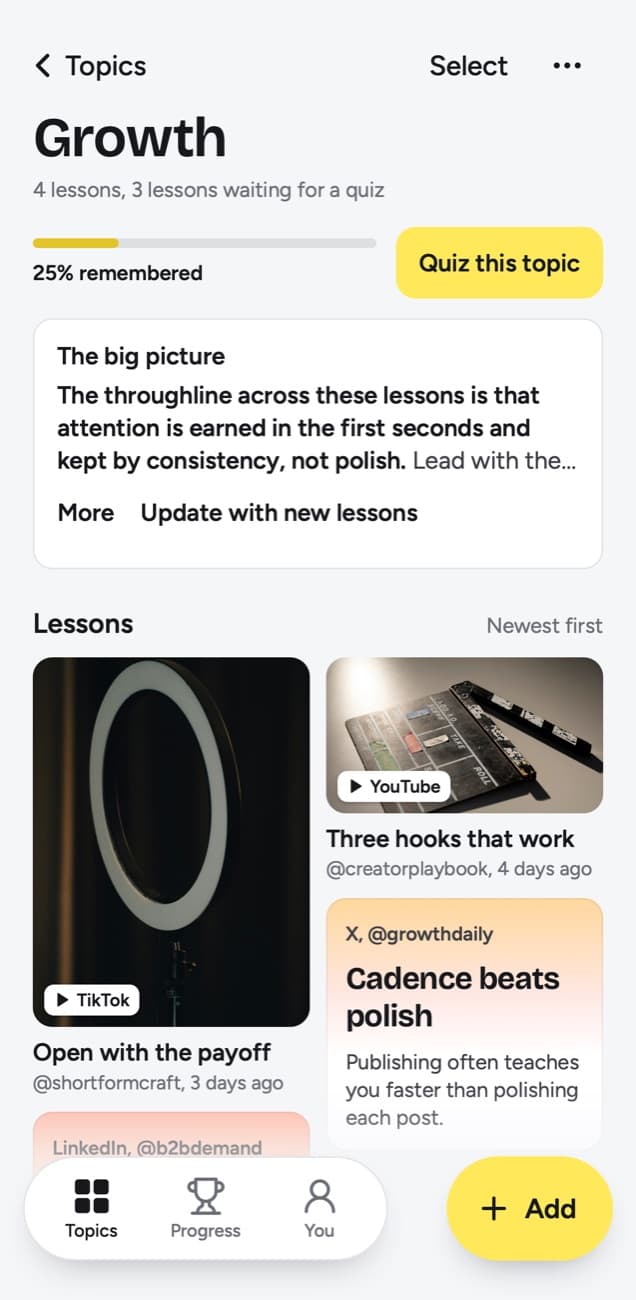
- It files for you. Each lesson goes into a topic named after what you keep saving. Change moves a lesson to another topic or to a new one you name, and when small topics pile up, Group topics suggests grouping them and you decide.
- It brings lessons back. Today's quiz asks a few questions a day and your grade sets the next date. Forgot brings a lesson back tomorrow and starts it over, Kind of in 4 days, Knew it in 14 days, then 35, 88 and 219 days, then a year.
- A big picture per topic. Each topic keeps a short summary across all its lessons, rewritten as the topic grows, and a knowledge score, which counts every lesson that has come up for a quiz, answered or not, and shows the share you remembered.
- Saving from the phone. A Shortcut in the iPhone share sheet sends a post in from the app where you found it. On Android the same works once you install the web app from Chrome, which adds scrollandlearn to the share sheet.
What Obsidian offers that scrollandlearn does not
- You own the files. Notes are plain text Markdown on your device, readable in any editor and available offline. Obsidian says its apps collect no telemetry.
- Linked thinking. Links between notes, a graph view of how they relate and Canvas for laying out ideas on an open board suit a Zettelkasten or a long writing project.
- It bends to your system. Thousands of community plugins and themes add almost anything, from calendars and Kanban boards to task lists.
- Price. The app is free without limits and needs no sign-up. Sync and Publish are optional paid add-ons.
- Web pages. The free, open source Web Clipper saves pages into your vault and lets you highlight passages, in Chrome, Safari, Firefox, Edge and other browsers.
- Every platform. There are apps for Windows, Mac, Linux, iOS and Android. scrollandlearn is a web app with no native app.
What scrollandlearn does not do
- No files of its own. Lessons stay in your account; Export lessons downloads them as Markdown, a folder per topic, to copy into a vault, and nothing syncs with Obsidian.
- No pages and no linked notes. A note you type into Add becomes a note card, or a lesson at 300 characters or more, and it cannot link to other notes. On a lesson you write in two places: My takeaway, up to 500 characters in your own words, and Edit lesson, where you can rewrite the title, core idea, key points (up to 4,000 characters), Try this, Remember this and the quiz question.
- No links of your own, no graph and no plugins.
- Web pages go in only through the browser extension, in Firefox today and soon in Chrome, Edge and Safari. Pasted links work for posts from the 15+ platforms and for LinkedIn articles.
- No timestamps in transcripts; search finds their exact words but cannot jump to a moment.
- No teams, no shared vaults or published pages, and no native app.
Who should use which
Pick scrollandlearn if the problem sits earlier: you save more videos and posts than you will ever turn into notes. It turns each one into a lesson without you rewatching it, and the daily quiz checks whether you still remember it weeks later.
If you keep an inbox note of links to process later and it keeps growing, the bottleneck is processing. That is the part scrollandlearn does, and the part a vault leaves to you.
Pick Obsidian if writing is how you think. If you keep a Zettelkasten, draft long pieces from linked notes or want your archive as files that will outlive any app, Obsidian is built for that and scrollandlearn is not.
Can they coexist?
Yes, if each keeps its own job. Nothing syncs between them; when you want lessons in your vault, Export lessons downloads them as Markdown files with front matter Obsidian reads. A practical split is to send saved posts to scrollandlearn and let the quiz show you which lessons stay with you. When one changes how you think about something, write a permanent note about it in Obsidian, in your words, with the link to the original post that the lesson keeps.
Frequently asked questions
- Is scrollandlearn local-first like Obsidian?
- No. Your lessons live in your scrollandlearn account and you open them in a browser. They are private to you and are not files on your device until you download them with Export lessons, as Markdown, CSV or JSON.
- Can I send lessons to my Obsidian vault?
- Not automatically, because there is no Obsidian sync. Export lessons downloads every lesson as a Markdown file, a folder per topic, with front matter Obsidian reads, and Copy lesson copies one lesson's text. Each lesson keeps the link to the original post.
- Which is better for a Zettelkasten?
- Obsidian. A Zettelkasten depends on writing small notes yourself and linking them, which is what Obsidian is built around. scrollandlearn files lessons into topics and shows related lessons under a lesson and under a search, but you cannot link notes to each other in it.
- How do the prices compare?
- As of 14 October 2026, the Obsidian app is free without limits. Sync costs $4 per user a month billed yearly or $5 monthly, and Publish $8 per site a month billed yearly or $10 monthly. On scrollandlearn your first 10 lessons are free with no card, then Starter is $19.99 a month for 100 saves. You can cancel any time.


