At a glance
| scrollandlearn | Notion | |
|---|---|---|
| What it is | A private web app that turns saved posts into lessons | A workspace for pages, databases, wikis and projects |
| What you add | A link to a public post from 15+ platforms, a note or quote, a photo with printed text, a voice memo, or a video or audio file up to 50 MB | Anything you type, paste, embed or clip into a page |
| Who organizes it | The app files each lesson into a topic | You design the pages, databases and properties |
| Transcripts | What is said in a TikTok, Reel or Facebook video, a YouTube video's captions, or a whole Spotify or Apple Podcasts episode, without timestamps | AI Meeting Notes write up meetings on the Business plan |
| Review | Today's quiz on a spaced schedule, with a knowledge score per topic | Whatever routine you build with pages and databases |
| Web articles | LinkedIn articles from a link; others through the browser extension, in Firefox today and soon in other browsers | The Web Clipper saves any page on the web to Notion |
| Sharing and teams | Share a lesson as an image; no shared pages or teams | Shared pages, teamspaces and guests (10 on Free, unlimited on paid plans) |
| Export | Every lesson as Markdown, CSV or JSON | A page or a whole workspace as HTML, Markdown or CSV |
| Apps | Web app in any browser; share-sheet saving through a Shortcut on iPhone, or on Android once installed from Chrome | Desktop and mobile apps, plus the browser |
| Price to start | 10 lessons free, no card; Starter $19.99 a month for 100 saves | Free plan; Plus $10 per seat a month billed yearly, or $12 monthly |
| Higher plans | Creator $39.99 a month for 250 saves, Power $79.99 for 1,000; both also save a whole playlist or profile from one link | Business $20 per seat a month billed yearly, or $24 monthly; Enterprise on request |
What a saved post becomes
In Notion a saved post becomes whatever you turn it into: a row in a database of links, a video embedded on a page, or a summary you write after watching it again. In scrollandlearn you paste the link and the lesson comes back on its own, usually within a minute. Below is an example of the lesson a TikTok about video hooks becomes.
Open with the payoff
The first two seconds decide whether anyone watches, so start on the result.
Key points
- Cut the introduction entirely and start on the result the viewer came for.
- Say what changed in the first sentence, then explain how it happened.
- Treat the first two seconds as the whole pitch, because that is where most people leave.
Try this
Re-record only the opening line of your next video so it starts on the result.
Remember this
If the hook needs context to make sense, it is not ready.
In the quiz
Why should a short video start on the result instead of an introduction?
Filed under Growth
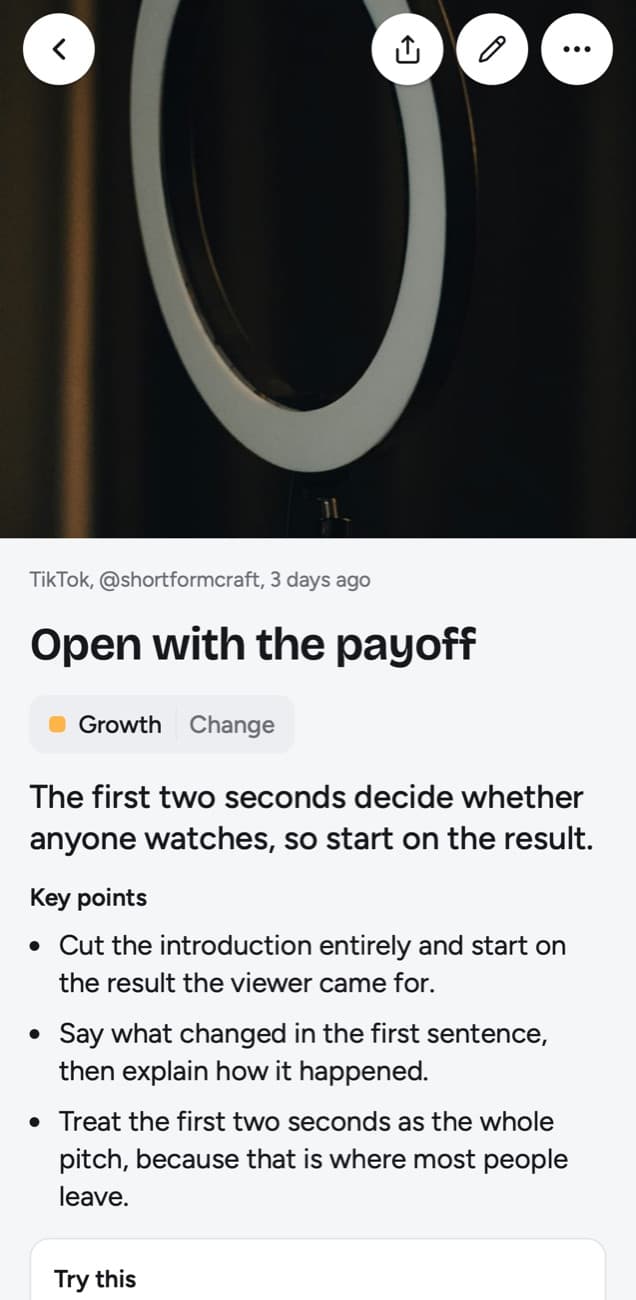
Each lesson is laid out the same way: a one-line core idea, key points and Remember this (the one sentence worth keeping, marked). A TikTok, Reel or Facebook video adds a transcript of what is said, and a YouTube video one made from its captions. Try this appears when the post suggests something to do, and it is written to leave out the creator's own pitch. The link to the original post and the creator's handle stay on the lesson. The line under In the quiz is the question Today's quiz will ask you about it later.
What you get with scrollandlearn
- No setup. There is no database to design and no template to pick. The first lesson arrives the first time you paste a link.
- The writing is done for you. A Reel or TikTok where someone talks comes back with a transcript of what is said and key points, and so does a YouTube video or Short that has captions. A post on X, Threads, Reddit, Bluesky or LinkedIn is written up from its text, and on Instagram, TikTok, X, Threads and LinkedIn the words printed on photos and carousel slides are read too.
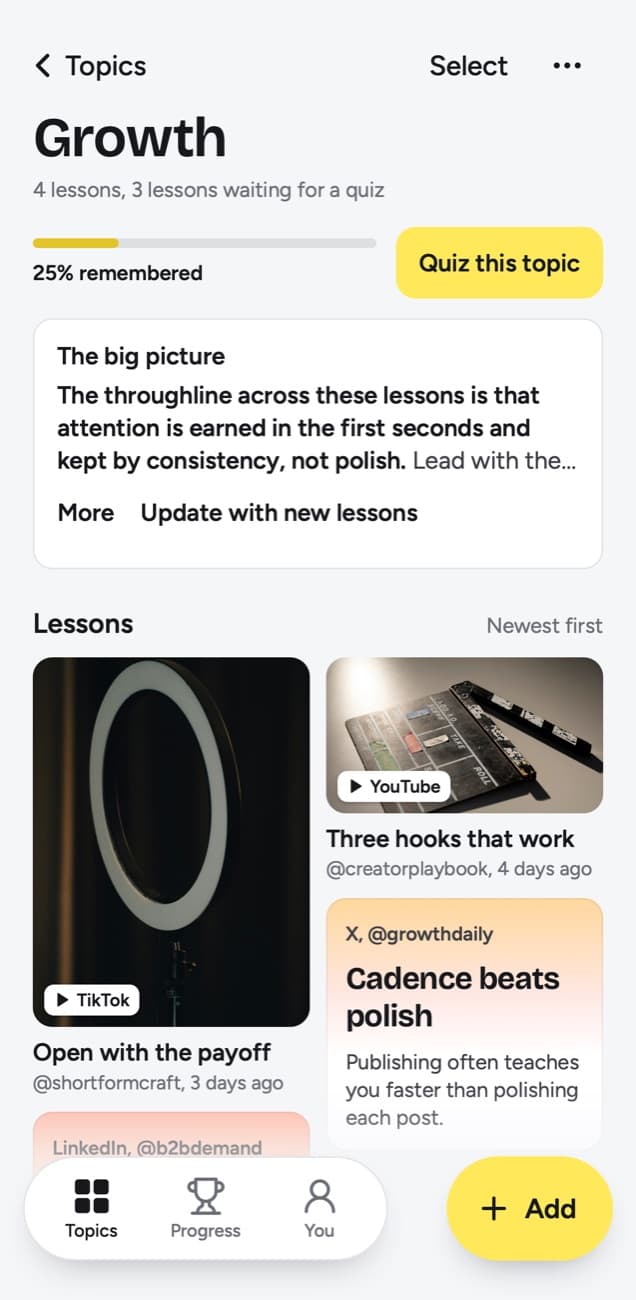
- Filing without folders. Each lesson lands in a topic named after what you keep saving, such as Growth or Money habits. Change moves a lesson, and when several small topics pile up the app suggests grouping them and you decide.
- Review that happens on its own. Today's quiz asks a few questions a day about lessons you saved. You answer in your head, tap Show answer and grade yourself: Forgot, Kind of or Knew it.
- A spaced schedule. Your grade sets the next date. Forgot brings a lesson back tomorrow and starts it over, Kind of in 4 days, Knew it in 14 days, then 35, 88 and 219 days, then a year.
- A measure of what stuck. Each topic shows a short big picture across all its lessons and a knowledge score: of the lessons you have graded or that have reached their quiz day, the share you remembered. A topic gets a score once one of its lessons comes up, and lessons left unanswered on their day count against it.
- Whole episodes, one lesson. Paste a Spotify or Apple Podcasts episode from most shows and it is transcribed from start to end, up to 6 hours within your plan's transcription minutes. A long source comes back as one lesson in sections of about 20 minutes each, with as many key points as it holds.
- A whole playlist from one link. On Creator and Power, "/" then Playlist or profile in Add takes the link to a public YouTube playlist or channel, or a TikTok or Instagram profile, and brings in up to 25 posts on Creator and 100 on Power, where Facebook pages, subreddits and podcast shows work too.
- Saving from the phone. On iPhone a Shortcut sits in the share sheet. On Android, install the web app from Chrome (Install and create shortcut in Chrome's menu) and scrollandlearn appears in the share sheet.
What Notion offers that scrollandlearn does not
- Writing and structure. Long documents, nested pages and databases with your own properties sit in one workspace, and you decide how they fit together.
- Teams. Shared pages, teamspaces and guests turn it into a wiki for a group. The Free plan allows 10 external guests and the paid plans unlimited. scrollandlearn has no shared pages or teams; one lesson can leave it as an image you share.
- The whole web. The Web Clipper saves any page on the web to Notion, articles included. scrollandlearn takes posts from its 15+ platforms, and the only articles it reads are LinkedIn ones.
- Getting your data out. You can export a page, or the whole workspace, as HTML, Markdown or CSV. scrollandlearn exports every lesson at once as Markdown, CSV or JSON, and nothing syncs.
- A free plan. Notion's Free plan costs nothing for one person. scrollandlearn gives you 10 lessons free with no card, then asks you to pick a plan.
- Meetings. On the Business plan, AI Meeting Notes take notes and follow-ups for your meetings with no bot joining the call.
What scrollandlearn does not do
If you are used to Notion, these gaps matter more than anything above, so here they are plainly.
- You cannot write documents in it. There are no pages or databases. Add takes a link, a note, a quote, a photo, a voice memo or a video file, and each becomes a lesson or a short card, never a page you keep writing in. Once a lesson exists, My takeaway takes up to 500 characters in your own words, and Edit lesson lets you change what the app wrote: the title, core idea, key points (up to 4,000 characters), Try this, Remember this and the quiz question.
- A pasted link saves no web articles except LinkedIn ones; other pages go in through the browser extension, in Firefox today and soon in Chrome, Edge and Safari.
- Its export is a download you make, as Markdown, CSV or JSON; nothing syncs with Notion or any other tool.
- It has no shared pages, teams or comments; Share as image sends a picture of one lesson. Nobody sees your library but you.
- It is a web app. There is no native iPhone or Android app; the share sheet works through a Shortcut on iPhone, and on Android after you install the web app from Chrome.
- Transcripts carry no timestamps. Search finds the exact words inside them but cannot take you to the moment they were said.
Who should use which
Use scrollandlearn if a lot of what you learn reaches you while you scroll. If you save cooking Reels, money advice on TikTok or YouTube interviews and rarely open them again, it handles the part a Notion database of links leaves to you: watching each one, writing it down, filing it and coming back to it. With a long interview, the lesson is written from all of its captions: an hour-long talk comes back in three sections, one for every part of about 20 minutes.
If you have kept a Notion page of saved links before, you know how it goes. The list grows because every row still needs someone to watch the video and take notes. That step is the one scrollandlearn removes, and the quiz is what makes the lessons stay with you once they exist.
Use Notion if most of your work is writing, planning or running projects with other people. A content calendar, a client database or a team wiki all belong there, and scrollandlearn can do none of them.
Can they coexist?
Yes, as two tools doing two jobs. Nothing syncs between scrollandlearn and Notion, so nothing moves across on its own; Export lessons downloads your lessons as Markdown, CSV or JSON when you want them elsewhere. A workable split is to keep projects, docs and team pages in Notion and send saved posts to scrollandlearn from the share sheet. When a lesson feeds a project, bring what you need into the Notion page yourself; the lesson keeps the link to the original post if you want to go back to the source.
Frequently asked questions
- Does scrollandlearn replace Notion?
- Only for one job: turning posts you save into lessons and quizzing you on them. It has no pages, databases or sharing, so it cannot stand in for Notion as a workspace or a team wiki.
- Can I move my lessons into Notion?
- Not automatically, because there is no Notion sync. Export lessons, on the You screen, downloads every lesson as Markdown files, a folder per topic, that you can import into Notion, and Copy lesson puts one lesson's text on your clipboard. In the app, each lesson keeps the link to the original post and the creator's handle.
- Which one costs less?
- Notion, if its Free plan covers you. As of 14 October 2026, Notion Plus is $10 per seat a month billed yearly, or $12 monthly. On scrollandlearn your first 10 lessons are free with no card, then Starter is $19.99 a month for 100 saves. You can cancel any time. Paying every 6 months costs 25% less and paying yearly 40% less, both up front.
- What if scrollandlearn can't read a post?
- On video platforms, a lesson is never made from a title alone. A TikTok or Reel is written up from what is said in it, so one with music and no talking gives no lesson (at most one about its lyrics), however long its caption. A YouTube video is read from its captions; when it has none, the app asks you to upload the video file, up to 50 MB, and you can do the same for a private or blocked post if you have the file. Deleted posts can't be read, and a failed link can be tried again with Try again.


