At a glance
| scrollandlearn | Apple Notes | |
|---|---|---|
| What it is | A private web app that turns saved posts into lessons | The notes app that comes with iPhone, iPad and Mac |
| What you add | A link to a public post from 15+ platforms, a note or quote, a photo with printed text, a voice memo, or a video or audio file up to 50 MB | Typed notes, checklists, sketches, scanned documents, photos, videos and audio recordings |
| Transcripts | What is said in TikTok, Reel and Facebook videos, and captions on YouTube; no timestamps | Of audio recorded in a note, on iPhone 12 and later in supported languages |
| Summaries | Core idea, key points and Remember this on every lesson; Try this when the post suggests one | Apple Intelligence can summarize a recording's transcript on supported iPhones |
| A pasted link | Becomes a lesson, usually within a minute | Stays a link in the note |
| Organizing | Automatic topics, each with a big picture | Folders, pins, tags and Smart Folders that you set up |
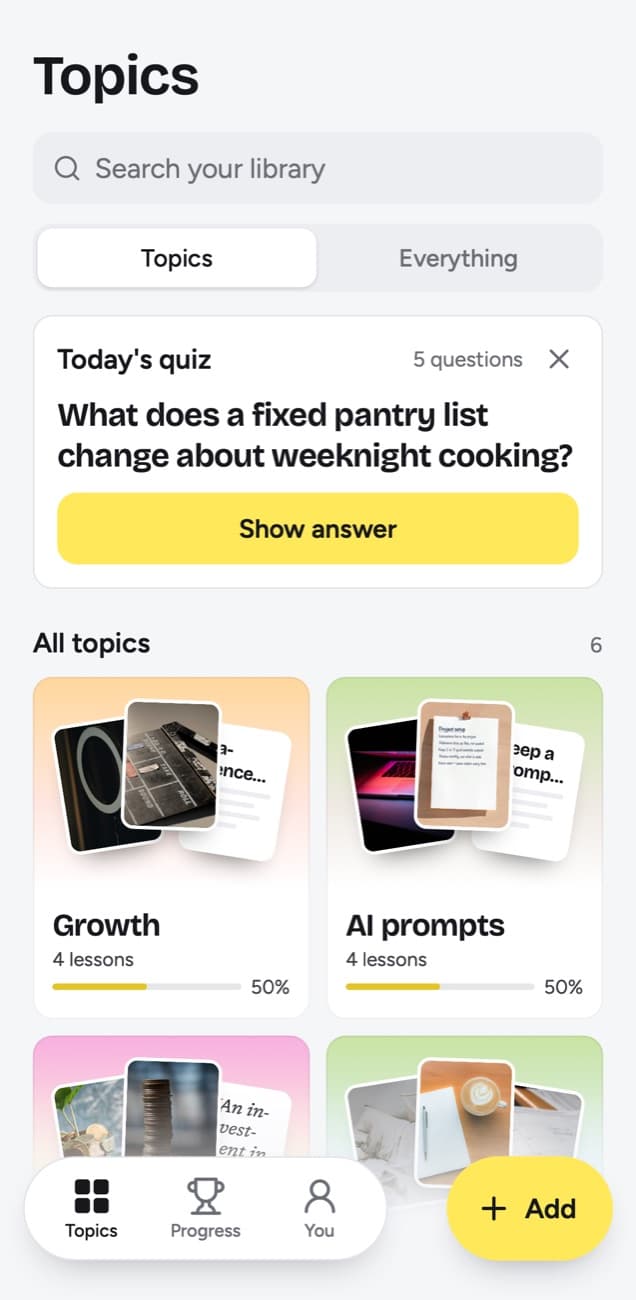
| Review | Today's quiz on a spaced schedule, with a knowledge score per topic | You decide when to reread |
| Sharing | A lesson as an image; the library stays private to you | Send a copy, or collaborate on a note or folder through iCloud |
| Apps | Web app in any browser; on iPhone a Shortcut adds it to the share sheet, and on Android installing it from Chrome does | Apple devices, plus Notes on iCloud.com in a browser |
| Price | 10 lessons free, no card; Starter $19.99 a month for 100 saves | Comes with the device |
What a saved post becomes
A YouTube link pasted into Notes stays a link until you find the time to watch it again. Paste the same link into scrollandlearn and, if the video has captions, you get a lesson like this one, usually within a minute.
Automate the transfer
Saving works when the money moves on payday, before you can spend it.
Key points
- Move money on payday, before it sits in the account you spend from.
- Start at a percentage you will not resent, then raise it with each pay increase.
- Keep the investing account separate from the account with the card attached.
- Review the amount twice a year rather than every month.
Try this
Set a standing transfer for the day after payday.
Remember this
Saving fails at the monthly decision, so remove the decision.
In the quiz
When should the savings transfer happen, and why then?
Filed under Money habits
This example illustrates the format of a lesson and is not financial advice. The lesson keeps the link to the original video and the creator's handle. The line under In the quiz is the question Today's quiz will ask you, and how you grade your answer decides when the lesson comes back.
What scrollandlearn adds
- Links become lessons. A TikTok, Reel or Facebook video comes back with a transcript of what is said and a YouTube video with one from its captions, and every lesson has a core idea, key points and Remember this, plus Try this when the post suggests something.
- More than video. Text posts on X, Threads, Reddit, Bluesky and LinkedIn become the lesson, and the words on Instagram and TikTok carousels, and on photos posted to X, Threads or LinkedIn, are read as well.
- Podcasts and playlists. A Spotify or Apple Podcasts episode from most shows is transcribed from start to end, up to 6 hours within your plan's transcription minutes, and becomes one lesson, in sections when it runs past half an hour. On Creator and Power, one link to a public playlist or profile brings in up to 25 posts on Creator and 100 on Power.
- Filing on its own. Each lesson goes into a topic named after what you keep saving, with a short big picture across all its lessons.
- A daily quiz. A few questions a day about lessons you saved: you answer in your head, tap Show answer and grade it. Forgot brings a lesson back tomorrow and starts it over, Kind of in 4 days, Knew it in 14 days, then 35, 88 and 219 days, then a year.
- A score per topic. The knowledge score counts every lesson you have graded or that has reached its quiz day, and shows the share you remembered; a lesson left unanswered on its day counts as not remembered.
- Finding things. Search finds lessons by title, key points, core idea, Try this, Remember this, your takeaway, topic and creator handle, and lists related lessons under the results. Open a lesson and up to three of your lessons on a similar idea sit below it.
- Any browser. It runs in Safari, Chrome or any other browser, on Android and Windows as well as Apple devices.
What Apple Notes offers that scrollandlearn does not
- It is already there. Notes comes with iPhone, iPad and Mac, syncs through iCloud and opens on iCloud.com in a browser.
- It takes what you make. Typed notes, checklists, sketches, scanned documents, photos and videos all go in. scrollandlearn has no checklists, sketches or scans.
- Audio you capture yourself. Make an audio recording in a note on iPhone 12 or later and, in supported languages, the spoken words are transcribed as you go. Tap a line to hear that moment, or use Find in Transcript.
- Summaries on newer iPhones. With Apple Intelligence, Notes can summarize the transcript of a recording.
- Calls. Phone and FaceTime calls you record can be transcribed into Notes on iOS 18.1 or later.
- Sharing. Send a copy, or share a link to work on a note or a folder together in real time, with edit or view-only permissions.
- Your own system. Folders, pins, tags such as #work and Smart Folders let you organize exactly the way you like.
What scrollandlearn does not do
- You cannot sketch or scan in it, and there are no folders of notes. A note, a photo with printed text or a voice memo you add becomes a lesson or a card on Everything. On a lesson you can add My takeaway, up to 500 characters, and change the title, core idea, key points, Try this, Remember this or quiz question in Edit lesson.
- It has no import from Apple Notes, and its export is a download of Markdown, CSV or JSON files, not a sync.
- It does not save websites or web articles; LinkedIn articles are the exception.
- Transcripts have no timestamps; search finds their exact words but cannot jump to a moment.
- There is no collaboration, sharing goes only as far as a picture of one lesson, and there is no App Store app; on iPhone it runs in the browser, with a Shortcut for the share sheet.
Who should use which
Add scrollandlearn when a note full of links keeps growing. If you paste TikToks, Reels and YouTube links into a note to watch later and rarely do, those links are the part scrollandlearn turns into lessons.
Three signs it is time: you have a note of saved links you never open, you remember saving a video about something and cannot find it, and you watch the same advice twice because the first time did not stay with you.
Keep using Apple Notes for anything you write or say yourself: shopping lists, meeting notes, ideas at midnight, a lecture you keep as an audio recording. It comes with the device and opens fast, and scrollandlearn is not built for lists or notes you keep adding to.
Can they coexist?
Yes, as long as each keeps its own job: Notes for what you write, scrollandlearn for what you save. There is no import or export between them, so the change is in where links go. On iPhone, tap Add to Shortcuts in scrollandlearn and send posts from the share sheet instead of pasting them into a note. On desktop, click Add and paste the link.
Frequently asked questions
- Does Apple Notes transcribe audio?
- Yes, for audio recorded in a note. On iPhone 12 and later, with the device language set to a supported language such as English, Spanish, French, German or Japanese, spoken words are transcribed as you go, and with Apple Intelligence Notes can summarize the transcript. Apple's guide describes transcripts for recordings in Notes and for recorded calls; a TikTok or YouTube link you paste stays a link.
- Is it worth paying when Apple Notes is free?
- Only if you save posts to learn from. As of 14 October 2026, Apple Notes has no price of its own and comes with the device, so if you mostly write quick notes and lists, it is enough. If you save videos and posts and rarely go back to them, test it on one saved post first. On scrollandlearn your first 10 lessons are free with no card, then Starter is $19.99 a month for 100 saves.
- Can I import my notes into scrollandlearn?
- No. There is no import. You can type a new note into Add, and one of 300 characters or more becomes a lesson, but notes you keep elsewhere do not come in.
- Does scrollandlearn work on iPhone?
- Yes, in Safari or any other browser. There is no App Store app. To save from other apps, tap Add to Shortcuts in scrollandlearn; the Shortcut then appears in the share sheet.


