Why a saved list stays a list
Every platform has a way to save a post for later, and each keeps its own list. Some let you sort saves into folders. Instagram has offered collections since 2017, and its announcement says they are private: "only you can see them." That helps you get back to a post, and getting back to a post is all a saved list is built to do.
A saved list remembers where a post is. Getting the point back means opening it and watching or reading it again, and that only works if you remember the post exists and which app it was in. A knowledge base turns this around: the point is written down, so you find it by what it was about.
| Saved list in an app | Social media knowledge base | |
|---|---|---|
| What is kept | The post itself | A written entry with the point of the post and its source |
| Finding something | Scroll and rewatch | Search by what it was about |
| Across platforms | One list per app | One collection |
| Grouped by | Folders you make, if you make any | Subject |
| Remembering it | Left to you | Brought back for review |
What makes social posts hard to keep
Most note-taking methods grew up around text you can highlight. Social posts come in formats where the useful part is harder to get at, and each one needs different handling before it can become an entry.
- Short video (TikTok, Reels, YouTube Shorts): the point is usually spoken, and the caption is often a hook. You need the words before you can summarize anything.
- Long video and podcasts (YouTube, Spotify): the point is buried somewhere in minutes of talk.
- Carousels and photo posts: the point is printed on the slides, one fragment per slide.
- Text posts (X, Threads, Reddit, Bluesky, LinkedIn): the words are there, and the work is picking the one idea worth keeping.
What a good entry holds
- The point in one line, so you can scan a subject in seconds.
- The few key points that support it.
- One thing to try, when the post was practical.
- The source: the link and the creator's handle, so you can check it or credit it.
- The words themselves when the post was spoken, so a summary can be checked against what was said.
Leave out the hook, the call to follow and anything the creator was selling. They are what made you watch, and none of them is what you saved the post for.
Subjects that hold up
Subjects named after what you actually save hold up better than categories planned in advance. Ten saves are often enough to show the pattern: a few posts on growing an audience, a few on money, a few recipes. Keep the subjects broad, and when several small ones pile up around the same idea, merge them.
How scrollandlearn builds one
You paste a link to a public post, and usually within a minute it comes back as a lesson: a one-line core idea, key points, a marked Remember this sentence, Try this when the post suggests something to do, and the link back to the post with the creator's handle. The example below illustrates the lesson an Instagram post about cooking becomes.
Salt the pasta water
The cooking water is the only chance to season the pasta itself, so salt it well.
Key points
- Add the salt once the water boils, then wait for it to dissolve before the pasta goes in.
- Save a cup of the starchy water before draining, it binds the sauce.
- Finish the pasta in the pan with the sauce rather than pouring sauce on top.
- Undercook slightly in the water because it keeps cooking in the pan.
Try this
Taste the water next time you cook pasta. It should taste clearly salty.
Remember this
If you can't taste the salt in the water, it is not enough.
In the quiz
Why salt pasta water so heavily?
Filed under Cooking
What it can read depends on the post. A TikTok, Reel or Facebook video becomes a lesson from what is said in it and its caption is not used, so a video with only music usually gives no lesson, however long the caption. A YouTube video becomes a lesson only from its captions. On video platforms, a lesson is never made from a title alone. For a long video, the lesson is written from everything said in it, and a talk of half an hour or more is read in parts of about 20 minutes, each its own section of the lesson. On text posts, the post text becomes the lesson. On carousels and photo posts from Instagram, TikTok, X, Threads and LinkedIn, the text printed on the slides is read and the photos themselves are never described; on Instagram and TikTok, caption and slide text together need about 300 characters. Private, deleted or blocked posts can't be read from their link. If you have the video file, you can upload it instead, up to 50 MB, and the app asks for the file when a YouTube video has no captions. Links to web articles are not saved, LinkedIn articles aside.
Each lesson is filed into a topic on its own, named after what you keep saving, such as Cooking or Money habits. Change moves a lesson to another topic, and when several small topics pile up, the app suggests grouping them and you decide. Each topic has a big picture, a short summary across its lessons that is rewritten as the topic grows.
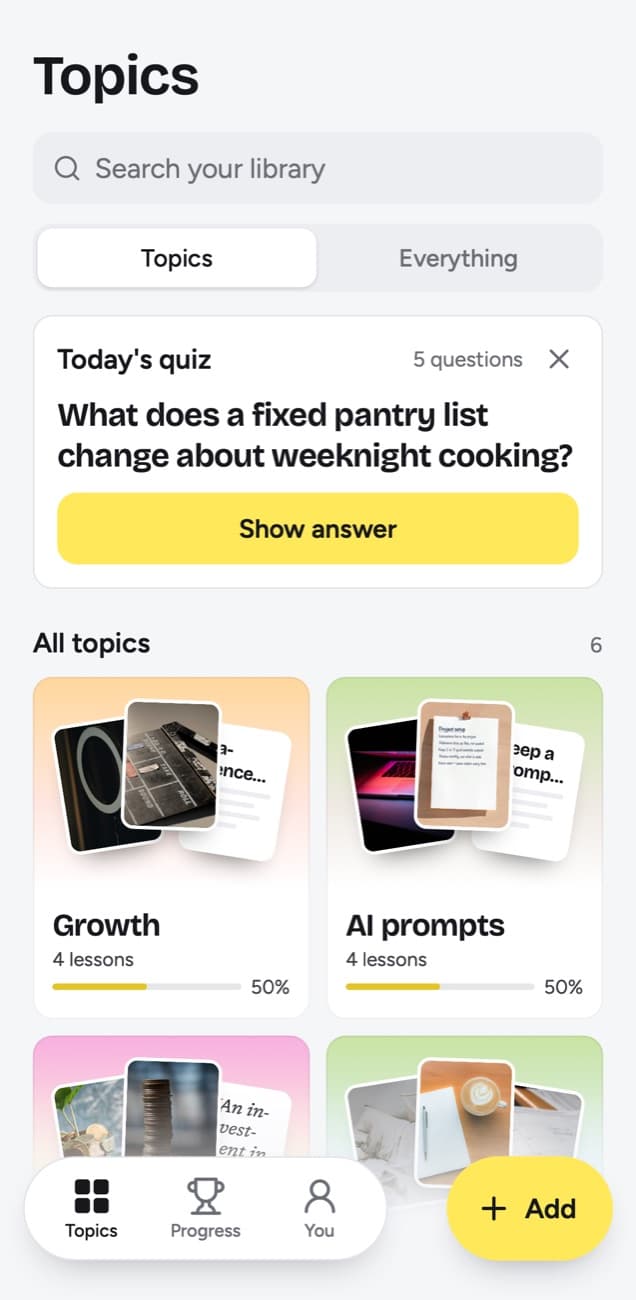
The last part is remembering. Today's quiz asks a few questions a day about lessons you saved, and you grade each answer. Forgot brings a lesson back tomorrow and starts it over, Kind of brings it back in 4 days, and Knew it in 14 days, then 35, 88 and 219 days, then a year.
Starting from the saves you already have
- Pick ten: open the saved list you use most and take the ten newest posts that taught you something.
- Paste them in: on a computer through Add, on a phone through the share sheet (on iPhone once you add the Shortcut from the app, on Android once you install the web app from Chrome).
- Read the topics: after ten lessons, look at the topics that formed. They show what you actually save.
- Save forward: from now on, share a post to scrollandlearn at the moment you would have saved it.
- Answer the quiz: a few questions a day is what keeps the collection from turning back into a list.
Frequently asked questions
- How is this different from a bookmark manager?
- A bookmark manager keeps the address of a post. A social media knowledge base keeps what the post taught you, written down with the source attached, so you can search it by subject and review it.
- Which platforms does scrollandlearn read?
- Public posts from 15+ platforms: Instagram, TikTok, YouTube, Facebook, X, Threads, Reddit, Bluesky, LinkedIn, Pinterest, Twitch, Spotify, Apple Podcasts, SoundCloud, Snapchat, Rumble and Telegram.
- What if a video has no speech?
- On TikTok, Instagram and Facebook a video's lesson is written from what is said in it, so a video with only music usually gives no lesson, however long its caption, and uploading the same video does not change that. On YouTube the words come from the video's captions. A YouTube video without them gives no lesson from its link, and scrollandlearn asks you to upload the video file instead, up to 50 MB.
- Can I save web articles too?
- Only LinkedIn articles for now. Otherwise a pasted link works only for posts from the 15+ supported platforms, and links to other articles and websites are not saved. The browser extension saves the article you are reading, in Firefox today and soon in Chrome, Edge and Safari.
- Can other people see my knowledge base?
- No. Your library is private by default. There is no public sharing and no team space.


