Where the term comes from
The phrase was popularized by Tiago Forte of Forte Labs, whose book Building a Second Brain came out in June 2022. On the book's site he defines it as "a trusted place outside your head where you can collect and organize your most important ideas and insights." In his overview of the method he calls it "an external, centralized, digital repository for the things you learn."
The wish is older than the name. In July 1945 Vannevar Bush described a desk-sized machine he called the memex, a place to store books, records and communications that would be "an enlarged intimate supplement to his memory." Today the storage fits in a phone, and the hard part is doing something with what you keep.
That is where Forte puts the weight. In his overview he writes that information only becomes knowledge "when we put it to use." A second brain is judged by what comes out of it, and storage is only the first half of the job.
The four steps: CODE
Forte breaks the method into four steps. Each has its own job, and a system that stops after the first two tends to turn into a pile.
- Capture: keep what resonates. Forte's advice is to save anything that "resonates" with you on an intuitive level, instead of trying to keep everything you read or watch.
- Organize: file by actionability. A note goes where it will be used next, in the project it helps with, using the four PARA buckets below.
- Distill: shrink each note to its essence. Forte's Progressive Summarization summarizes a note "in multiple stages over time," each pass marking a smaller part of it.
- Express: use it. A note earns its place when it shows up in something you write, decide, build or teach.
Capture and Organize take seconds. Distill and Express take longer, and they are the steps that turn a collection into work.
PARA: where things go
PARA is Forte's filing system, "a simple, comprehensive, yet extremely flexible system for organizing any type of digital information across any platform." It rests on what he calls a simple observation, "that there are only four categories that encompass all the information in your life."
| Bucket | What goes in | Example |
|---|---|---|
| Projects | Short-term efforts you take on with a goal in mind | Launch a cooking channel by March |
| Areas | Responsibilities that need ongoing attention | Health, money, the team you manage |
| Resources | Topics you are interested in and learning about | Video hooks, investing, sleep |
| Archives | Anything from the other three that is no longer active | Last year's finished project |
Forte calls this organizing by actionability. The question for a new note is where you will need it next, which is easier to answer than which subject it belongs to.
What a second brain is not
- A pile of saved links. A link points to a source; a second brain keeps what you took from it.
- A perfect taxonomy. Forte argues that the system has to be simple enough to free up your attention, which is why PARA stops at four buckets.
- An archive of everything. Capturing what resonates means letting most things go.
- A replacement for thinking. Distill and Express are where you decide what a note means and what to do with it.
Where saved posts fall out of the method
Most of the capture examples in Forte's overview are text: snippets, highlights from books, links and web pages. Capturing is easy when the words are already in front of you, and distilling is a matter of marking the best lines.
A lot of what people learn from today arrives as posts on Instagram, TikTok and YouTube, where the point is often spoken and the caption is a hook. Saving one takes a tap. Distilling it means watching again, pausing and typing out the part that mattered, so the save happens and the rest of the loop never starts. For many people the result is a tidy second brain for reading and, next to it, a saved list in every app that nobody reopens.
How scrollandlearn runs CODE on a saved post
scrollandlearn is a web app for that gap. You paste a link to a public post from one of 15+ platforms, and usually within a minute it comes back as a lesson. Each step of CODE has a counterpart.
- Capture: click Add and paste the link, or share the post from your phone. On iPhone a Shortcut sits in the share sheet once you tap Add to Shortcuts in the app; on Android scrollandlearn appears in the share sheet after you install the web app from Chrome.
- Organize: the lesson is filed into a topic on its own, named after what you keep saving, such as Growth or Money habits. You do not have to make folders; Change moves a lesson to another topic or to a new one you name, and any topic can be renamed.
- Distill: each lesson has a one-line core idea, key points and one marked sentence, Remember this. A TikTok, Reel or Facebook video also brings the transcript of what is said in it, and a YouTube video the transcript from its captions.
- Express: when the post suggests something to do, Try this names it; Things to try keeps the ones you pick with a done check, and My takeaway holds a few lines in your own words.
Open with the payoff
The first two seconds decide whether anyone watches, so start on the result.
Key points
- Cut the introduction entirely and start on the result the viewer came for.
- Say what changed in the first sentence, then explain how it happened.
- Treat the first two seconds as the whole pitch, because that is where most people leave.
Try this
Re-record only the opening line of your next video so it starts on the result.
Remember this
If the hook needs context to make sense, it is not ready.
In the quiz
Why should a short video start on the result instead of an introduction?
Filed under Growth
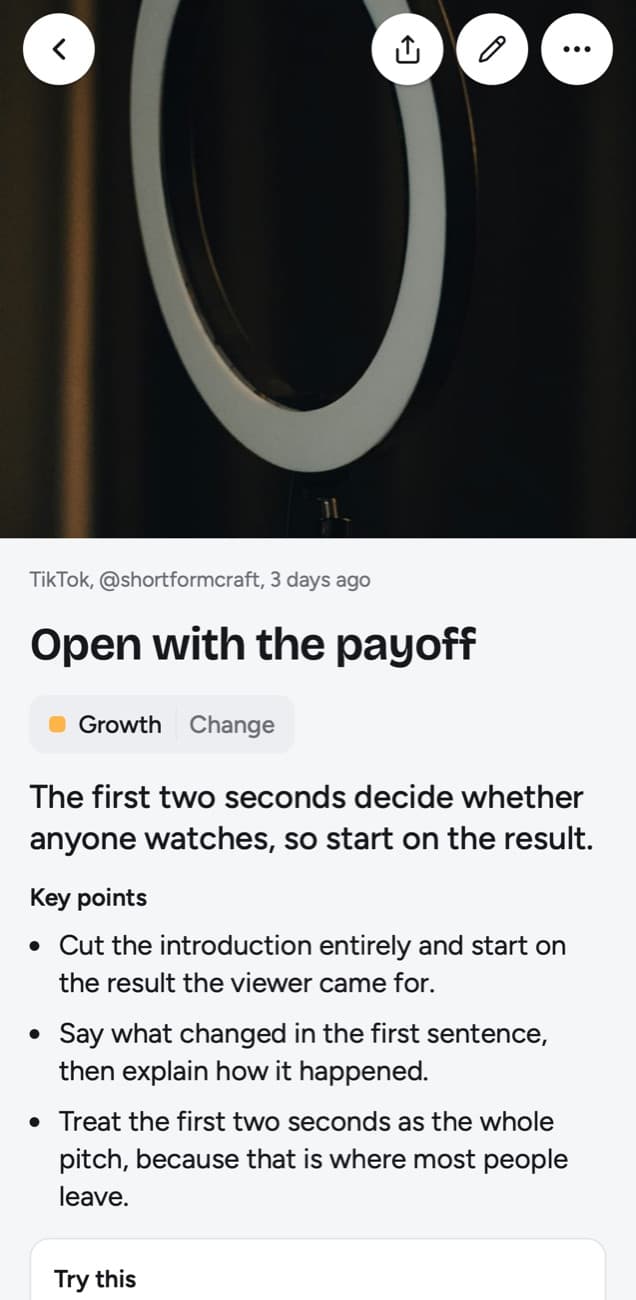
The example above illustrates the lesson a TikTok about video hooks becomes. Its Remember this line, "If the hook needs context to make sense, it is not ready," is the kind of sentence Progressive Summarization would have you mark.
The step CODE leaves to you: remembering
None of the four CODE steps is about remembering what you saved. The method is built around finding a note when a project calls for it, which works for reference material and less well for the ideas you meant to carry around in your head.
scrollandlearn adds Today's quiz. Every day it asks a few questions written from your lessons. You answer in your head, tap Show answer and grade yourself. Forgot brings a lesson back tomorrow and starts it over, Kind of brings it back in 4 days, and Knew it in 14 days, then 35, 88 and 219 days, then a year.
Frequently asked questions
- Who came up with the second brain?
- Tiago Forte popularized the term through Forte Labs and his 2022 book Building a Second Brain. The wish behind it, a memory aid outside your head, goes back at least to Vannevar Bush's memex of 1945.
- What does CODE stand for?
- Capture, Organize, Distill and Express. You keep what resonates, file it by the project it helps, shrink it to its essence and then use it in your own work.
- What is the difference between a second brain and a zettelkasten?
- A zettelkasten is Niklas Luhmann's slip-box: short notes with fixed numbers, linked to each other, built for writing and developing ideas. A second brain is Forte's broader method, organized by projects and areas.
- Can scrollandlearn be my whole second brain?
- It covers the posts you save from 15+ platforms, from capture to a daily quiz. Notes, photos with printed text and voice memos go in through Add as well; it keeps no file library, it saves web articles other than LinkedIn ones only through the browser extension (in Firefox today, other browsers soon), and its lessons reach other tools only as a download of Markdown, CSV or JSON, so it works best beside a notes app.
- Is my library private?
- Yes. Your library is private by default and nobody sees it but you. There is no public sharing and no team space.


