At a glance
| scrollandlearn | Glasp | |
|---|---|---|
| What it is | A private web app that writes lessons from social posts | A social web highlighter with AI summaries, a reader app and a public profile |
| What you save | A link to a public post from 15+ platforms or a podcast episode; through Add, also notes, photos, voice memos and video files | Highlights and notes on web pages, YouTube videos and Kindle books |
| Short social video | TikToks, Reels and Facebook videos where someone talks, and YouTube videos with captions | YouTube, the video source its pages describe as of 14 October 2026 |
| YouTube transcripts | From the video's captions, part of the lesson, without timestamps; a long video's lesson is written from all of them | Beside the player, with clickable timestamps and lines you can highlight |
| Privacy | Private; nobody sees your library but you | Public by default; private highlights come with Pro |
| Community | None | A public profile, followers and other readers' highlights on the same page |
| Review | Today's quiz: a graded question per lesson on a spaced schedule | Daily emails of random Kindle highlights and a review widget on the phone |
| Imports | None | Kindle, Readwise, Pocket, Instapaper, Medium and more |
| Export | Markdown, CSV or JSON, on every plan; no sync | Markdown, HTML, CSV, JSON, Notion, Obsidian and others, on every plan |
| Apps | Any browser; on iPhone a Shortcut in the share sheet, on Android the share sheet once installed from Chrome; a browser extension for Firefox, with Chrome, Edge and Safari to follow | Extensions for Chrome, Safari, Edge and Firefox; apps for iPhone, iPad and Android |
| Price to start | 10 lessons free, no card; Starter $19.99 a month for 100 saves | Free plan with no time limit; Pro $12.50 a month billed yearly, or $15 monthly |
| Higher plans | Creator $39.99 a month for 250 saves, Power $79.99 for 1,000; both also save a whole playlist or profile from one link | Unlimited $30 a month billed yearly, or $36 monthly |
What a saved post becomes
Open a YouTube video about prompting with the Glasp extension and a summary and the full transcript appear beside the player, ready for you to highlight lines and attach notes. Paste the same video into scrollandlearn and, as long as it has captions, a lesson like this one comes back, usually within a minute, with nothing to select.
Give the model a role
Tell the model who it is and what the answer should look like before you give it the task.
Key points
- Specify the output shape, length, and audience explicitly rather than hoping.
- Provide one worked example when the format matters more than the content.
- Name the constraints, including what the answer should not do.
- Ask it to flag its own uncertainty instead of filling gaps silently.
Try this
Add a role and an output format to the prompt you use most.
Remember this
Say who it is, then what you want back.
In the quiz
What two things should a prompt say before the task itself?
Filed under AI prompts
Glasp keeps the passages you chose, in the source's wording. scrollandlearn writes the lesson and then tests you on it: the question at the bottom is what Today's quiz asks when the lesson is due, and your grade decides when it returns.
What scrollandlearn does for what you scroll
- Social posts are the whole point. TikTok, Instagram, YouTube, Facebook, X, Threads, Reddit, Bluesky, LinkedIn and the rest of its 15+ platforms. As of 14 October 2026, Glasp's pages describe web pages, YouTube and Kindle books as what it works with.
- Nothing to select. A short Reel offers no sentence to drag a highlighter across. scrollandlearn writes the lesson from what is said in it, from a YouTube video's captions, or from a post's text and the words printed on its slides.
- Long talks and whole episodes. A YouTube talk with captions, or a Spotify or Apple Podcasts episode from most shows, is read from start to end and becomes one lesson, split past half an hour into sections of about 20 minutes each; an episode is transcribed up to 6 hours, within your plan's transcription minutes.
- A channel at once. On Creator and Power, one link to a public YouTube playlist or channel, or a TikTok or Instagram profile, brings in up to 25 posts on Creator and 100 on Power.
- Private from the first save. Nothing you add is public, and keeping it to yourself costs nothing extra.
- Recall, graded. Today's quiz shows the question before the answer, and you grade yourself Forgot, Kind of or Knew it. Forgot brings the lesson back tomorrow; Knew it pushes it out to 14 days, then further each time, up to a year.
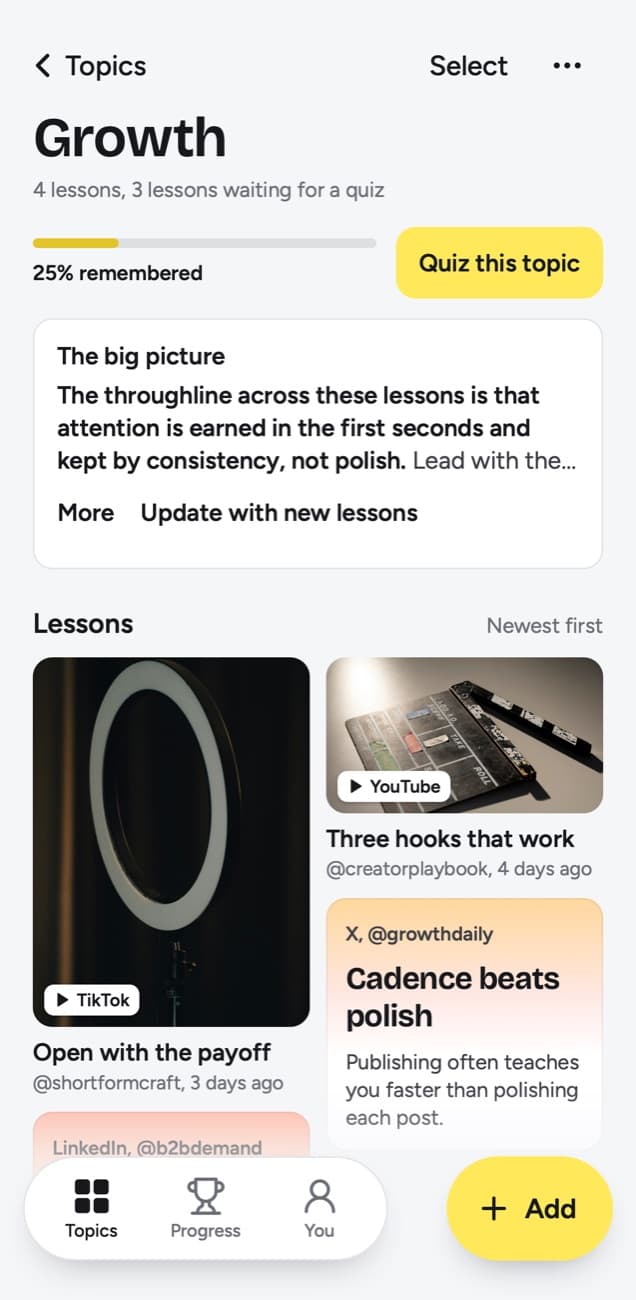
- Topics without tagging. Each lesson goes into a topic named after what you keep saving, such as AI prompts, with a big picture across it and a knowledge score for how much of what has come up you still remember.
- Your view on top. Write up to 500 characters of your own on any lesson in My takeaway, and search finds them later.
What Glasp offers that scrollandlearn does not
- The open web. Highlight any page in four colors, with a note tied to the exact sentence, and Glasp puts the highlights back when you reopen the page. scrollandlearn saves no articles or web pages.
- Books. Kindle highlights come in free from Kindle Cloud Reader, and Glasp emails a daily review of randomly chosen ones. Readwise, Pocket, Instapaper, Medium and Hypothesis can be imported too.
- YouTube in detail. Timestamps in the transcript move the player to that second, and lines of the transcript can be highlighted and kept. scrollandlearn's transcripts carry no timestamps.
- Reading in public. Every highlight has its own link, your profile shows what you read in public, people can follow it, and you can see where other readers stopped on the same page. scrollandlearn has no profile or public links; the only sharing is a picture of one lesson.
- Asking your library. Chat answers from your highlights and notes, and a connector lets other AI assistants use them too.
- Free export and a free plan. Markdown, HTML, CSV and JSON downloads and the daily Notion sync are on every plan, and Glasp says its free plan is not a trial. scrollandlearn's export is a download of Markdown, CSV or JSON with no sync.
- Apps on every device. Extensions for Chrome, Safari, Edge and Firefox, and apps for iPhone, iPad and Android with a reader and widgets.
What scrollandlearn does not do
- No highlighting. You cannot mark a passage in a lesson or a transcript. The app picks Remember this, and you can rewrite it in Edit lesson along with the title, core idea, key points, Try this and the quiz question; My takeaway holds your own words.
- No newsletters, books or web pages, and no Kindle import; LinkedIn articles are the only articles it reads.
- No app in the App Store or Google Play, and the browser extension is in Firefox only so far.
- No public profile, no followers and no public links; a lesson can be shared only as an image.
- No sync with Notion, Obsidian or anything else; the export is a download.
- No timestamps in transcripts; search finds their exact words but cannot jump to a moment.
Who should use which
Choose scrollandlearn if you learn by scrolling. The advice in a cooking Reel, a money TikTok or a LinkedIn post about job hunting rarely gets highlighted because there is nothing on screen to highlight, and it fades by the weekend. Those posts are what scrollandlearn turns into lessons, and the quiz keeps them with you.
Choose Glasp if you learn by reading. Students working through articles, writers keeping a swipe file of quotes, and people who like learning in public next to other readers will find it built around them, and the free plan goes a long way.
If both sound like you, they rarely compete: one covers pages and books, the other posts.
Using both
They sit side by side without talking to each other: scrollandlearn has no import and no Glasp connection. Keep articles, Kindle books and long reads in Glasp, and send social posts to scrollandlearn from your phone's share sheet. For a YouTube video, choose by what you need: Glasp to mark the transcript yourself and jump back by timestamp, scrollandlearn, when the video has captions, to have the lesson drafted and a question waiting for you later.
Frequently asked questions
- Is Glasp free?
- Yes. As of 14 October 2026, the free plan has no time limit and needs no card, and it includes unlimited public highlights and a set number of YouTube summaries. Pro, at $12.50 a month billed yearly or $15 monthly, adds private highlights and higher AI limits.
- Are my Glasp highlights public?
- By default, yes, so other readers can find them; as of 14 October 2026, Pro lets you make any of them private. In scrollandlearn everything is private, and a lesson cannot be made public.
- How do Glasp's YouTube summaries work?
- As of 14 October 2026, Glasp describes two kinds. Basic summaries send the transcript and your prompt to an AI assistant you pick, 3 a day on the free plan. Advanced summaries are written by Glasp beside the video, 3 every 7 days on Free and 1,000 every 30 days on Pro. scrollandlearn turns a YouTube video or Short with captions into a lesson with a quiz question.
- Can I bring my Kindle or Glasp highlights into scrollandlearn?
- No. It has no import: it takes links to public posts from its 15+ platforms and what you add yourself, so there is no Kindle import and no way to move highlights over from Glasp.
- Which one costs less?
- Glasp, for most people: as of 14 October 2026, its free plan covers public highlighting, and Pro is $12.50 a month billed yearly. On scrollandlearn your first 10 lessons are free with no card, then Starter is $19.99 a month for 100 saves. You can cancel any time.


