Watch later is where good videos go to be forgotten
YouTube makes saving easy: a tap or two puts a video in Watch later or a playlist. For someone learning from YouTube, those lists fill with tutorials, explainers, course lectures and long interviews, and they rarely get opened again. When you need one point from a 12-minute tutorial, the only way back is to scrub through it until you find it.
Even the videos you finished fade. You remember that a channel explained something well, and you can't say what the explanation was. A summary you read once has the same problem. What helps is having the point written down where you will find it, and being asked about it again before it is gone.
What a video becomes
Paste a link to a YouTube video with captions and it usually comes back as a lesson within a minute, with the transcript taken from those captions. Every lesson has a one-line core idea, the key points, a Try this with one thing to do when the post suggests one, the one sentence worth keeping marked as Remember this, and the link back to the video with the creator's handle.
Give the model a role
Tell the model who it is and what the answer should look like before you give it the task.
Key points
- Specify the output shape, length, and audience explicitly rather than hoping.
- Provide one worked example when the format matters more than the content.
- Name the constraints, including what the answer should not do.
- Ask it to flag its own uncertainty instead of filling gaps silently.
Try this
Add a role and an output format to the prompt you use most.
Remember this
Say who it is, then what you want back.
In the quiz
What two things should a prompt say before the task itself?
Filed under AI prompts
The step-by-step version, from the share button to reading the result, is in the guide to taking notes from YouTube videos. This page is about what happens in the weeks after you start.
What to paste, and what to leave in Watch later
A lesson is worth having when the video teaches something you will use or need to recall. Paste it once you know it earned that, during or right after watching.
| Kind of video | Worth a lesson? |
|---|---|
| A tutorial you will apply, from spreadsheets to sourdough | Yes. The key points, and the Try this when there is one, are the steps you will want later |
| An explainer on a subject you are studying | Yes. The quiz keeps it in your head past the week you watched it |
| A long interview with one or two ideas worth keeping | Yes. The lesson is written from the whole interview, a section for every part of about 20 minutes, so an idea from late in it is there too |
| A Short with captions where someone explains one tip | Yes. Shorts are read like any other video, from their captions |
| Music, vlogs and videos you watch to relax | No. Nothing in them needs remembering |
| A video without captions, even one where someone talks | No lesson. The speech itself is not transcribed, so the app asks for the video file |
How a subject builds up
You don't have to sort anything. Each lesson is filed into a topic on its own, named after what you keep saving: a run of prompt-writing videos becomes AI prompts, a few personal finance channels become Money habits. Change moves a lesson that landed in the wrong place, and when several small topics pile up the app suggests grouping them, and you decide.
Every topic has a big picture, a short summary across all its lessons that is rewritten as the topic grows. After ten videos on a subject it gives you one overview across their lessons. Links from 15+ platforms share one library, so under a lesson, related lessons can put a YouTube explainer next to a Reddit post or a TikTok that made the same point.
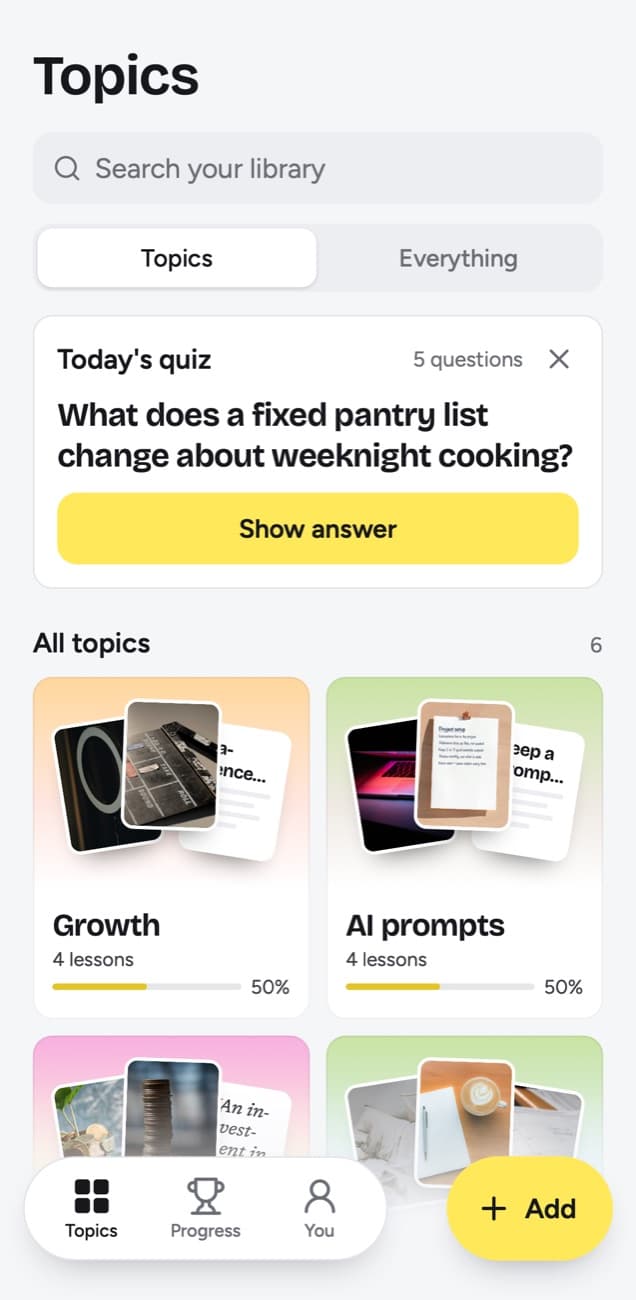
Today's quiz turns watching into remembering
Every day Today's quiz asks a few questions about lessons you saved. Each question is written from the lesson, so it asks about the idea in the video. You answer in your head, tap Show answer and grade yourself: Forgot, Kind of or Knew it. Forgot brings the lesson back tomorrow and starts it over, Kind of brings it back in 4 days, and Knew it in 14 days, then 35, 88 and 219 days, then a year.
That schedule is what a summarizer on its own lacks. A lesson you graded Knew it twice is one you can explain without the video. Quiz this topic runs the quiz on a single subject, which helps right before you use the skill, and each topic's knowledge score shows the share you remembered of the lessons that have come up, graded or simply due.
Things to try and My takeaway
Tutorials end with something to do, and that part is easy to lose. Add a lesson's Try this to Things to try, a list of the steps you picked with a done check, and it waits there until you have done it. After a month the list shows what you put into practice from everything you watched.
My takeaway is a few lines in your own words on any lesson, up to 500 characters: how you will use it, what you disagree with, where it fits what you already know. Search covers takeaways along with titles, key points, the core idea, Try this, Remember this, topics, creator handles and the exact words of transcripts.
What it reads from YouTube
| You paste | You get |
|---|---|
| A TikTok, Reel, Facebook video, Snapchat Spotlight or Twitch clip where someone talks | A transcript of what is said, a short summary and key points |
| A TikTok, Reel or Facebook video with music and no talking | Usually no lesson: it is written from what is said, and the caption is not used |
| A YouTube video or Short with captions | A transcript from the captions, a short summary and key points |
| A YouTube video or Short without captions | No lesson; it asks you to upload the video file |
| A YouTube community post | Its text and the text printed on its images; together they need about 300 characters |
| A post on X, Threads, Reddit, Bluesky, LinkedIn or a public Telegram channel | The text of the post you link, written down as a lesson; replies and comments are not read |
| A video on X, Threads, LinkedIn or Reddit | Under 300 characters of post text: a transcript of what is said (on Reddit, from its own captions), or else the post's text. 300 or more: the post's text, without the video |
| A photo post or carousel on Instagram, TikTok, X, Threads, LinkedIn or Telegram | The text printed on the images; photos are not described. On Instagram and TikTok, caption and slides together need about 300 characters |
| A Spotify or Apple Podcasts episode | The whole episode, transcribed from the show's public podcast feed; a Spotify exclusive gives only its title and description |
| A private or deleted post | No lesson; it can't be read, so upload the file if you have it |
| A link to an article or any other website | Not saved; only posts from the 15+ supported platforms, and LinkedIn articles |
- Long videos and Shorts with captions come back with a transcript taken from them; the speech itself is not transcribed. YouTube creates automatic captions with speech recognition for many videos, and lists very long videos, poor sound and overlapping speakers among the reasons they can be missing.
- A lesson is written from what is said, so a step that is only shown on screen, never spoken, is not in it.
- Without captions, a video gives no lesson: all the app has then is its title, which is never enough for one. The app then offers Upload the video, for files up to 50 MB.
- Private and deleted videos can't be read; upload the file if you have it. A link that failed can be tried again with Try again.
- Transcripts have no timestamps, but search reaches their exact words, so a line you remember from the video finds the lesson again.
A month of learning from YouTube
In the first week you paste the videos worth keeping, and Today's quiz begins asking about what you saved. By the third week the lessons you graded Kind of have come back more than once, and the ones you knew are waiting out their 14 days. By the end of the month each subject has a big picture, Things to try shows what you used, and the knowledge scores tell you which subject is slipping.
Starter covers 100 saves a month. If you learn from more videos than that, Creator covers 250 and Power 1,000.
Frequently asked questions
- Does it replace watching the video?
- No. Watching is how you learn the material the first time. The lesson keeps what you learned, brings it back in the quiz and links to the video for when you want to see a part again.
- Does it work with YouTube Shorts?
- Yes, when the Short has captions: it comes back with a transcript taken from them, like a long video. A Short without them gives no lesson, even when someone talks in it.
- Can it take me to the exact moment in a video?
- No. Transcripts have no timestamps. The lesson links to the video, and the key points tell you what to look for.
- Does a lesson cover a whole long video?
- Yes. The lesson is written from the whole transcript, so a two-hour interview comes back in about six sections, one for every part of about 20 minutes. The link stays on the lesson for the details, and Edit lesson lets you add a point to the key points yourself.
- What happens when a video can't be read?
- You get no lesson, and nothing is guessed from the title. The app offers Upload the video for files up to 50 MB, and a link that failed can be tried again with Try again.
- Can I save videos from the YouTube app on my phone?
- Yes, through the share sheet. On iPhone, Add to Shortcuts in the app puts a scrollandlearn Shortcut there. On Android, install the web app from Chrome first (Install and create shortcut in Chrome's menu), and scrollandlearn then appears in the share sheet. On a computer, click Add and paste the link.


