Use YouTube's own tools first
Start with what YouTube already gives you. On a computer, open the video's description and click Show transcript. The transcript scrolls along with the video, and clicking any line jumps to that moment. YouTube's help page says it is there for any video that has captions. Automatic captions are generated by machine, so YouTube warns their quality varies, and they can be missing when a video was just uploaded, when the audio is hard to process or when the language isn't supported.
To keep a video, tap More below it, then Save. YouTube adds it to the last playlist you saved to, or to Watch Later, and a message at the bottom tells you which; tap Change there to pick another playlist or make a new one. Set a new playlist to Private and only you can see it. All your playlists live in the You tab.
The manual method builds on those two tools: open the transcript next to the video, copy the lines that matter into a notes app, then write two or three sentences on what you will do with them. It works. It also takes about as long as the video itself, which is why Watch Later fills faster than it empties.
Turn a YouTube video into a lesson
- Copy the link: under the video, tap Share, then Copy link. On a computer, the address in the browser works as well.
- Paste it into scrollandlearn: open the app, tap Add and paste the link. Regular videos and Shorts both work.
- Let it read the captions: the transcript comes from the video's captions, and the lesson is usually ready within a minute. The speech itself is not transcribed, so a video without captions gives no lesson and the app asks for the video file.
- Read the lesson top to bottom: the core idea in one line, the key points, Remember this, the one sentence worth keeping, and Try this when the video suggests something to do. The transcript, the link back to the video and the creator's handle are on the lesson too.
- Write My takeaway: a few lines in your own words on why the video mattered to you. To change anything else, such as a key point or the quiz question, tap the pencil on the lesson to open Edit lesson.
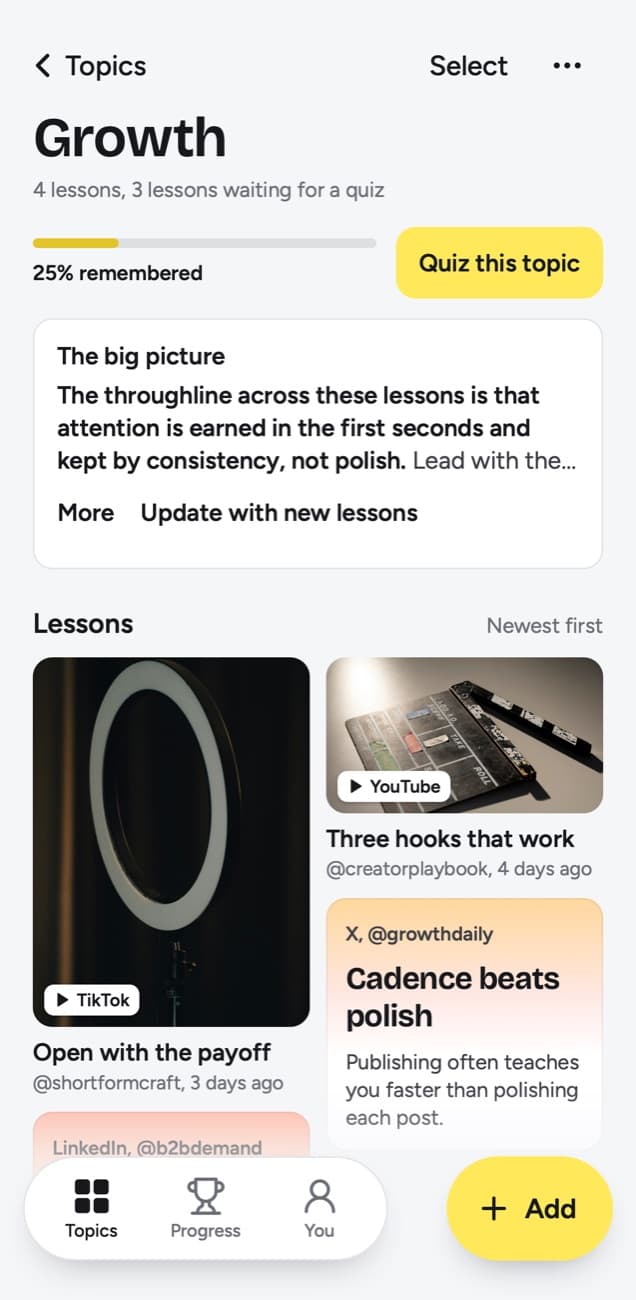
- Check the topic: the lesson files itself into a topic, such as Growth or AI prompts. Tap Change if it belongs somewhere else.
- Add Try this to your list: if the video gave you something to do, add it to Things to try and tick it off when it is done.
- Send the next one from YouTube: on iPhone, tap Add to Shortcuts in scrollandlearn once, then use Share under any video. On Android, first install scrollandlearn from Chrome (tap Install and create shortcut in Chrome's menu), and it then shows up in the share sheet. On a computer, click Add and paste the link.
Here is an example of the lesson a YouTube video about hooks becomes. The key points are the notes you would have typed by hand, and Remember this is the line you would have underlined.
Three hooks that work
Three openings keep people watching: an open loop, a contradiction, or the cost of a mistake.
Key points
- Open loop: state a result and delay the method until later in the video.
- Contradiction: lead with the thing that goes against what the audience expects.
- Cost: name what the mistake is costing them before offering the fix.
- Rotate between the three instead of reusing one until it stops working.
Try this
Write one hook of each type for your next video before you write the script.
Remember this
Write the hook before the script, not after.
In the quiz
What are the three hook types that keep people watching?
Filed under Growth
Long videos, Shorts and videos it can't read
Captions decide whether a video becomes a lesson, because scrollandlearn builds the transcript from them and never from the sound. That makes YouTube's own warning above worth knowing: automatic captions can be missing on a new upload, on hard-to-process audio or in an unsupported language.
| You paste | You get |
|---|---|
| A TikTok, Reel, Facebook video, Snapchat Spotlight or Twitch clip where someone talks | A transcript of what is said, a short summary and key points |
| A TikTok, Reel or Facebook video with music and no talking | Usually no lesson: it is written from what is said, and the caption is not used |
| A YouTube video or Short with captions | A transcript from the captions, a short summary and key points |
| A YouTube video or Short without captions | No lesson; it asks you to upload the video file |
| A YouTube community post | Its text and the text printed on its images; together they need about 300 characters |
| A post on X, Threads, Reddit, Bluesky, LinkedIn or a public Telegram channel | The text of the post you link, written down as a lesson; replies and comments are not read |
| A video on X, Threads, LinkedIn or Reddit | Under 300 characters of post text: a transcript of what is said (on Reddit, from its own captions), or else the post's text. 300 or more: the post's text, without the video |
| A photo post or carousel on Instagram, TikTok, X, Threads, LinkedIn or Telegram | The text printed on the images; photos are not described. On Instagram and TikTok, caption and slides together need about 300 characters |
| A Spotify or Apple Podcasts episode | The whole episode, transcribed from the show's public podcast feed; a Spotify exclusive gives only its title and description |
| A private or deleted post | No lesson; it can't be read, so upload the file if you have it |
| A link to an article or any other website | Not saved; only posts from the 15+ supported platforms, and LinkedIn articles |
- No captions: the video gives only its title, which is never enough for a lesson. The app asks for the video file instead.
- Shorts: they follow the same rule as any other video, so a Short needs captions to become a lesson.
- Long videos: the lesson is written from the whole transcript, and an hour-long talk comes back in three sections, one for every part of about 20 minutes. Put a detail you care about that is not among them in My takeaway.
- Private videos: a private video can't be read from its link. If you have the file, tap Upload the video and choose one up to 50 MB, which suits a short clip better than a full lecture.
- Deleted or blocked videos: these can't be read either. A link that failed can be tried again with Try again.
- Timestamps: the transcript in a lesson has no timestamps. To jump to a moment, open the original from the link on the lesson and use YouTube's Show transcript there.
- Finding it later: search covers title, key points, core idea, Try this, Remember this, your takeaway, topic and creator handle, and finds the exact words of the transcript too, with the passage around them. It does not take you to the moment in the video, because transcripts carry no timestamps.
Review what you watched
A note you never read again does little. Today's quiz asks a few questions every day about lessons you saved, each written from a lesson. You answer in your head, tap Show answer, then grade it: Forgot, Kind of or Knew it.
Forgot brings the lesson back tomorrow and starts it over. Kind of brings it back in 4 days. Knew it waits 14 days, then 35, 88 and 219 days, then a year. Each topic also shows a knowledge score, the share of lessons you remembered out of those that have come due, and Quiz this topic runs the questions for one topic at a time.
What makes a good YouTube note
- One idea per note. If you find three takeaways, write the one you will act on this week.
- Write down what you will do differently. The key points already cover what the host said.
- Leave out what you knew before you pressed play.
- Skip praise for the video or the host. A month from now, only the idea matters.
- Watch first, then paste. If a video did not hold your attention to the end, it rarely earns a lesson.
Frequently asked questions
- Does it work with YouTube Shorts?
- Yes, when the Short has captions: they become its transcript, the same as for a longer video. A Short without captions gives only its title, so there is no lesson, and the app asks for the video file.
- What if the video has no captions?
- Then the link gives no lesson. The transcript comes only from the video's captions, and the speech is never transcribed from the link. If you have the file, tap Upload the video and pick one up to 50 MB.
- Does it work with long videos?
- Yes. The lesson is written from the whole transcript, so a long lecture or interview comes back in sections, one for every part of about 20 minutes.
- Can I save a whole playlist?
- Yes, on Creator and Power. Paste the playlist's link into Add and it reads the videos in the playlist's own order, from the first one: up to 25 on Creator, up to 100 on Power. A channel link works too, from its newest videos. Each video that becomes a lesson counts toward the month, and one without captions gives no lesson. On Starter, videos go in one link at a time.
- Can I take notes from a private video?
- Not from the link. Private, deleted or blocked videos can't be read. If you have the file, upload it with Upload the video, up to 50 MB.
- Does the transcript have timestamps?
- No. The lesson keeps the transcript as text without timestamps. The link back to the video is on the lesson, and YouTube's Show transcript there lets you click a line to jump to it.
- How long does it take?
- Usually within a minute after you paste the link or share it from the YouTube app.
- Can I export the notes to Notion or Obsidian?
- Yes, as files. Export lessons, on the You screen, downloads every lesson as Markdown, a folder per topic and a file per lesson, which Obsidian opens and Notion can import, or as CSV or JSON. Nothing syncs, so lessons you add later need a new export.


