Save it in TikTok first
TikTok's own save is called Favorites. Open the video and tap the Favorite button on the side of the screen, directly below the comment button; a short animation confirms it. On a tablet, the same option sits in the Share menu as Favorite. Everything you favorite lands in Favorites on your profile. Inside Favorites you can also sort videos into collections, which helps once you save for more than one subject.
Favorites is the right tool for the moment of saving: one tap, and you keep scrolling. As a way to learn, it is thin. The list holds videos, so the point someone made forty seconds in is still inside the video, with no note of why you saved it and nothing that asks you about it next week. A few hundred favorites later, the list is a wall of thumbnails.
TikTok also has a download option. In the Share menu, Save video shows up only on posts whose creator allows downloads. Keep that in mind for the one case where scrollandlearn needs the file itself, covered further down.
Turn a saved TikTok into a lesson
- Copy the link: on the video, tap Share, then Copy link. On a computer, copy the address of the video's page from the browser.
- Paste it into scrollandlearn: open the app in your browser, tap Add and paste the link. Videos already sitting in your Favorites work the same way, so you can start with those.
- Wait for the lesson: the app reads what is said in the video and writes the lesson, usually within a minute.
- Read it once: start with the core idea in one line, then the key points, Remember this, the one sentence worth keeping, and Try this when the video suggests something to do. The link back to the TikTok and the creator's handle stay on the lesson.
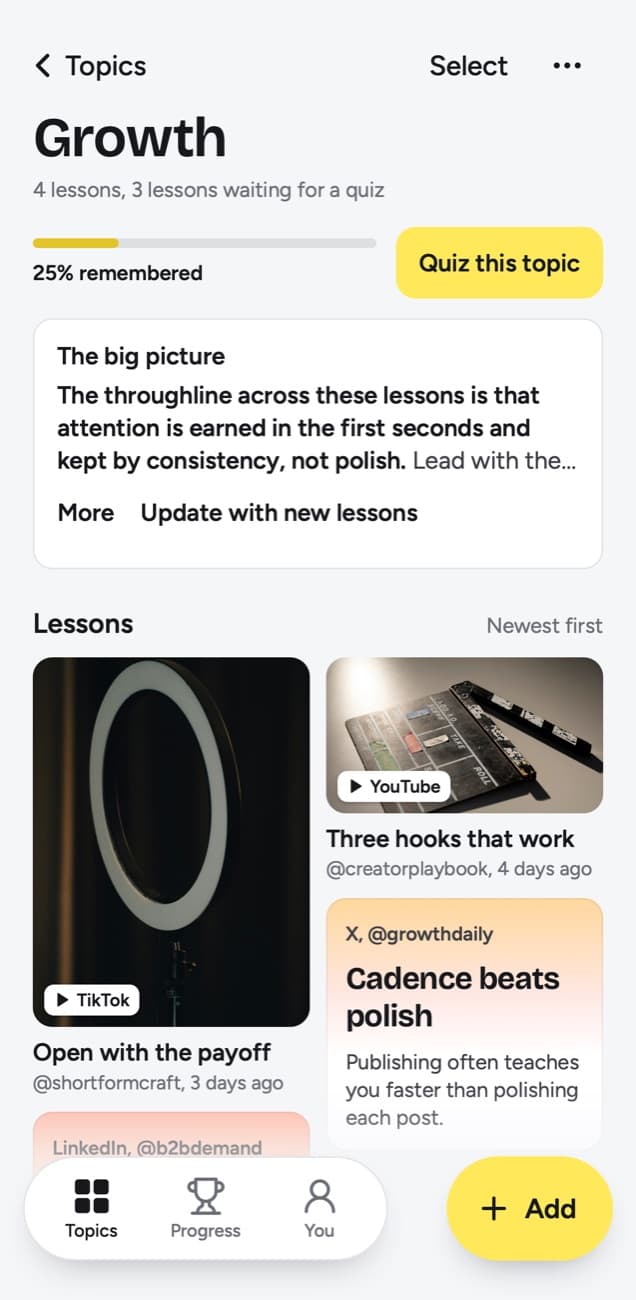
- Check the topic: the lesson is filed into a topic on its own, named after what you keep saving, such as Growth or Cooking. If it landed in the wrong place, tap Change.
- Add your own words: write My takeaway, a few lines of your own, and if the lesson has a Try this worth doing, add it to Things to try.
- Save the next one from TikTok: on iPhone, tap Add to Shortcuts in scrollandlearn once, and the Shortcut is there when you tap Share on a TikTok. On Android, install scrollandlearn from Chrome first, with Install and create shortcut in Chrome's menu, and it then appears in the share sheet. On a computer, click Add and paste the link.
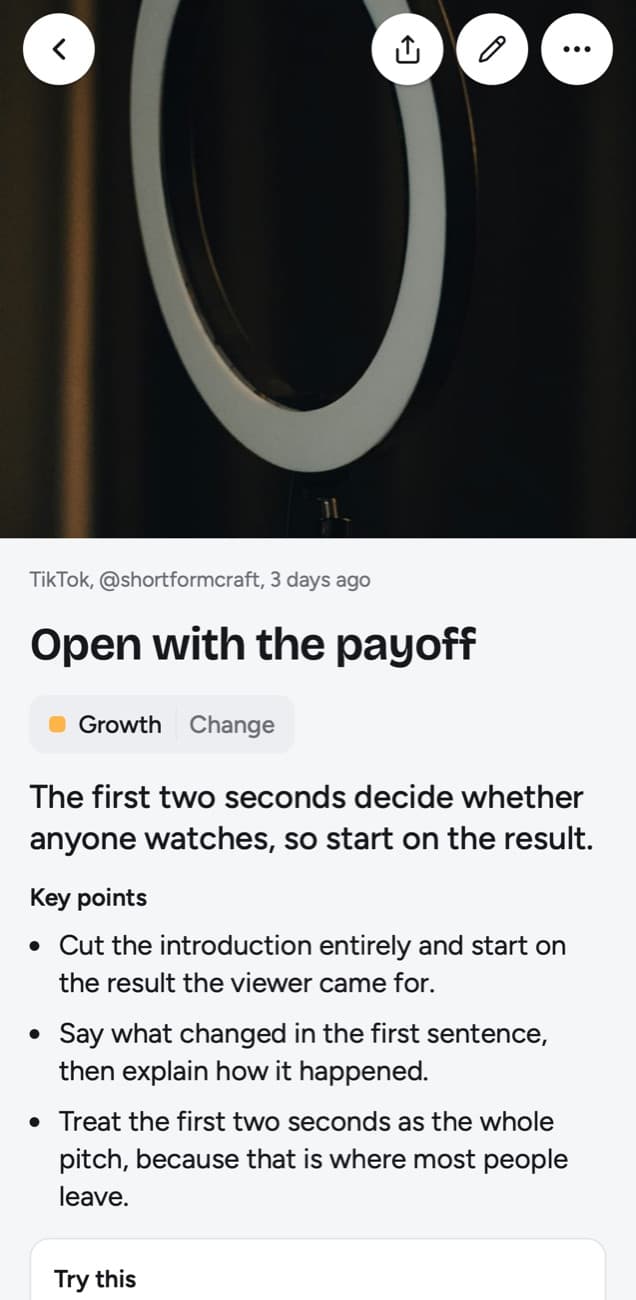
Here is an example of the lesson a TikTok about video openings becomes. The question at the bottom is the one Today's quiz asks when the lesson comes back.
Open with the payoff
The first two seconds decide whether anyone watches, so start on the result.
Key points
- Cut the introduction entirely and start on the result the viewer came for.
- Say what changed in the first sentence, then explain how it happened.
- Treat the first two seconds as the whole pitch, because that is where most people leave.
Try this
Re-record only the opening line of your next video so it starts on the result.
Remember this
If the hook needs context to make sense, it is not ready.
In the quiz
Why should a short video start on the result instead of an introduction?
Filed under Growth
What it can read from a TikTok
Most TikToks worth learning from are someone talking to the camera, and those are the easy case: the speech becomes the transcript and the lesson is written from it. The table shows what happens with each kind of post.
| You paste | You get |
|---|---|
| A TikTok, Reel, Facebook video, Snapchat Spotlight or Twitch clip where someone talks | A transcript of what is said, a short summary and key points |
| A TikTok, Reel or Facebook video with music and no talking | Usually no lesson: it is written from what is said, and the caption is not used |
| A YouTube video or Short with captions | A transcript from the captions, a short summary and key points |
| A YouTube video or Short without captions | No lesson; it asks you to upload the video file |
| A YouTube community post | Its text and the text printed on its images; together they need about 300 characters |
| A post on X, Threads, Reddit, Bluesky, LinkedIn or a public Telegram channel | The text of the post you link, written down as a lesson; replies and comments are not read |
| A video on X, Threads, LinkedIn or Reddit | Under 300 characters of post text: a transcript of what is said (on Reddit, from its own captions), or else the post's text. 300 or more: the post's text, without the video |
| A photo post or carousel on Instagram, TikTok, X, Threads, LinkedIn or Telegram | The text printed on the images; photos are not described. On Instagram and TikTok, caption and slides together need about 300 characters |
| A Spotify or Apple Podcasts episode | The whole episode, transcribed from the show's public podcast feed; a Spotify exclusive gives only its title and description |
| A private or deleted post | No lesson; it can't be read, so upload the file if you have it |
| A link to an article or any other website | Not saved; only posts from the 15+ supported platforms, and LinkedIn articles |
- Talking videos: the transcript is what is said, taken from TikTok's own captions when the video has them and from the audio otherwise, so a tutorial, a tip or a walkthrough all work.
- Videos with nobody speaking: the lesson is written from what is said, and the caption is not used for a video. A clip with only music gives no lesson however long its caption is, or a lesson about the song's lyrics. The app never guesses from the title.
- Photo posts: for TikTok photo posts, the text printed on the slides is read, and the caption and slide text together need about 300 characters. The photos are never described, so a slideshow with little or no text gives no lesson.
- Private or deleted videos: these can't be read from the link. If you have the file, upload it.
- Uploading: for a video that can't be read from its link, tap Upload the video and pick a file up to 50 MB. Save video in TikTok's Share menu only appears when the creator allows downloads, so this rescue is not always open to you.
- A failed link: tap Try again to send it through once more.
Keep what you learned
Saving a TikTok as a lesson is the first half. The second half is Today's quiz: every day a few questions about lessons you saved, each one written from a lesson. You answer in your head, tap Show answer, and grade yourself Forgot, Kind of or Knew it.
The grade decides when the lesson comes back. Forgot brings it back tomorrow and starts it over, Kind of in 4 days, and Knew it in 14 days, then 35, 88 and 219 days, then a year. Quiz this topic asks the questions for one topic when you want to go through it.
Each topic shows a knowledge score: the share of lessons you remembered, meaning your last grade was Knew it and the lesson is not due again yet, out of the lessons that have come up for a quiz. A lesson counts once you grade it or once its quiz day arrives, answered or not, so a topic whose lessons came due while you skipped the quiz shows 0%. Before any lesson in a topic has come up, there is no score.
Tips for a TikTok library you will use
- Paste at the moment you save. You still know why the video caught you, and the post is still up.
- Favor explainers over trends. A video where someone talks through a method gives a full lesson; a clip with no speech gives nothing to read, whatever its caption says.
- Keep Favorites for rewatching. A dance, a song or a recipe you will cook along to belongs in TikTok. The idea you want to remember belongs in a lesson.
- Start with your last ten favorites. Ten is enough to see which topics form, and small enough to finish in one sitting.
- Write the takeaway with the word you will look for. Search finds lessons by title, key points, core idea, Try this, Remember this, your takeaway, topic and creator handle, and by the exact words of their transcripts.
Frequently asked questions
- Do I need to download the TikTok first?
- No. Paste the link and the lesson is written from what is said in the video. You only need the file when the app can't read the link, for example when the post is blocked or was made private. Then tap Upload the video and pick a file up to 50 MB.
- Does it work with TikTok photo posts?
- Yes. The text printed on the slides is read and, with the caption, becomes the lesson; together they need about 300 characters. The photos themselves are never described, so a slideshow with little or no text gives no lesson.
- How long does a TikTok take to become a lesson?
- Usually within a minute after you paste the link or share it from TikTok.
- Can anyone see my scrollandlearn library?
- No. Your library is private by default: nobody sees it but you, and there is no public sharing.
- How many TikToks can I save a month?
- Starter covers 100 saves a month, Creator 250 and Power 1,000.


