Where each platform keeps your saves
Before you organize anything, find where each app put your saves. These steps come from each platform's own help pages. Menus move between app versions, so treat the labels as a guide.
| Platform | Save a post | Find your saves |
|---|---|---|
| Tap Save below the post; for a Reel, Options, then Save. Tap and hold Save to pick a collection | Profile, then Menu, then Saved | |
| TikTok | Tap the Favorite button below the comment button | Favorites on your profile |
| YouTube | More below the video, then Save, to Watch Later or a playlist | The You tab |
| X | Open the post and tap the Bookmark icon | Bookmarks in the navigation menu |
| The More icon on the post, then Save | On a phone, your profile picture, then Saved posts. On a computer, Saved items on the home page | |
| The overflow menu on the post, then Save | Your profile, then Saved |
Instagram and X both say your saves are visible only to you, and a YouTube playlist set to Private works the same way. On Instagram, the person who posted can't tell you saved it.
What none of these lists does is tell you what a post said. Six apps give you six separate lists, and the idea that made you tap Save is still inside each post. Finding it again means remembering which app it was in and scrolling until you see it. That idea is the part worth organizing.
Pull your saves into one library
- Open one saved list: pick the platform you save on most and open its saved list, using the table above.
- Copy a post's link: most apps put Copy link in the post's Share menu. On a computer, copy the address of the post's page.
- Paste it into scrollandlearn: open the app, tap Add and paste the link. Posts from 15+ platforms work, including Instagram, TikTok, YouTube, X, Threads, Reddit, Bluesky and LinkedIn.
- Let it file itself: the lesson goes into a topic named after what you keep saving, such as Money habits or Job outreach. You don't have to make folders.
- Move the odd one: tap Change on a lesson that landed in the wrong topic. The same sheet has New topic, for a topic with a name of your own, and any topic can be renamed.
- Group small topics when asked: when several small topics pile up, the app suggests Group topics, and you decide whether to group them.
- Save new posts straight in: on iPhone, tap Add to Shortcuts in scrollandlearn once and share from any of those apps. On Android, install scrollandlearn from Chrome first, by tapping Install and create shortcut in Chrome's menu, and it then appears in the share sheet. On a computer, click Add and paste the link.
Text posts are the simplest case. Here is an example of the lesson a LinkedIn post about CVs becomes: the post text turns into the core idea, the key points and, since a post like this suggests a step, one thing to try.
Lead with the result
Start every CV line with the outcome and a number, then the role.
Key points
- Open each line with what changed and by how much, then name the role.
- Use a number even when it is small, since specificity reads as real.
- Cut responsibilities that every person in that role would have had.
- Match the language of the posting rather than inventing your own labels.
Try this
Rewrite your top three CV lines so each starts with a number.
Remember this
Outcomes compare across companies, titles don't.
In the quiz
How should each line of a CV start?
Filed under Job outreach
What carries over from each platform
Each kind of post gives a different lesson, and a few give none. The table sums up the rules, and the notes below put them in platform terms.
| You paste | You get |
|---|---|
| A TikTok, Reel, Facebook video, Snapchat Spotlight or Twitch clip where someone talks | A transcript of what is said, a short summary and key points |
| A TikTok, Reel or Facebook video with music and no talking | Usually no lesson: it is written from what is said, and the caption is not used |
| A YouTube video or Short with captions | A transcript from the captions, a short summary and key points |
| A YouTube video or Short without captions | No lesson; it asks you to upload the video file |
| A YouTube community post | Its text and the text printed on its images; together they need about 300 characters |
| A post on X, Threads, Reddit, Bluesky, LinkedIn or a public Telegram channel | The text of the post you link, written down as a lesson; replies and comments are not read |
| A video on X, Threads, LinkedIn or Reddit | Under 300 characters of post text: a transcript of what is said (on Reddit, from its own captions), or else the post's text. 300 or more: the post's text, without the video |
| A photo post or carousel on Instagram, TikTok, X, Threads, LinkedIn or Telegram | The text printed on the images; photos are not described. On Instagram and TikTok, caption and slides together need about 300 characters |
| A Spotify or Apple Podcasts episode | The whole episode, transcribed from the show's public podcast feed; a Spotify exclusive gives only its title and description |
| A private or deleted post | No lesson; it can't be read, so upload the file if you have it |
| A link to an article or any other website | Not saved; only posts from the 15+ supported platforms, and LinkedIn articles |
- Text posts on X, Threads, Reddit, Bluesky and LinkedIn: the post text becomes the lesson.
- Photo posts and carousels on Instagram, TikTok, X, Threads and LinkedIn: the text printed on the images is read, and on Instagram and TikTok the caption and slide text together need about 300 characters. Photos are never described, so a post that is only a picture gives no lesson. Images on Reddit, Facebook and Pinterest are not read.
- YouTube videos and Shorts: the transcript comes only from the video's captions. A video without captions gives no lesson, and the app asks for the video file.
- Videos on Instagram, TikTok and Facebook: what is said becomes the transcript. The caption is not used for a video, so a clip with only music gives no lesson however long its caption is.
- Links to articles: a link to an article or any other website is not saved. Only posts from the 15+ platforms work, plus articles published on LinkedIn.
- Old saves: private, deleted or blocked posts can't be read. The older a save, the more likely the post is gone, which is one more reason to start with recent ones.
Clear the backlog without starting over
Most people arrive with hundreds of saves across several apps, and trying to process all of them at once is where the plan stalls. Start with the last ten saves on the app you use most. You still remember saving them, and they show you which topics form.
After that, paste new posts as you save them and take a few old ones each week. Saves count against your plan: Starter covers 100 a month, Creator 250 and Power 1,000. A backlog of hundreds is a reason to be choosy. Paste the posts you would still save today, and leave the rest where they are.
- Skip posts you saved for a laugh. They are fine in the app's own list.
- Skip anything you already acted on. The recipe you cooked twice is in your head now.
- Keep posts with a method, a number or a rule you would want to recall without the video.
Find and review what you saved
Once posts are lessons, search finds them by title, key points, core idea, Try this, Remember this, your takeaway, topic and creator handle, and by the exact words of their transcripts. Under a lesson, related lessons from your library appear when some are close in meaning, so a post you saved on X can sit next to a YouTube video on the same idea.
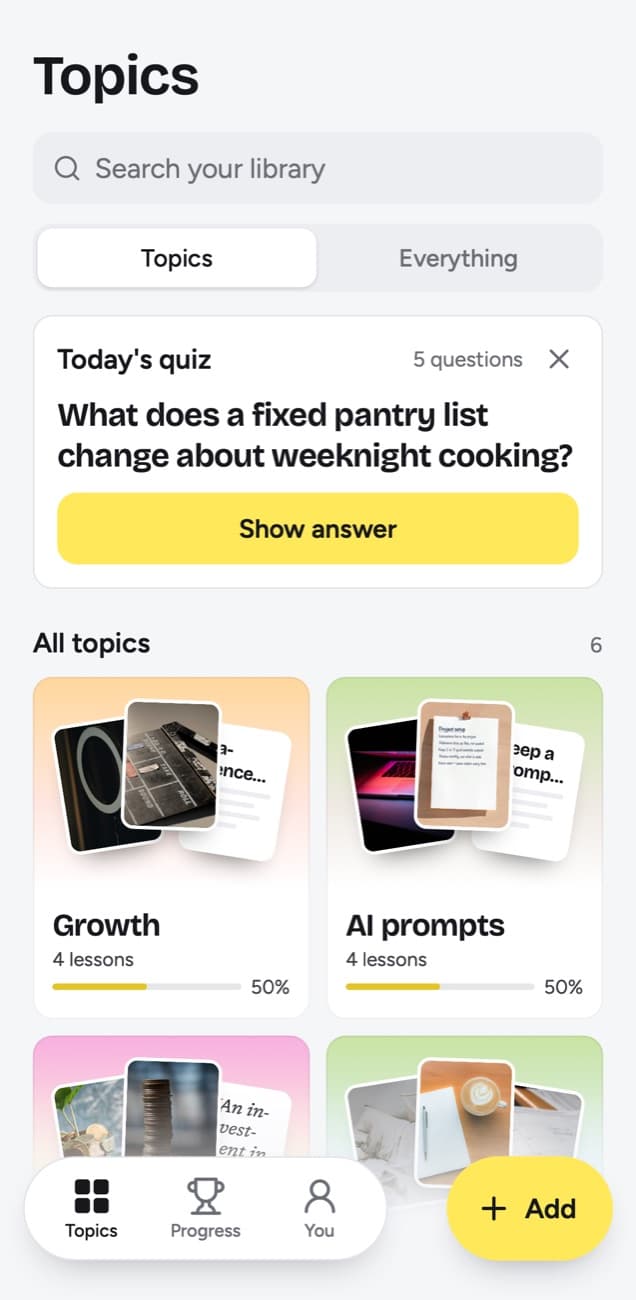
Today's quiz asks a few questions every day about lessons you saved. You answer in your head, tap Show answer and grade it Forgot, Kind of or Knew it. Forgot brings the lesson back tomorrow, Kind of in 4 days, Knew it in 14 days and then at longer gaps up to a year. Each topic shows a knowledge score, the share of lessons you remembered out of those that have come due.
Frequently asked questions
- Can it import all my saved posts at once?
- No. Each post goes in by its link, pasted into Add or sent from the share sheet. Starting with the last ten saves takes a few minutes and shows you how your topics form.
- Which platforms does it work with?
- 15+ platforms: Instagram, TikTok, YouTube, Facebook, X, Threads, Reddit, Bluesky, LinkedIn, Pinterest, Twitch, Spotify, Apple Podcasts, SoundCloud, Snapchat, Rumble and Telegram. Links to articles and other websites are not saved, apart from articles published on LinkedIn.
- Can I export the library?
- Yes. Export lessons, on the You screen, downloads every lesson as Markdown, CSV or JSON, on every plan. There is no sync with Notion or Obsidian, so the files are a copy of the day you export.
- Do I have to stop using the Saved folders?
- No. The save button is still the fastest way to grab something mid-scroll. Use it as your inbox, and paste the posts worth keeping into scrollandlearn.
- Is my library private?
- Yes, private by default. Nobody sees your library but you. There is no public sharing and no team space.


