Where a creator's saves end up
Most creators learn the craft from other creators. A TikTok on why the first two seconds decide everything, a YouTube teardown of a channel that grew, a LinkedIn post about rewriting a headline, a thread on X about posting cadence. Each one gets saved in the app it came from, so a year of lessons sits in five separate saved lists, and none of those lists tells you what the post said.
The cost shows up when you plan a video. You remember that someone had a good rule about hooks, and finding it means scrolling thumbnails or rewatching. So the rule stays in the saved list, and the video goes out with the same opening as last week.
What one saved post turns into
Paste the link to a public post from any of the 15+ supported platforms and it usually comes back as a lesson within a minute. A TikTok, Reel or Facebook video brings a transcript of what is said in it, and a YouTube video with captions brings the text of those captions. Every lesson has a one-line core idea, a few key points, a Try this with one thing to do when the post suggests one, the one sentence worth keeping marked as Remember this, and the link back to the post with the creator's handle.
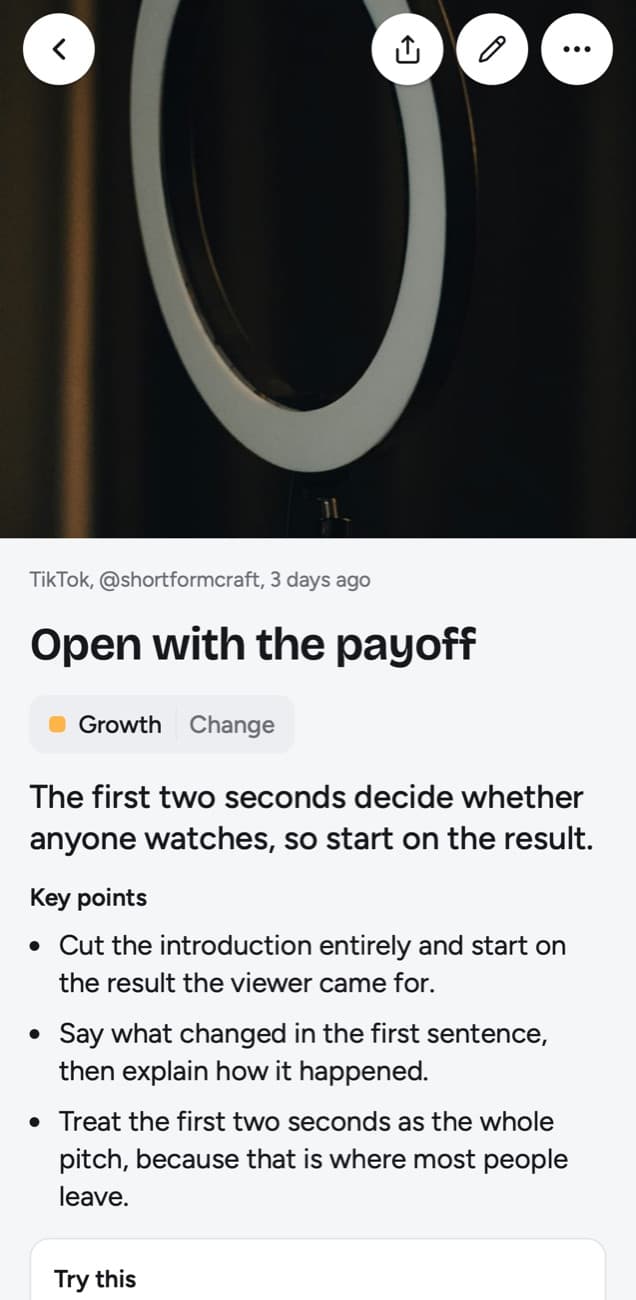
Open with the payoff
The first two seconds decide whether anyone watches, so start on the result.
Key points
- Cut the introduction entirely and start on the result the viewer came for.
- Say what changed in the first sentence, then explain how it happened.
- Treat the first two seconds as the whole pitch, because that is where most people leave.
Try this
Re-record only the opening line of your next video so it starts on the result.
Remember this
If the hook needs context to make sense, it is not ready.
In the quiz
Why should a short video start on the result instead of an introduction?
Filed under Growth
Try this is phrased as a step you can take yourself, and it is written to leave out the creator's own call to action, such as a course or a referral link. The handle stays on the lesson, so you can study that creator's other posts or credit the idea.
What is worth saving
The posts that pay off teach a move you can repeat. Before you paste, ask whether you could use it in your next piece without watching the post again.
| Save it | Leave it in the feed |
|---|---|
| A breakdown of why a hook worked, with the structure spelled out | A video you liked for the joke or the sound |
| An editing or pacing rule you can try on your next cut | A trend you would copy once and forget |
| A thread on cadence, testing or analytics with a clear claim | Motivation with no step in it |
| A carousel of caption or headline formats printed on the slides | A photo post where the idea lives only in the picture |
How your topics fill in
You don't have to make folders. Each lesson is filed into a topic on its own, named after what you keep saving, so a creator's library splits along the craft: Growth for hooks, cadence and testing, and other topics for whatever else you study. If a lesson lands in the wrong place, Change moves it, and the same sheet has New topic for one with your own name, say Thumbnails.
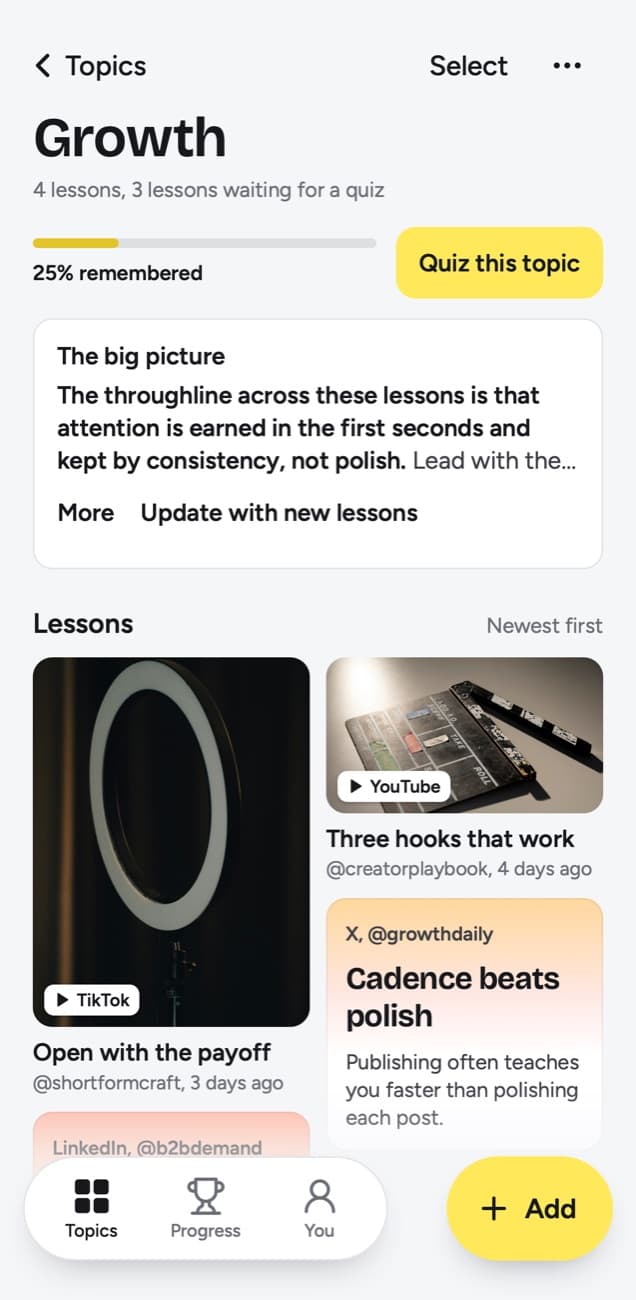
Each topic keeps a short big picture, a summary across all of its lessons that is rewritten as the topic grows. A few weeks in, the Growth big picture sums up what many different creators taught you about openings, cadence and testing. When several small topics pile up, the app suggests grouping them, and you decide.
Below a lesson, up to three related lessons from your library show when some are close in meaning, so a new post about openings can bring up the hook advice you saved a month ago.
Things to try is your list of experiments
A tactic changes your next video only once you try it. When a Try this is worth doing, add it to Things to try, a list of the steps you picked with a done check beside each. For a creator the list becomes a backlog of small experiments: re-record only the opening line, write one hook of each type before the script, set a weekly publishing floor and keep it for a month.
My takeaway holds your own words: up to 500 characters on any lesson, enough to say how a rule applies to your channel, for example "show the finished dish in the first second" on a lesson about hooks. The lesson itself is yours to change too: Edit lesson, the pencil on a lesson, lets you rewrite the title, core idea, key points (up to 4,000 characters), Try this, Remember this and the quiz question. Search covers takeaways along with titles, key points, the core idea, Try this, Remember this, topics, creator handles and the exact words of transcripts.
The daily quiz keeps the moves in your head
Today's quiz asks a few questions every day about lessons you saved, each one written from the lesson. You answer in your head, tap Show answer, then grade yourself: Forgot, Kind of or Knew it. Forgot brings the lesson back tomorrow and starts it over, Kind of brings it back in 4 days, and Knew it in 14 days, then 35, 88 and 219 days, then a year.
For a creator the point is timing. The hook rule you can recall while editing is the one that ends up in the video. Before you plan a batch of videos, Quiz this topic runs the quiz on Growth alone. The topic's knowledge score is the share of its lessons you remembered out of those that have come up for a quiz. A lesson has come up once you grade it or once its quiz day arrives, so quiz days you skip count against the score, and a topic whose due lessons all went unanswered shows 0%.
What it reads from the posts creators save
| You paste | You get |
|---|---|
| A TikTok, Reel, Facebook video, Snapchat Spotlight or Twitch clip where someone talks | A transcript of what is said, a short summary and key points |
| A TikTok, Reel or Facebook video with music and no talking | Usually no lesson: it is written from what is said, and the caption is not used |
| A YouTube video or Short with captions | A transcript from the captions, a short summary and key points |
| A YouTube video or Short without captions | No lesson; it asks you to upload the video file |
| A YouTube community post | Its text and the text printed on its images; together they need about 300 characters |
| A post on X, Threads, Reddit, Bluesky, LinkedIn or a public Telegram channel | The text of the post you link, written down as a lesson; replies and comments are not read |
| A video on X, Threads, LinkedIn or Reddit | Under 300 characters of post text: a transcript of what is said (on Reddit, from its own captions), or else the post's text. 300 or more: the post's text, without the video |
| A photo post or carousel on Instagram, TikTok, X, Threads, LinkedIn or Telegram | The text printed on the images; photos are not described. On Instagram and TikTok, caption and slides together need about 300 characters |
| A Spotify or Apple Podcasts episode | The whole episode, transcribed from the show's public podcast feed; a Spotify exclusive gives only its title and description |
| A private or deleted post | No lesson; it can't be read, so upload the file if you have it |
| A link to an article or any other website | Not saved; only posts from the 15+ supported platforms, and LinkedIn articles |
- Talking-head videos and tutorials with a voiceover on TikTok, Instagram or Facebook come back with a transcript of what is said. On YouTube, long videos and Shorts need captions, because the transcript is taken from them.
- A lesson is written from the whole transcript, so a long teardown comes back in sections, one for every part of about 20 minutes, from its beginning to its end.
- An editing tutorial told only through music and on-screen text gives no lesson, however long its caption. A video's lesson is written from what is said, so the caption and the text shown inside the video are not used.
- Carousels on Instagram and LinkedIn are read for the text printed on the slides, and on Instagram the caption and slide text together need about 300 characters. The photos are never described.
- On X, Threads, Reddit, Bluesky and LinkedIn, the post's text becomes the lesson. Articles are saved only from LinkedIn; newsletters and blog posts on other websites are not.
- A private or blocked post can't be read from its link, and neither can a YouTube video without captions. For those, the app asks you to upload the file, up to 50 MB.
What it does not do for a creator
scrollandlearn is a library of what you learned from other people's posts. It is not a place for drafts or scripts: a note or voice memo you add becomes a note card or a lesson, not a document you keep writing; its export is a download of Markdown, CSV or JSON, so nothing flows into your script document or Notion on its own. With no shared library and no teams, an editor or co-host can't work in the same library. Keep scripts where you write them, and reach for the lessons while you write.
It is a web app with no native iOS or Android app. Saving from the phone goes through the share sheet: on iPhone through a Shortcut, and on Android once you install the web app from Chrome (Install and create shortcut in Chrome's menu). The guide to saving TikTok videos for learning shows how.
A month in
Starter covers 100 saves a month, which suits a creator who saves on purpose. After a month, Growth and a few other topics have their own big pictures, Things to try has a handful of experiments ticked off, and the lessons you graded Knew it two weeks earlier start coming back in the quiz. When you save faster than that, Creator covers 250 saves a month and Power 1,000.
Frequently asked questions
- Can I keep my own ideas and scripts in scrollandlearn?
- No. It saves links to public posts from 15+ platforms and turns each one into a lesson. On a lesson you can write My takeaway, up to 500 characters in your own words, and change any part of the lesson with Edit lesson: the title, core idea, key points up to 4,000 characters, Try this, Remember this and the quiz question. Ideas and scripts that don't start from a post belong in the tool you write in.
- Which platforms can I save from?
- Today: Instagram, TikTok, YouTube, Facebook, X, Threads, Reddit, Bluesky, LinkedIn, Pinterest, Twitch, Spotify, Apple Podcasts, SoundCloud, Snapchat, Rumble and Telegram. Links to articles, newsletters or any other website are not saved, with one exception: LinkedIn articles.
- Can my editor or team see my lessons?
- No. Your library is private by default and nobody sees it but you. There is no public sharing, no team space and no way to share a topic.
- Can I move my lessons into Notion or a script document?
- Yes, as a download. Export lessons, on the You screen, gives you every lesson as Markdown, CSV or JSON, and Copy lesson copies one lesson's text to paste into a script. Nothing syncs, and every lesson keeps the link back to the original post.
- Can I save a creator's whole profile?
- Yes, on Creator and Power. Paste the link to a creator's public TikTok or Instagram profile into Add and up to 25 of their newest posts come in at once, or up to 100 on Power; each post that becomes a lesson counts toward the month. Your own Saved collection on Instagram and Favorites on TikTok can't be read, so those posts still go in one link at a time.
- How many posts can I save a month?
- Starter covers 100 saves a month at $19.99, Creator 250 at $39.99 and Power 1,000 at $79.99, each with the same number of transcription minutes. Every plan can also be paid every 6 months, 25% less, or yearly, 40% less, paid up front.


