At a glance
| scrollandlearn | mymind | Obsidian | |
|---|---|---|---|
| What it is | A private web app that turns saved posts into lessons | A private place for notes, bookmarks, articles and images | A note app that keeps notes as Markdown files on your device |
| What you add | A link to a public post from 15+ platforms, a note or quote, a photo with printed text, a voice memo, or a video or audio file up to 50 MB | Images, links, articles, notes, quotes and highlights; video uploads on Mastermind | Notes you write, plus web pages saved with the free Web Clipper |
| Who organizes | The app files each lesson into a topic; you can move it | mymind, with AI tags and Smart Spaces | You, with links, folders, graph view and Canvas |
| What comes back | A lesson: core idea, key points, Remember this, and a transcript for videos | A card; AI summaries of images, articles and websites on Mastermind | The note you wrote |
| Bringing things back | Today's quiz on a spaced schedule | Serendipity resurfaces forgotten things | Up to you and the plugins you install |
| Where it lives | In your account, opened in a browser | In your mymind account | In local files you own, readable offline |
| Apps | Web app; the share sheet through a Shortcut on iPhone, or on Android after installing it from Chrome; a browser extension for Firefox, with Chrome, Edge and Safari to follow | iPhone, Android and Mac, plus extensions for Chrome, Edge and Safari | Windows, Mac, Linux, iOS and Android |
| Price | 10 lessons free, no card; Starter $19.99 a month for 100 saves | Student of Life $7.99 a month or $79 a year; Mastermind $12.99 a month or $129 a year | Free without limits; Sync $4 a month billed yearly or $5 monthly; Publish $8 or $10 a month |
scrollandlearn: for the videos you saved to learn from
Many people who compare mymind and Obsidian have one kind of save in common: TikToks, Reels, YouTube videos and threads with a method, a recipe or a piece of advice in them. In mymind such a post becomes a card you can find again. In Obsidian it becomes a note only after you watch it again and write one. Either way, what the video said is still in the video.
scrollandlearn does that step for you. You paste the link, it reads the post, from what is said in a TikTok, Reel or Facebook video, a YouTube video's captions or a text post's words, and writes a lesson, usually within a minute. A Spotify or Apple Podcasts episode is transcribed from start to end, up to 6 hours within your plan's minutes, and an hour-long source comes back as one lesson in sections. Here is the lesson a TikTok about video hooks becomes.
Open with the payoff
The first two seconds decide whether anyone watches, so start on the result.
Key points
- Cut the introduction entirely and start on the result the viewer came for.
- Say what changed in the first sentence, then explain how it happened.
- Treat the first two seconds as the whole pitch, because that is where most people leave.
Try this
Re-record only the opening line of your next video so it starts on the result.
Remember this
If the hook needs context to make sense, it is not ready.
In the quiz
Why should a short video start on the result instead of an introduction?
Filed under Growth
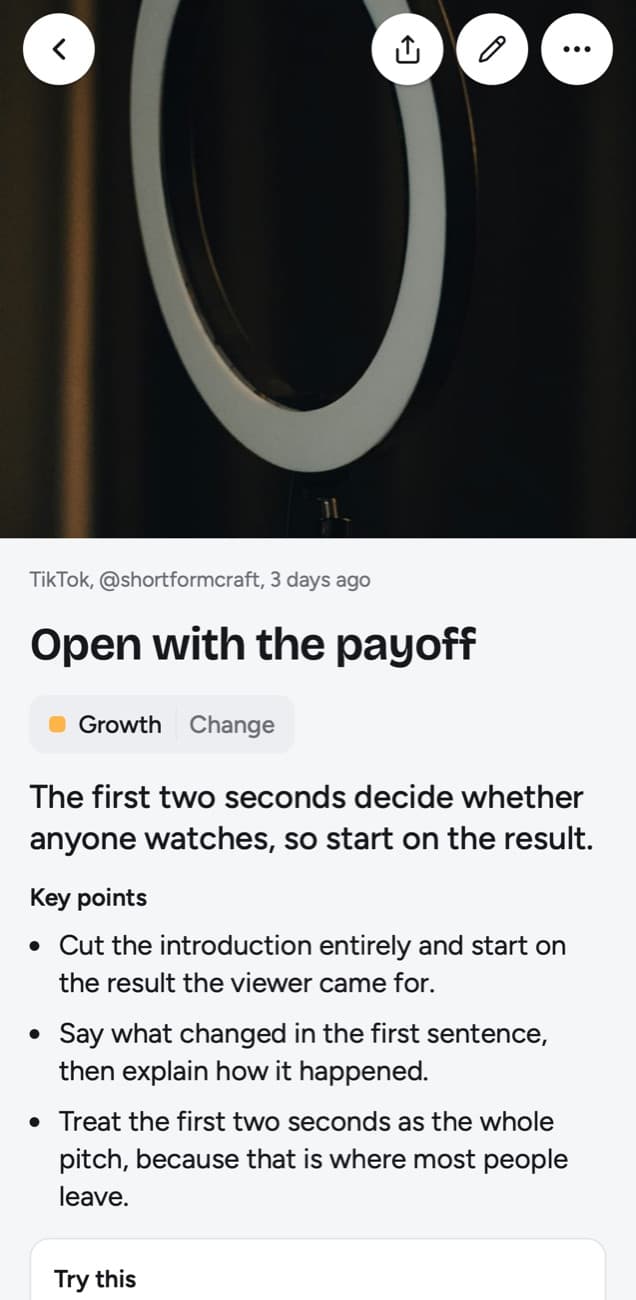
Each lesson is filed into a topic named after what you save, and Today's quiz asks about it on a spaced schedule. Forgot brings a lesson back tomorrow and starts it over, Kind of in 4 days, Knew it in 14 days, then 35, 88 and 219 days, then a year.
The real difference
mymind and Obsidian are both called a second brain, but they ask opposite things of you. mymind asks almost nothing: you save, and it tags, sorts and resurfaces. Obsidian asks for the work that makes notes valuable: you write each note in your own words and decide how it links to the others.
So the choice comes down to what you do after you save something. If you mostly want to find it again, a pile that sorts itself is enough, and mymind is the calmer place to keep it. If you want to think with it, connect it to other ideas and build on it in writing, you need notes you wrote, and Obsidian is built around them.
What mymind offers
- Nothing to set up. There is no folder, template or plugin to choose. You save and mymind recognizes what kind of thing each item is.
- It is visual. Collections of images work as mood boards, and you can search by color, brand or the text inside an image.
- Articles. Reading Mode on Mastermind keeps whole articles without ads or pop-ups.
- It brings things back on its own. Serendipity shows you forgotten saves to keep or let go, without you asking.
- Saving from the browser and the phone, through extensions for Chrome, Edge and Safari and apps for iPhone, Android and Mac.
What Obsidian offers
- You own the files. Notes are plain text Markdown on your device, readable in any editor and available offline.
- Linked thinking. Links between notes, a graph of how they relate and Canvas for laying ideas out on a board suit a Zettelkasten or a long writing project.
- It bends to your system. Thousands of community plugins and themes add calendars, task lists, Kanban boards and much more.
- Price. The app is free without limits and needs no sign-up; Sync and Publish are optional.
- Every platform, with apps for Windows, Mac, Linux, iOS and Android.
Who should use which
Pick scrollandlearn if most of your saves are posts you meant to learn from and never went back to. It turns each one into a lesson and checks with a quiz whether you still remember it weeks later.
Pick mymind if what you save is mostly visual or mixed: design references, products, recipes, articles to read later, quotes. It keeps all of it in one private place and asks nothing of you.
Pick Obsidian if writing is how you think: a Zettelkasten, research notes, drafts built from linked ideas, or an archive you want as files that outlive any app.
Can you use them together?
Yes, and many people do, because each has a different job. A common split is scrollandlearn for the videos and posts you want to learn from, mymind for images, articles and products, and Obsidian for the notes you write. Nothing syncs between them. scrollandlearn's Export lessons downloads every lesson as a Markdown file, a folder per topic, with front matter Obsidian reads, so a lesson that changed how you think can become a permanent note in your vault.
Frequently asked questions
- Which is cheaper, mymind or Obsidian?
- Obsidian. As of 22 October 2026 the app is free without limits, and Sync costs $4 a month billed yearly or $5 monthly if you want your notes on several devices. mymind's Student of Life plan costs $7.99 a month or $79 a year, Mastermind $12.99 a month or $129 a year, and The Bookmarker, without AI features, $4.99 a month.
- Which is better for a second brain?
- It depends on what you mean by one. If your second brain is meant to hold what you learned from videos and posts, scrollandlearn writes those lessons and quizzes you on them. For a second brain you build by writing and linking notes, Obsidian. For a place that keeps everything you save and sorts it for you, mymind.
- Which is better for a Zettelkasten?
- Obsidian. A Zettelkasten depends on writing small notes yourself and linking them, which is what Obsidian is built around. mymind does not link notes to each other.
- Where does scrollandlearn fit?
- Next to either of them, for the posts you saved to learn from. It turns links from 15+ platforms such as TikTok, Instagram and YouTube into lessons and a daily quiz. Its price as of 22 October 2026: On scrollandlearn your first 10 lessons are free with no card, then Starter is $19.99 a month for 100 saves. You can cancel any time.


