At a glance
| scrollandlearn | mymind | |
|---|---|---|
| What it is | A private web app that turns saved posts into lessons | A private place for notes, bookmarks, articles and images |
| What you add | A link to a public post from 15+ platforms, a note or quote, a photo with printed text, a voice memo, or a video or audio file up to 50 MB | Images, links, articles, notes, quotes and highlights; video uploads on Mastermind |
| How it organizes | Files each lesson into a topic it names; you can move a lesson, rename a topic or make your own | Sorts by itself with AI tags and Smart Spaces |
| What comes back | A lesson: core idea, key points and Remember this, a transcript for videos, and Try this when the post suggests one | A card; AI summaries of images, articles and websites on Mastermind |
| Search | Lesson titles, core ideas, key points, Try this, Remember this, your takeaway, topic and creator handle | Keywords, colors, brands and dates, plus text inside images |
| Bringing things back | Today's quiz on a spaced schedule, with a knowledge score | Serendipity resurfaces forgotten things to keep or forget |
| Articles and web pages | Not saved, apart from LinkedIn articles | Saved, with Reading Mode to read without ads or pop-ups |
| Apps | Web app in any browser; saving from the share sheet with a Shortcut on iPhone, or on Android after installing it from Chrome; a browser extension for Firefox, with Chrome, Edge and Safari to follow | Apps for iPhone, Android and Mac, plus extensions for Chrome, Edge and Safari |
| Privacy | Private by default; no teams or shared library | Private; no social features, collaboration or ads |
| Price | 10 lessons free, no card; Starter $19.99 a month for 100 saves | Student of Life $7.99 a month or $79 a year; Mastermind $12.99 a month or $129 a year |
What a saved post becomes
Save a cooking Reel to mymind and you get a card you can find again by how it looks or by a keyword. Paste the same kind of Reel into scrollandlearn and you get a lesson like the one below, usually within a minute.
Salt the pasta water
The cooking water is the only chance to season the pasta itself, so salt it well.
Key points
- Add the salt once the water boils, then wait for it to dissolve before the pasta goes in.
- Save a cup of the starchy water before draining, it binds the sauce.
- Finish the pasta in the pan with the sauce rather than pouring sauce on top.
- Undercook slightly in the water because it keeps cooking in the pan.
Try this
Taste the water next time you cook pasta. It should taste clearly salty.
Remember this
If you can't taste the salt in the water, it is not enough.
In the quiz
Why salt pasta water so heavily?
Filed under Cooking
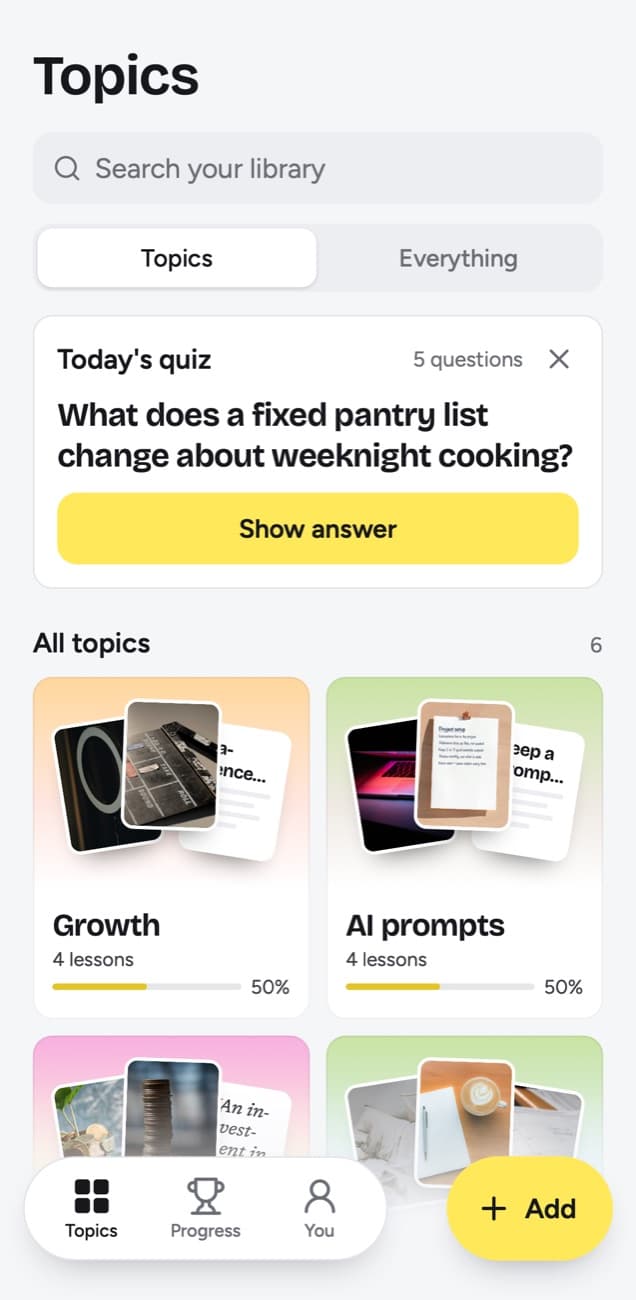
The difference shows a week later. In mymind the card waits until you search for it or Serendipity brings it up. In scrollandlearn the question under In the quiz comes to you in Today's quiz, and the grade you give your answer decides when you see it again.
What scrollandlearn does with a saved post
- It reads the post. A TikTok, Reel or Facebook video gives a transcript of what is said, and a YouTube video one from its captions. Posts on X, Threads, Reddit, Bluesky and LinkedIn become the lesson from their text, and on Instagram, TikTok, X, Threads and LinkedIn the words printed on photos and slides are read. As of 14 October 2026, mymind's pages describe AI summaries of images, articles and websites.
- It writes a lesson. Every lesson comes with a one-line core idea, key points and Remember this, the one sentence worth keeping. A long video or a podcast episode is read to its end, and one over half an hour comes back in sections.
- Podcasts as well as posts. A Spotify or Apple Podcasts episode link from most shows is transcribed from start to end, up to 6 hours within your plan's transcription minutes.
- Whole profiles. On Creator and Power, one link to a public playlist or profile brings in up to 25 posts on Creator and 100 on Power, so a creator you learn from can come in at once.
- It gives you something to do. When the post suggests an action, Try this turns it into one step, written to leave out the creator's own pitch, and Things to try keeps the ones you choose, with a done check.
- It asks, then waits. Today's quiz asks a question written from each lesson. You answer in your head, tap Show answer and grade it: Forgot, Kind of or Knew it.
- It shows what stuck. Each topic has a knowledge score, the share you remembered of the lessons you graded or that reached their quiz day, and a big picture that sums up all its lessons.
- Your words on top. My takeaway holds up to 500 characters in your own words on any lesson, and search finds it later. Edit lesson lets you rewrite any part the app wrote: title, core idea, key points, Try this, Remember this and the quiz question.
What mymind offers that scrollandlearn does not
- It takes almost anything. Images, articles, products, books, recipes, quotes and notes all go into one place, and mymind recognizes what kind of thing each one is.
- It is visual. Collections of images work as mood boards, and you can find things by color, brand or the text inside an image.
- Articles. Reading Mode keeps whole articles without ads or pop-ups. scrollandlearn reads LinkedIn articles and no others.
- Saving from anywhere. There are browser extensions for Chrome, Edge and Safari and apps for iPhone, Android and Mac. scrollandlearn is a web app with a browser extension for Firefox so far.
- Video files. Mastermind takes video uploads of up to 500 MB each, 4K included.
- Price. Student of Life costs $7.99 a month and The Bookmarker $4.99, against $19.99 for scrollandlearn Starter.
What scrollandlearn does not do
These are the limits a mymind user will notice first.
- It does not describe photos. On Instagram, TikTok, X, Threads and LinkedIn it reads the text printed on photos and slides, and a photo post with too little text gives no lesson. Images on Reddit, Facebook and Pinterest are not read.
- It does not save products, web articles or any other website from a link. Links work for posts from the 15+ platforms, plus LinkedIn articles.
- It has no native app, and its browser extension is in Firefox only so far. On desktop you click Add and paste the link, or in Firefox click the extension. On a phone you share the post, through a Shortcut on iPhone, or on Android once the web app is installed from Chrome.
- It keeps no files: a note, a photo, a voice memo or a video file you add (up to 50 MB) becomes a lesson or a card.
- Its export is a download of your lessons, as Markdown, CSV or JSON; nothing syncs with other tools.
Who should use which
Pick scrollandlearn if what you save is mostly advice: how-to videos, money tips, cooking techniques, podcast episodes, posts with a method in them. You saved those to learn something, and a lesson with a quiz behind it gets you closer to that than a card you may never open.
Pick mymind if what you save is mostly visual or mixed: design references, products you might buy, recipes, articles to read later, quotes. It keeps all of it in one calm place and asks nothing of you.
Can they coexist?
Easily, because they barely overlap. There is no connection between them, so each keeps its own saves: images, articles and products in mymind, and the TikToks, Reels, YouTube videos and text posts you want to learn from in scrollandlearn. On a phone, once you add the iPhone Shortcut or install the web app on Android from Chrome, the share sheet sends a post there from the app where you found it.
Frequently asked questions
- Is mymind cheaper than scrollandlearn?
- Yes. As of 14 October 2026, mymind's Student of Life plan is $7.99 a month or $79 a year, and Mastermind is $12.99 a month or $129 a year. On scrollandlearn your first 10 lessons are free with no card, then Starter is $19.99 a month for 100 saves. You can cancel any time.
- How is Serendipity different from the quiz?
- mymind describes Serendipity as a purposefully slow and peaceful experience that resurfaces forgotten things so you can keep or forget them. scrollandlearn's quiz asks a question about a lesson and sets the next date from your grade. Forgot brings a lesson back tomorrow and starts it over, Kind of in 4 days, Knew it in 14 days, then 35, 88 and 219 days, then a year.
- Can scrollandlearn save images or articles?
- Only in a narrow way. It takes links to public posts from its 15+ platforms, and LinkedIn articles are the one kind of article it reads. On photo posts and carousels from Instagram, TikTok, X, Threads and LinkedIn it reads the text printed on the slides and never describes the photos themselves. Links to any other article or website are not saved.
- Are both private?
- Yes. mymind says nobody can see what you save and that it does not track your data or sell it. In scrollandlearn nobody sees your library but you; there is no public sharing and there are no teams.


