At a glance
| scrollandlearn | Dewey | |
|---|---|---|
| What it is | A private web app that writes a lesson from each post you send it | A bookmark manager that gathers saved posts from your social accounts |
| How saves arrive | One link at a time through Add or the share sheet; on Creator and Power, also a whole public playlist or profile | Its Chrome extension pulls in what you saved on each account |
| Saves you made before | No import; old bookmarks stay where they are | Pulled in by the extension from each account you connect |
| Networks | 15+ platforms, YouTube and Facebook among them | X, Bluesky, LinkedIn, Threads, Truth Social, TikTok, Instagram, Reddit, Substack and any web page |
| What you get back | A lesson: core idea, key points and Remember this, a transcript for videos (on YouTube, from captions), and Try this when the post suggests one | The post itself, with its text and media |
| Organizing | Topics the app names and fills on its own; you can move a lesson, start a topic with your own name or rename one | Folders, nested folders and tags, plus AI bulk tagging you approve |
| Coming back to it | Today's quiz on a spaced schedule, and a knowledge score per topic | Search, filters by source and date, and browsing |
| Export and sync | Every lesson as Markdown, CSV or JSON; no sync | CSV, Markdown, Google Sheets, media downloads, Notion sync and RSS |
| Sharing | A lesson as an image; nobody sees your library but you | Private folders you can open to anyone by link |
| Browser extension | Firefox; Chrome, Edge and Safari soon | Chrome; its guide calls it the backbone of the product |
| Price to start | 10 lessons free, no card; Starter $19.99 a month for 100 saves | Free plan: manual syncing, basic search, one connected account |
| Paid plans | Creator $39.99 a month for 250 saves, Power $79.99 for 1,000; both also save a whole playlist or profile from one link | Pro $10 a month, or $7.50 billed yearly; Lifetime $225 |
What a saved post becomes
Save a LinkedIn post about CV writing and Dewey shows it in your feed with its author and the network it came from, ready for a tag or a folder. Paste the same post into scrollandlearn and its text comes back as a lesson like this one, usually within a minute.
Lead with the result
Start every CV line with the outcome and a number, then the role.
Key points
- Open each line with what changed and by how much, then name the role.
- Use a number even when it is small, since specificity reads as real.
- Cut responsibilities that every person in that role would have had.
- Match the language of the posting rather than inventing your own labels.
Try this
Rewrite your top three CV lines so each starts with a number.
Remember this
Outcomes compare across companies, titles don't.
In the quiz
How should each line of a CV start?
Filed under Job outreach
Dewey keeps the author's words so you can look them up again. scrollandlearn adds the core idea, the sentence worth keeping and, when the post suggests one, a thing to try, and its last line is what Today's quiz will ask you once the lesson is due.
What scrollandlearn does with a post
- The post gets read for you. What is said in a TikTok, Reel or Facebook video, or the captions of a YouTube video, becomes a transcript, and the lesson is written from it. As of 14 October 2026, Dewey's pages describe keeping each post with its caption and media, across the networks in the table above.
- Words on slides. Instagram carousels, TikTok photo posts, LinkedIn document posts and photo posts on X and Threads have their printed text read into the lesson; on Instagram and TikTok, caption and slides together need about 300 characters.
- A creator's posts from one link. On Creator and Power, the link to a public YouTube playlist, or a TikTok or Instagram profile, brings in up to 25 posts on Creator and 100 on Power, each written up as its own lesson; on Power also X, LinkedIn, Threads and Bluesky profiles, Facebook pages, subreddits and podcast shows.
- Whole episodes. A Spotify or Apple Podcasts episode from most shows is transcribed from start to end, up to 6 hours within your plan's transcription minutes, and a long source comes back as one lesson in sections.
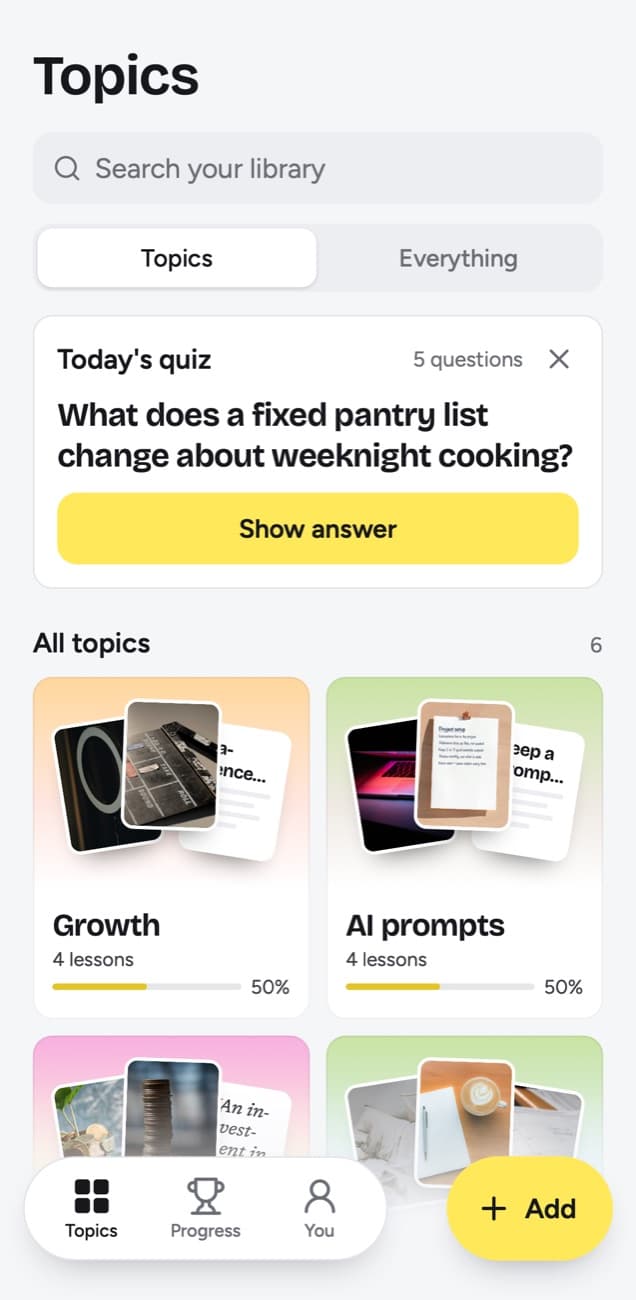
- Filing with no system to keep up. Each lesson lands in a topic named after what you keep saving, such as Job outreach, and when small ones pile up, Group topics suggests grouping them and you decide.
- A reason to look again. Today's quiz asks a few questions a day from your lessons. You answer in your head, tap Show answer and grade it Forgot, Kind of or Knew it, and the grade sets the next date, from tomorrow up to a year away.
- Progress you can read. Each topic shows a big picture across its lessons and a knowledge score: the share you remembered of the lessons that have come up, whether you graded them or they simply reached their quiz day.
- Phone first. A Shortcut in the iPhone share sheet sends a post in from the app where you found it, with no desktop browser involved. On Android, install the web app from Chrome first, and scrollandlearn then shows up in the share sheet.
What Dewey offers that scrollandlearn does not
- Your backlog. With the extension installed, Dewey pulls in the bookmarks and saved posts you already have, and Instagram and TikTok collections arrive as folders. scrollandlearn imports nothing; posts come in as links, and on Creator and Power one link can bring in a whole public playlist or profile.
- Saving as you already do. On the paid plans sync is automatic: keep tapping save inside X, Instagram, TikTok or Reddit, and Dewey picks up the new ones when you are back in your desktop browser.
- Threads of posts. On X, Bluesky and LinkedIn it can save every post in a thread along with the first. On X and Threads, scrollandlearn reads only the post you link.
- A structure you design. Folders, nested folders in your own colors, and tags added by hand or in bulk; Dewey AI proposes tags from keywords you type and shows a sample first.
- Getting it all out. Export a few bookmarks or the whole library as CSV, Markdown or a Google Sheet, download the images and videos, or keep a Notion database in step. scrollandlearn exports lessons, not the posts and their media, as Markdown, CSV or JSON.
- Sharing. Any folder can open to anyone with the link, no sign-up needed, or become an RSS feed.
- Cheaper ways in. Dewey Free costs nothing and Lifetime is $225. scrollandlearn gives you 10 lessons free with no card before you choose a plan.
What scrollandlearn does not do
- It imports nothing: no bookmarks or saved posts from a network, a file or another app.
- There are no folders, and tags are written by the app, up to three on each new lesson; you cannot add your own. The app files each lesson into a topic and names it; you can move a lesson, make a new topic with your own name or rename one.
- No Notion or Google Sheets sync and no RSS; the export is a download of Markdown, CSV or JSON.
- No native app, and the browser extension is in Firefox only so far. On a computer, click Add and paste the link, or use the extension in Firefox.
- No newsletters or web pages. It takes posts from the 15+ platforms, and of articles only LinkedIn ones.
- On X, Threads and Reddit only the linked post is read, without the replies under it.
- No public folders, links or teams; one lesson can go out as an image you share.
Who should use which
Use scrollandlearn if the trouble is that saved posts never turn into anything you know. It works on what you send it, one link at a time or, on Creator and Power, a whole public playlist or profile: the advice in a Reel or a LinkedIn post becomes a lesson, and the quiz checks days and weeks later whether it stuck.
Use Dewey if the trouble is the pile you already have. Years of X bookmarks, Instagram saves and Reddit posts become one searchable archive with folders, tags and an export that keeps your data portable. It suits researchers, writers and anyone who treats saved posts as reference material.
A quick test: picture the last ten posts you saved. Wanting to find them again points to Dewey; wanting to explain them without looking points to scrollandlearn.
Using both
They can run side by side, though nothing passes between them on its own: no import and no sync in either direction. One split that works is to let Dewey keep the archive of everything you save, and to share a post to scrollandlearn as well whenever it holds advice you mean to act on. The lesson keeps the link to the original and the creator's handle, so the two copies are easy to match.
Frequently asked questions
- Can scrollandlearn import my Dewey bookmarks?
- No. There is no import from Dewey, a CSV file or any network's saved list. Posts go in as links, one at a time, or on Creator and Power a whole public playlist or profile at once; your saved lists can't be read.
- What does Dewey do with the posts it saves?
- As of 14 October 2026, its pages describe syncing, searching, organizing and exporting posts with their captions and media, plus an AI that proposes tags. In scrollandlearn the lesson is the point: a transcript of what is said in a TikTok, Reel or Facebook video, or of a YouTube video's captions, written up as a core idea and key points.
- Do I need a computer for either one?
- Dewey's guides set it up through its Chrome extension in a desktop browser, and saves made in the phone apps are picked up once you are back there. scrollandlearn runs in any browser, on a phone or a computer. It takes posts from the iPhone share sheet through a Shortcut, and from the Android one after you install the web app from Chrome.
- Which one costs less?
- Dewey. As of 14 October 2026, its Free plan costs nothing, and Pro is $10 a month or $7.50 a month billed yearly. On scrollandlearn your first 10 lessons are free with no card, then Starter is $19.99 a month for 100 saves. You can cancel any time.


