Where Facebook keeps what you save
In the Facebook app, Saved sits in the menu, sometimes behind See more. On a computer it is at facebook.com/saved. Menus move between app versions, so if you can't find it, search the menu for Saved. Facebook describes saved items as private: only you see them until you choose to share them.
Saved holds more than posts: videos, Reels, links to articles, Marketplace listings and events all end up in one list, newest first. Collections are how Facebook lets you sort it. Open Saved, create a collection, name it, and move items into it.
Sort Facebook Saved in five steps
- Start from the kind of thing: Facebook mixes videos, listings, events and links, so split them first, with one collection for each kind you actually come back to.
- Make one called To learn: every video where someone teaches something goes there, and nothing else does.
- Work through a month at a time: begin with what you saved in the last four weeks, file each item, and unsave anything whose reason you no longer remember.
- Stop at the point where you stop recognising things: older saves you cannot place are cheaper to drop than to file.
- File as you save: choose the collection at the moment you tap Save, and the plain list stays short.
Collections make Saved easier to browse. They do not change what a saved video is. The advice someone gave in a two-minute video is still inside it, and getting it back means finding it and watching it again.
Each kind of save has its own home
Facebook Saved is unusual because so many different things land in it. A Marketplace listing is a decision to buy, an event is a date, a link is an article to read and a video is often something you meant to learn. Treating them as one list is why Saved feels useless after a few months.
Listings and events are best left in Facebook, where you can message the seller or see who is going. Articles you saved through Facebook are better read in the browser and then let go. The videos are the part that rewards more care, because what they teach is spoken and disappears from memory fastest.
Turn the To learn collection into lessons
The saves that lose the most in a list are videos with a method in them: a money tip, a workout explained step by step, a recipe the cook talks through. scrollandlearn turns each one into a short lesson you can read in a minute and files it into a topic named after what you keep saving.
- Take the video's address: in the Facebook app tap Share under the video, then Copy link; on a computer, copy it from the address bar while the video is open.
- Give it to scrollandlearn: in the app, tap Add and paste. Within about a minute what the speaker said is written down.
- Read it in a minute instead of rewatching: the core idea comes first, then the key points and Remember this, plus Try this when the speaker suggests an action. The lesson links back to the Facebook video.
- Look at where it was filed: lessons go into topics on their own, and Change moves one if the topic is not right.
- Skip the copying from your phone: once you tap Add to Shortcuts in scrollandlearn on an iPhone, the Shortcut is in Facebook's share options. On Android, install scrollandlearn from Chrome first (Install and create shortcut in Chrome's menu), and it then appears in the share sheet.
Here is the kind of lesson a saved money video becomes. The key points hold the method, and the question at the end is the one Today's quiz asks.
Automate the transfer
Saving works when the money moves on payday, before you can spend it.
Key points
- Move money on payday, before it sits in the account you spend from.
- Start at a percentage you will not resent, then raise it with each pay increase.
- Keep the investing account separate from the account with the card attached.
- Review the amount twice a year rather than every month.
Try this
Set a standing transfer for the day after payday.
Remember this
Saving fails at the monthly decision, so remove the decision.
In the quiz
When should the savings transfer happen, and why then?
Filed under Money habits
What can be read from a Facebook link
Facebook videos and Reels where someone talks give the fullest lessons, because what is said becomes the transcript. Here is how each kind of link is read.
| You paste | You get |
|---|---|
| A TikTok, Reel, Facebook video, Snapchat Spotlight or Twitch clip where someone talks | A transcript of what is said, a short summary and key points |
| A TikTok, Reel or Facebook video with music and no talking | Usually no lesson: it is written from what is said, and the caption is not used |
| A YouTube video or Short with captions | A transcript from the captions, a short summary and key points |
| A YouTube video or Short without captions | No lesson; it asks you to upload the video file |
| A YouTube community post | Its text and the text printed on its images; together they need about 300 characters |
| A post on X, Threads, Reddit, Bluesky, LinkedIn or a public Telegram channel | The text of the post you link, written down as a lesson; replies and comments are not read |
| A video on X, Threads, LinkedIn or Reddit | Under 300 characters of post text: a transcript of what is said (on Reddit, from its own captions), or else the post's text. 300 or more: the post's text, without the video |
| A photo post or carousel on Instagram, TikTok, X, Threads, LinkedIn or Telegram | The text printed on the images; photos are not described. On Instagram and TikTok, caption and slides together need about 300 characters |
| A Spotify or Apple Podcasts episode | The whole episode, transcribed from the show's public podcast feed; a Spotify exclusive gives only its title and description |
| A private or deleted post | No lesson; it can't be read, so upload the file if you have it |
| A link to an article or any other website | Not saved; only posts from the 15+ supported platforms, and LinkedIn articles |
- Videos with only music give no lesson, however long the caption, because the caption is not used for a video.
- Images on Facebook posts are not read, so a photo post gives no lesson.
- Links to articles that you saved on Facebook are not saved either; only posts from the 15+ supported platforms are, plus LinkedIn articles.
- Videos from private profiles or groups can't be read from their link. If you have the video file, upload it with Upload the video, up to 50 MB.
Remember what you saved
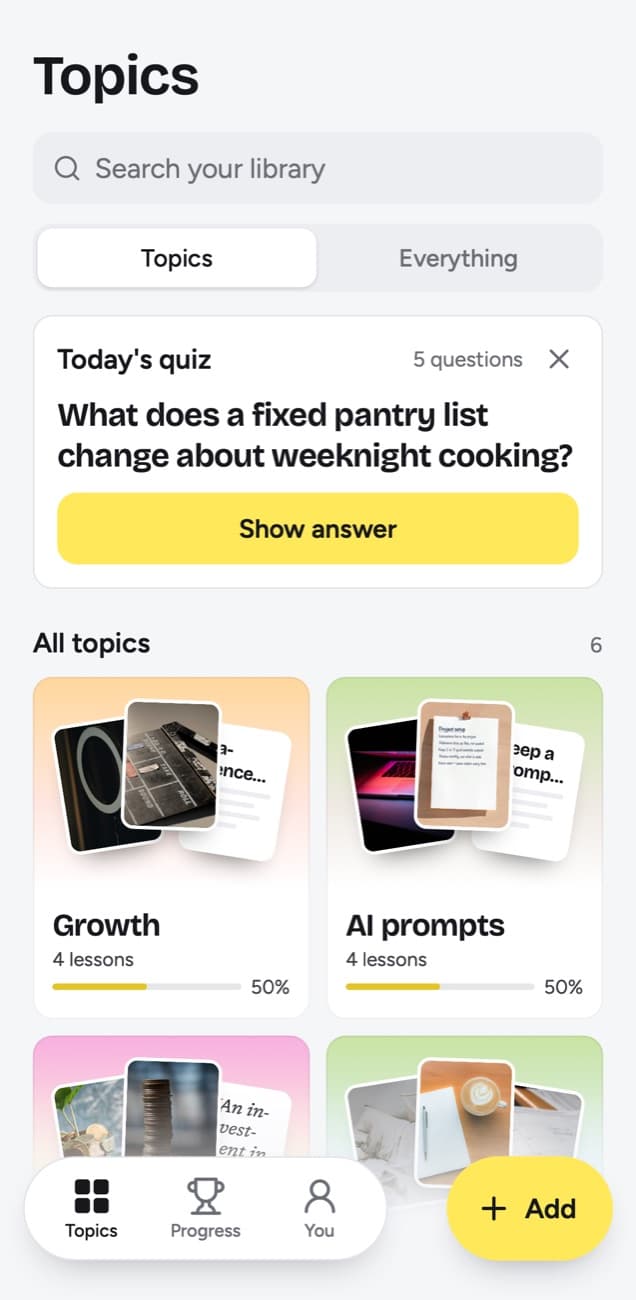
The test of a saved video is whether you could explain its point a month later. Today's quiz checks exactly that: a few short questions every day, each one written from a lesson you made. Say the answer to yourself, tap Show answer, then pick Forgot, Kind of or Knew it.
Your pick decides the next date. A lesson you forgot returns the next day and starts again; Kind of brings it back in 4 days; Knew it waits 14 days, and after that 35, 88 and 219 days, then a year. The knowledge score on each topic shows what share of its due lessons you got right.
A routine that keeps Saved useful
- Every save goes into a collection at the moment you make it.
- Videos in To learn go to scrollandlearn on the day you save them, before a creator can take them down.
- At the end of each month, empty To learn on Facebook; the lessons already hold the links.
- Listings, events and articles stay in their Facebook collections, since that is where you act on them.
Frequently asked questions
- Can other people see what I save on Facebook?
- No. Facebook describes saved items as private: only you see them, until you choose to share them.
- Does scrollandlearn read my Facebook Saved automatically?
- No. It never connects to your Facebook account. You paste or share the link of each video you want as a lesson, and nothing else from your account is read.
- Does it work with Facebook Reels?
- Yes, when someone talks in them. A Reel is written down from what is said, so a Reel with only music gives no lesson.
- Is my scrollandlearn library private?
- Yes. Nobody sees it but you; there is no public sharing and there are no teams.


