Where Instagram keeps what you save
Everything you save sits in a private section of your profile: tap Profile, then Menu in the top right, then Saved. Only you can see it, and the person who posted can't tell you saved it. To save a post, tap Save under it; for a Reel, tap Options, then Save. To put a post straight into a collection, tap and hold Save, then choose a collection or tap New collection.
Saved starts as one long list in the order you saved things, newest first. Collections are the only way Instagram gives you to sort it, and a post can sit in more than one collection. There is no search inside Saved, so a post you saved months ago is found by scrolling.
Sort Saved in five steps
- Name collections by what you will do: To cook, To buy, To try at the gym, To read later and To learn. A collection named after an action tells you what to do when you open it; one named Misc or Inspiration does not.
- Keep it to five or six: more collections means more choices every time you save, and saving fast is the reason you use Save at all.
- Go through the newest 50: open Saved, tap and hold each post's Save to move it into a collection, or tap Save once to remove it if you know you will never open it.
- Leave the old ones: past the newest 50, posts you have not opened since saving them are rarely worth sorting. Clearing or ignoring them costs less than filing them.
- Save into a collection from now on: tap and hold Save instead of tapping it, so a new post goes straight to its place.
This gets Saved into a shape you can browse. It does not change what a saved post is: a video and its caption. A recipe or a method explained out loud still has to be watched again to be used, and collections cannot tell you which ones you still remember.
Turn the To learn collection into lessons
The posts that lose the most value in Saved are the ones you saved to learn from: a Reel with a budgeting method, a carousel with a checklist, a cooking technique explained out loud. scrollandlearn turns each one into a lesson you can read in a minute and files it into a topic named after what you keep saving, such as Cooking or Money habits.
- Copy the link: on the post, tap Send, then Copy Link.
- Paste it into scrollandlearn: open the app in your browser, tap Add and paste the link. The lesson is usually ready within a minute.
- Read what you get: a one-line core idea, key points, Remember this, the one sentence worth keeping, and Try this when the post suggests something to do. The link back to the post and the creator's handle stay on the lesson.
- Check the topic: the lesson is filed on its own. Tap Change to move it to another topic or a new one you name.
- Next time, share instead of copying: on iPhone, tap Add to Shortcuts in scrollandlearn once, and the Shortcut shows up when you share a post. On Android, install scrollandlearn from Chrome first (Install and create shortcut in Chrome's menu), and it then appears in the share sheet.
Here is the lesson a cooking Reel becomes. The key points carry the method, so you do not need to find the Reel again to use it.
Salt the pasta water
The cooking water is the only chance to season the pasta itself, so salt it well.
Key points
- Add the salt once the water boils, then wait for it to dissolve before the pasta goes in.
- Save a cup of the starchy water before draining, it binds the sauce.
- Finish the pasta in the pan with the sauce rather than pouring sauce on top.
- Undercook slightly in the water because it keeps cooking in the pan.
Try this
Taste the water next time you cook pasta. It should taste clearly salty.
Remember this
If you can't taste the salt in the water, it is not enough.
In the quiz
Why salt pasta water so heavily?
Filed under Cooking
What can be read from an Instagram post
Reels where someone talks through a method give the fullest lessons, because what is said becomes the transcript. Carousels work when their slides carry text. Here is how each kind of post is read.
| You paste | You get |
|---|---|
| A TikTok, Reel, Facebook video, Snapchat Spotlight or Twitch clip where someone talks | A transcript of what is said, a short summary and key points |
| A TikTok, Reel or Facebook video with music and no talking | Usually no lesson: it is written from what is said, and the caption is not used |
| A YouTube video or Short with captions | A transcript from the captions, a short summary and key points |
| A YouTube video or Short without captions | No lesson; it asks you to upload the video file |
| A YouTube community post | Its text and the text printed on its images; together they need about 300 characters |
| A post on X, Threads, Reddit, Bluesky, LinkedIn or a public Telegram channel | The text of the post you link, written down as a lesson; replies and comments are not read |
| A video on X, Threads, LinkedIn or Reddit | Under 300 characters of post text: a transcript of what is said (on Reddit, from its own captions), or else the post's text. 300 or more: the post's text, without the video |
| A photo post or carousel on Instagram, TikTok, X, Threads, LinkedIn or Telegram | The text printed on the images; photos are not described. On Instagram and TikTok, caption and slides together need about 300 characters |
| A Spotify or Apple Podcasts episode | The whole episode, transcribed from the show's public podcast feed; a Spotify exclusive gives only its title and description |
| A private or deleted post | No lesson; it can't be read, so upload the file if you have it |
| A link to an article or any other website | Not saved; only posts from the 15+ supported platforms, and LinkedIn articles |
- Reels with nobody speaking give no lesson, even with a full recipe in the caption, because the caption is not used for a video.
- Carousels: the text printed on the slides is read, and the caption and slides together need about 300 characters. Photos are never described.
- Posts from private accounts can't be read from their link. If you have the video, upload it with Upload the video, up to 50 MB.
- Deleted posts have nothing left to read, so paste a post soon after you save it.
Keep what you learned, not just what you saved
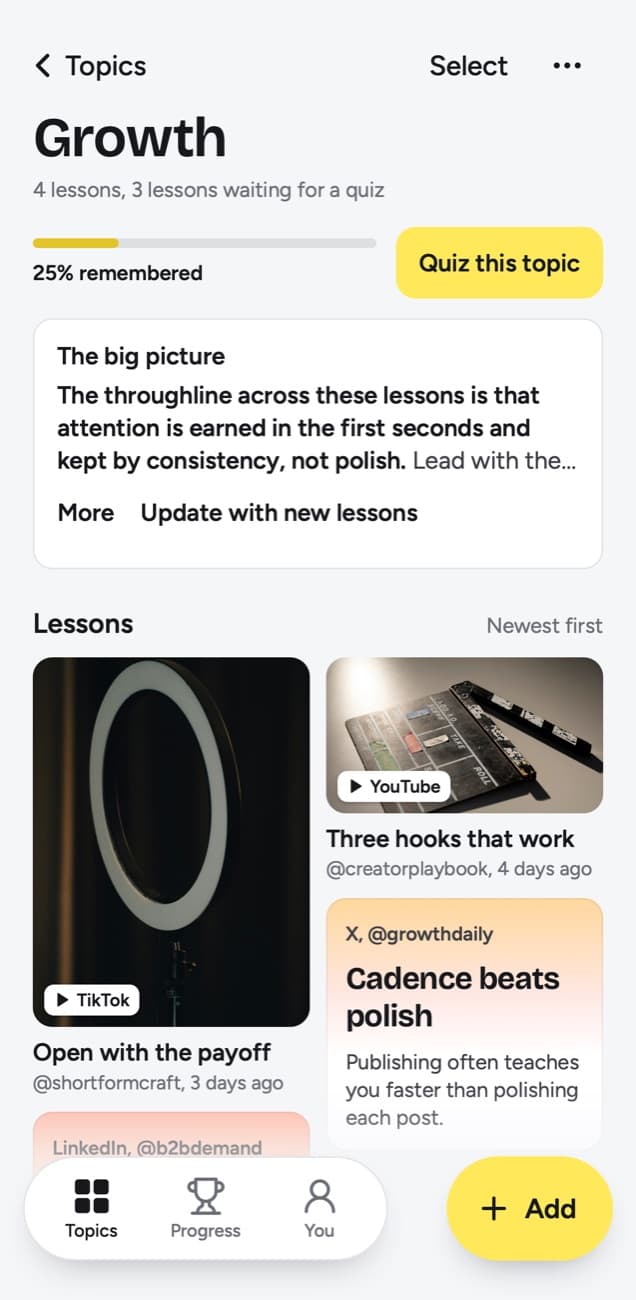
A collection shows you how much you saved. It cannot show how much you remember. In scrollandlearn, Today's quiz asks a few questions every day, each written from a lesson. You answer in your head, tap Show answer and grade it Forgot, Kind of or Knew it, and the grade sets when the lesson comes back.
Forgot brings the lesson back tomorrow and starts it over, Kind of in 4 days, and Knew it in 14 days, then 35, 88 and 219 days, then a year. Each topic shows a knowledge score, the share of lessons you remembered out of those that have come due.
A routine that keeps Saved small
- Save into a collection, never into the plain list.
- Paste anything in To learn into scrollandlearn the same day, while the post is still up.
- Once a month, open each collection and remove what you no longer need. The lessons keep the link to every post you pasted.
- Leave visual saves, outfits, places and design ideas, in Instagram, where seeing them is the point.
Frequently asked questions
- Can other people see my Instagram saved posts?
- No. Saved posts and collections are private: only you can see them, and the person who posted can't tell you saved it.
- Can I search my Instagram saved posts?
- Not inside Saved. You scroll the list or open a collection. Once a post is a lesson in scrollandlearn, search finds it by its title, core idea, key points, topic or the creator's handle.
- Does scrollandlearn read my Instagram Saved automatically?
- No. It never connects to your Instagram account. You paste or share the link of each post you want as a lesson, and nothing else from your account is read.
- What happens to carousels?
- The text printed on the slides is read and becomes the lesson. Photos are never described, so a carousel needs text on its slides, and the caption and slides together need about 300 characters.


