How bookmarks work on X
X's help center keeps it short. Open a post and tap the Bookmark icon; X confirms the bookmark and offers a way to view the rest. All of them collect in one timeline, opened from the Bookmarks tab in the navigation menu.
Bookmarks are private, and X says only you can see them in your account. To remove one, tap the Bookmark icon again on the post inside your Bookmarks timeline; the more icon at the top of that timeline clears every bookmark at once. Lists are a separate tool, for following accounts: a List shows posts from the accounts you add to it, and a new List is public unless you switch on Private.
Folders are where free and paid accounts split. As of 14 October 2026, X's Premium help page lists bookmark folders among the features of the Basic tier, and the higher tiers include everything in Basic. Without a subscription, every bookmark shares the same timeline, so a growth tip sits next to a recipe next to a post about tax returns.
Folders also only sort. A folder called Marketing holds the same posts the timeline did, and the reason you bookmarked each one is still yours to remember.
Sort your bookmarks into topics
- Open Bookmarks: tap Bookmarks in X's navigation menu and pick out the posts you still remember saving.
- Copy one post's link: X's help lists the share icon, then Share Post via, then Copy link to Post. In a browser, the post's address works too.
- Paste it into scrollandlearn: tap Add and paste the link. The post is read and written up as a lesson, usually within a minute.
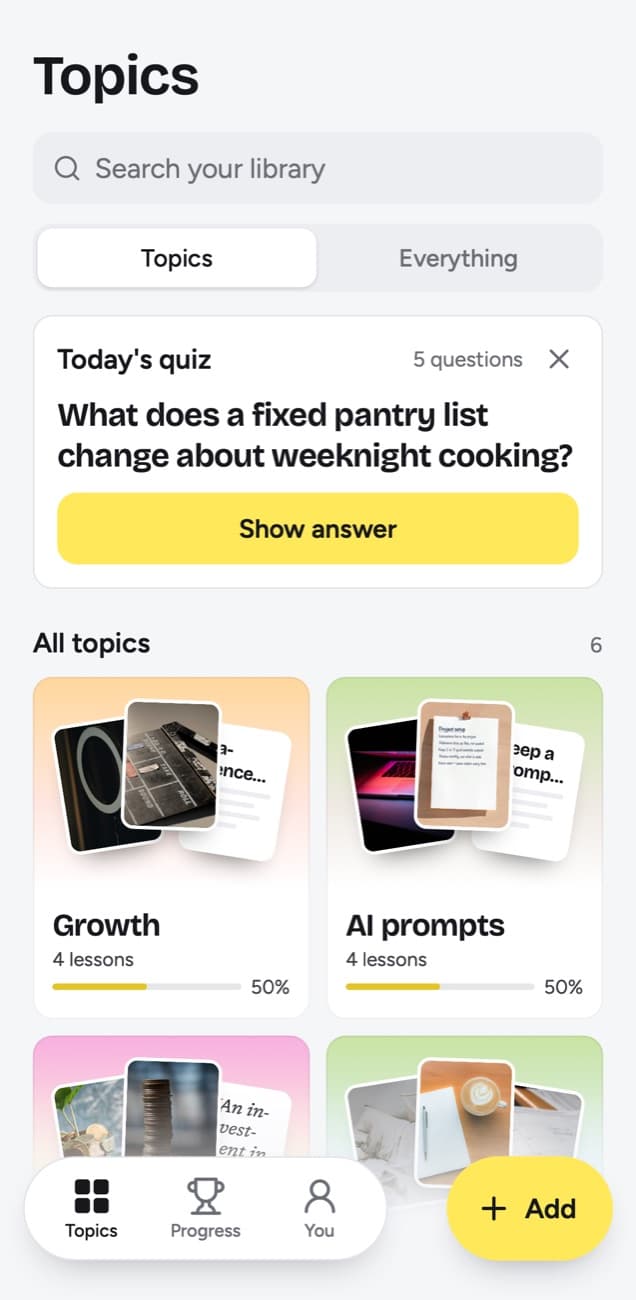
- Let the topics form: the lesson files itself under a topic such as Growth or AI prompts. You don't have to make folders; tap Change if one lands in the wrong place, or New topic in the same sheet to start one of your own.
- Accept a grouping when it fits: once several small topics pile up, the app suggests Group topics, and you choose whether to merge them.
- Clear the bookmark if you like: the lesson keeps the author's handle and a link back to the post, so the bookmark on X can go.
- Send new posts straight over: tap Add to Shortcuts in scrollandlearn once on iPhone, and the Shortcut shows up when you share a post from X. On Android, install scrollandlearn from Chrome once (Install and create shortcut in Chrome's menu), then pick it in the share sheet. At a computer, click Add and paste.
This is an example of the lesson a short post on X about publishing becomes. A post that makes one argument in a few lines splits into a core idea, the reasons and, here, a weekly floor to try.
Cadence beats polish
Publishing often teaches you faster than polishing each post.
Key points
- Each post is a data point, so fewer posts means slower learning, not higher quality.
- Set a floor for quality, then optimize for how often you clear it.
- Reuse structures that already performed instead of starting from a blank page.
- Polish the ones that show early traction, not the ones you have not published yet.
Try this
Set a weekly publishing floor and keep it for a month.
Remember this
Fifty two tests a year beat twelve.
In the quiz
Why does a weekly post teach you more than a polished monthly one?
Filed under Growth
Long threads, replies and quoted posts on X
Here is the part that trips people up. scrollandlearn reads the single post whose link you paste: its text and any words printed on its photos. It does not follow a thread. Paste the first post of a twelve-part thread and the lesson is written from that first post; the other eleven stay on X.
- Link the post that carries the idea. In most threads one post states the method and the rest set it up or add examples. Open that post and copy its own link.
- Paste two posts if the idea needs both. Each link becomes its own lesson and counts as a save, so keep this for threads where the method really is split.
- Look for a recap. Many authors close a thread with a summary post, and it often makes the best single link.
- Quoted posts: when someone quotes a post and adds a line, the quoted post is not read. If the idea lives in the original, open it and copy that link.
- Replies: replies under a post are not read. A reply is a post of its own, though, so if one holds the point, open it and link it directly.
- Posts that share an article: the article behind the link is not opened, so a post that says little beyond 'worth reading' gives a thin lesson. A link to the article itself is not saved either; only posts from the 15+ supported platforms are, plus articles published on LinkedIn.
- Long posts: a very long post is read whole, from its first line to its last.
What it reads from an X post
The table below holds the rules for every platform. For X, the notes under it are the ones that matter.
| You paste | You get |
|---|---|
| A TikTok, Reel, Facebook video, Snapchat Spotlight or Twitch clip where someone talks | A transcript of what is said, a short summary and key points |
| A TikTok, Reel or Facebook video with music and no talking | Usually no lesson: it is written from what is said, and the caption is not used |
| A YouTube video or Short with captions | A transcript from the captions, a short summary and key points |
| A YouTube video or Short without captions | No lesson; it asks you to upload the video file |
| A YouTube community post | Its text and the text printed on its images; together they need about 300 characters |
| A post on X, Threads, Reddit, Bluesky, LinkedIn or a public Telegram channel | The text of the post you link, written down as a lesson; replies and comments are not read |
| A video on X, Threads, LinkedIn or Reddit | Under 300 characters of post text: a transcript of what is said (on Reddit, from its own captions), or else the post's text. 300 or more: the post's text, without the video |
| A photo post or carousel on Instagram, TikTok, X, Threads, LinkedIn or Telegram | The text printed on the images; photos are not described. On Instagram and TikTok, caption and slides together need about 300 characters |
| A Spotify or Apple Podcasts episode | The whole episode, transcribed from the show's public podcast feed; a Spotify exclusive gives only its title and description |
| A private or deleted post | No lesson; it can't be read, so upload the file if you have it |
| A link to an article or any other website | Not saved; only posts from the 15+ supported platforms, and LinkedIn articles |
- Text: the post text becomes the lesson, with no minimum length. Two sentences with a sharp rule are enough.
- Photos: words printed on images, such as a checklist or the labels on a chart, are read. The images are never described, and a photo with no words under a short caption gives no lesson.
- Videos: when the post's text is under 300 characters, a video on X is transcribed and the lesson is written from what is said. When it can't be, for example because the video is longer than 6 hours, the month's transcription minutes are used up or the video has no words in it, the text of the post makes the lesson, if the post has any. A post with 300 characters or more is the lesson on its own, without the video.
- Protected or deleted posts: posts from protected accounts and posts deleted since you bookmarked them can't be read. Old bookmarks are the likeliest to be gone.
- A failed link: tap Try again to send it through once more.
Keep the ideas you bookmarked
Short posts are easy to agree with and easy to forget. Today's quiz is built for that. Every day it asks about a few of your lessons, with each question written from a lesson; for the example above, why a weekly post teaches more than a polished monthly one. You answer in your head, tap Show answer and grade it Forgot, Kind of or Knew it.
The grade sets the next date. Forgot schedules the lesson for tomorrow and starts it over; Kind of, four days out; Knew it, two weeks, then 35 days, 88, 219 and finally a year. A topic's knowledge score shows how much of it you have kept: lessons whose latest grade was Knew it, as a share of the lessons that have come due. A lesson counts once you grade it or once its day arrives unanswered, so a topic you stopped quizzing can sit at 0%; a topic shows no score only before any of its lessons has come up.
Use My takeaway for what a post meant to you, in a few lines of your own, and Things to try for the advice you plan to test, each with a done check. Every topic also carries a big picture, a summary across its lessons that is rewritten as the topic grows. It is the closest thing to reading your bookmarks back as one argument.
Frequently asked questions
- Does it read the rest of the thread?
- No. It reads the one post you link. Copy the link of the post in the thread that carries the idea, or paste a second post if the method is split across two.
- Are replies or quoted posts included?
- No. Replies under the post and posts it quotes are not read. Open the one you need and paste its own link.
- Are videos on X transcribed?
- Only when the post's text is under 300 characters. Then what is said in the video becomes the lesson, and if the video can't be transcribed, for example because the video is longer than 6 hours or it has no words in it, the lesson comes from the post's text, so it is only as full as what the author wrote. A post with 300 characters or more is the lesson on its own, without the video.
- Do I need X Premium?
- No. Any public post on X can be pasted without it. As of 14 October 2026, X's help page lists bookmark folders as a Premium feature, and scrollandlearn files lessons into topics without them.
- Can it pull in all my bookmarks at once?
- No. Each post goes in by its own link, through Add or the share sheet. A dozen posts from your Bookmarks timeline take a few minutes.


