Why saved posts are forgotten
Tapping Save feels like progress. The idea was clear while you watched, the post is stored, and the job seems done. Three things work against you from that moment on.
- Saving asks nothing of your memory. In a 2014 study in Psychological Science by Linda Henkel, people were led on a guided tour of an art museum. They later remembered fewer objects, and fewer details about them, when they had photographed each object whole than when they had only looked at it. When they zoomed in to photograph one detail, the loss disappeared. The study was about cameras, and the parallel with Save is close: handing the job to a device lets your attention move on.
- Nothing brings a saved post back. A saved list holds posts in the order you saved them. It does not remind you of them or ask you about them, so a post returns only if you remember that it exists, which app holds it, and how far down it sits. Each app keeps its own list, so a year of saves ends up split across Instagram, TikTok, YouTube and X.
- The feed is built for the next post. In a 2023 explainer of Instagram's ranking, Adam Mosseri wrote that the feed makes "educated guesses at how likely you are to interact with a post in different ways," and that Reels are designed "to help you discover new things, with an emphasis on entertainment." Posts you have saved are one of the signals it uses to pick what to show you. None of the predictions it lists is about whether you will remember what you saw.
What the research says helps
Four techniques have good evidence behind them, and each one fits into the minute after you watch a post.
- Retrieval practice: recall the idea without looking at the post. Pulling something out of memory strengthens it more than watching it again, a finding called the testing effect. A 2013 review of ten study techniques, led by John Dunlosky, gave practice testing its top rating of high utility.
- Spacing: come back to the idea after a gap, and let each gap grow when you remember it. The same review gave distributed practice its top rating too; the spaced repetition guide covers the schedules.
- Your own words: explain why the idea is true, or how it connects to something you already know. Dunlosky's team rated two techniques built on this as moderate utility: elaborative interrogation, which means working out why a stated fact is true, and self-explanation. The review found both promising and short of classroom evidence.
- One thing to try: turn the post into a single action with a time and a place attached. Peter Gollwitzer calls these implementation intentions, plans that spell out the when, where and how in advance, in the form: if situation Y comes up, then I will do X.
A routine for the posts you save
The routine works with any tool, from a notes app to a sheet of paper.
- Save on purpose: before you tap Save, name the one thing you would want to remember without the video. If nothing comes to mind, let the post go.
- Say it back: close the post and state its point in one sentence, out loud or in writing, without looking. This is your first recall.
- Add a line of your own: write why it is true or where it fits in your life. A tip about follow-up emails is easier to recall once it is tied to the application you sent last week.
- Pick one thing to try: write it as a plan with a when and a where, such as "when I send an application, I put two follow-up dates in my calendar."
- Quiz yourself later: a few days on, ask yourself the question the post answers and reply before you look. Each time you get it right, wait longer before the next try.
- Let go of the rest: if a saved post no longer matters to you, remove it. A short list you come back to is worth more than a long one you never open.
How scrollandlearn runs the routine
scrollandlearn is a web app that does the setup work of this routine for posts from 15+ platforms. You paste a link, or share the post from your phone, and usually within a minute it comes back as a lesson.
- Remember this: each lesson marks the one sentence worth keeping, next to a one-line core idea and the key points. It names the one thing to remember, the first step of the routine.
- My takeaway: up to 500 characters in your own words on any lesson, for the why-it-is-true or where-it-fits step.
- Things to try: a lesson can suggest one action, called Try this. The ones you pick go on a list with a done check.
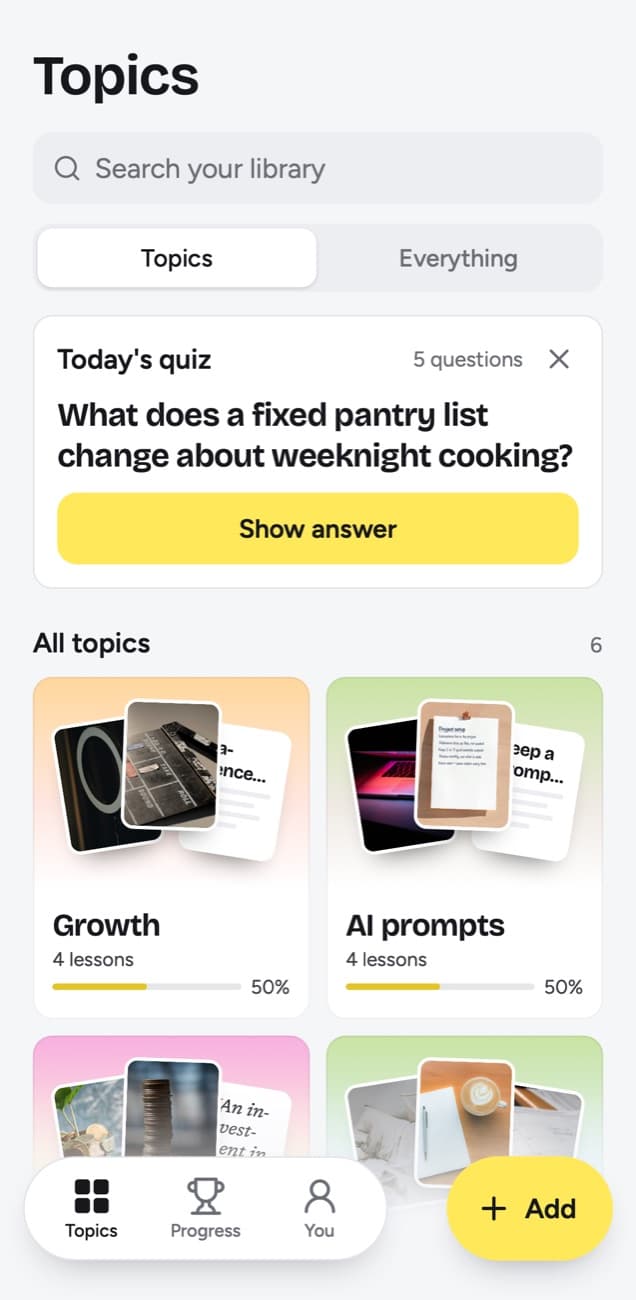
- Today's quiz: a few questions a day, each written from a lesson you saved. You answer in your head, tap Show answer to check, then grade it Forgot, Kind of or Knew it. The grade decides how soon that lesson comes back.
- Knowledge score: each topic shows the share of its lessons you remembered, meaning your last grade was Knew it and the lesson is not due again yet, out of those that have come up for a quiz. A lesson counts once you grade it or once its quiz day arrives, so a topic with unanswered lessons can show 0%; before any of its lessons has come up, it shows no score yet.
Follow up twice
Follow up twice, a week apart, with something new each time, then stop.
Key points
- Send one follow up after a week and one after two, then stop.
- Add something new each time instead of repeating the original message.
- Keep applying while you wait, since a pipeline removes the pressure from any single reply.
- Log what you sent and when, so follow ups are scheduled rather than emotional.
Try this
When you send the next application, put both follow up dates in your calendar.
Remember this
Silence is usually about their process, not about you.
In the quiz
How many times should you follow up on an application, and when?
Filed under Job outreach
The example illustrates the lesson an X post about job applications becomes. Its Try this line, "When you send the next application, put both follow up dates in your calendar," already has the when-then shape of an implementation intention. The quiz asks how many times to follow up and when, and you answer before the lesson is shown.
What stays your job
The app sets up the recall, and the trying is yours. A few limits are worth knowing before you rely on it.
- It reads public posts from 15+ platforms, and links to web articles are not saved, apart from LinkedIn articles.
- A TikTok, Reel or Facebook video becomes a lesson only from what is said in it, however long its caption, and a YouTube video only from its captions.
- Private, deleted or blocked posts can't be read from their link, and neither can a YouTube video without captions. For those, you can upload the video file instead if you have it, up to 50 MB.
- My takeaway holds up to 500 characters per lesson, a few lines in your own words, and Edit lesson lets you rewrite the title, core idea, key points (up to 4,000 characters), Try this, Remember this and the quiz question. A longer note that is not about a saved post can go in through Add, where 300 characters or more becomes a lesson of its own.
- The quiz trusts your grade. Marking Knew it when you only half knew it pushes the lesson further out than it should go.
Frequently asked questions
- Why do I forget the posts I save?
- Saving asks nothing of your memory, the saved list never brings a post back, and the feed moves you straight on to the next one. An idea you never recall again tends to fade.
- Is rewatching a saved video a good way to remember it?
- It helps less than it feels. Rewatching works like rereading, which the 2013 Dunlosky review rated low utility. Closing the video, recalling its point and then checking does more with the same minute.
- How often should I review what I saved?
- Soon after you save it, then at gaps that grow each time you remember it. In scrollandlearn the grade you give in Today's quiz sets the next date, from tomorrow after Forgot to months away for a lesson you keep knowing.
- Can scrollandlearn import my saved folder?
- No. Each post goes in by its link, pasted into Add or shared from your phone: on iPhone through a Shortcut in the share sheet, on Android through the share sheet once you install the web app from Chrome.
- Do I have to write a takeaway?
- No. Today's quiz works from the lesson itself. A takeaway helps when you want a lesson tied to your own situation, and search finds lessons by it later.


