Save the post on LinkedIn first
LinkedIn's help center describes one Save action for posts and articles. Tap the More icon, the three dots at the top right of the post, then tap Save. A banner shows for a moment with a View Saved Posts link, the quickest way to check it worked. On a computer it is the same: click More, then Save in the dropdown.
To find your saves in the app, tap your profile picture, then Saved posts. On a computer, click Saved items in the left pane of the home page, then Saved posts and articles. Unsave sits behind the More icon on each saved item. Some things can't be saved at all: LinkedIn names recommended jobs, follow recommendations, and work anniversary or profile change updates.
The saved list holds the post and nothing else. Why you saved it stays in your head: the interview scorecard from a recruiter, the slide deck on pricing, the story of a launch that went wrong. Three weeks later the list is a column of profile photos and first lines, and the post about negotiating an offer is somewhere in the middle of it.
Turn a saved LinkedIn post into a lesson
- Copy the post's link: on a computer, click the More icon on the post and choose Copy link to post. In the LinkedIn app, tap the More icon, then Share via, then Copy on iPhone or Copy to clipboard on Android.
- Paste it into scrollandlearn: open the app in your browser, tap Add and paste the link. An lnkd.in short link works as well; it opens the post it points to.
- Give it a minute: the post text, the words on the pages of a document post or the body of a LinkedIn article is read and written up as a lesson, usually within a minute.
- Read the lesson: a one-line core idea, the key points, Remember this, the sentence worth keeping, and Try this when the post suggests a next step. The author's handle and a link back to the post stay on it.
- Check the topic: the lesson lands in a topic named after what you keep saving, such as Growth or Job outreach. Tap Change if a hiring tip ended up among your marketing lessons.
- Make it yours: write My takeaway, a few lines on how the advice fits your job, and if the lesson has a Try this you plan to act on, add it to Things to try.
- Skip the copy step next time: on iPhone, tap Add to Shortcuts in scrollandlearn once, then share a LinkedIn post to the Shortcut. On Android, scrollandlearn appears in the share sheet once you install it from Chrome, with Install and create shortcut in Chrome's menu. On a laptop, click Add and paste.
Below is an example of the lesson a LinkedIn post about ad testing becomes. It illustrates what a lesson keeps from a post of advice: the rule, the reasons behind it, a step to try and one sentence to remember.
Test one variable
A test only teaches you something when one thing changes at a time.
Key points
- Give each test enough spend to reach a decision, otherwise the result is noise.
- Write down the expected outcome before launching so you cannot rationalize after.
- Kill losers on a schedule rather than when you happen to look at the dashboard.
- Keep a log of what was tested, because teams repeat old tests constantly.
Try this
Before the next test, write down the result you expect and the day you will stop it.
Remember this
Change the creative or the audience or the offer, never two at once.
In the quiz
How many things should change in one ad test, and why?
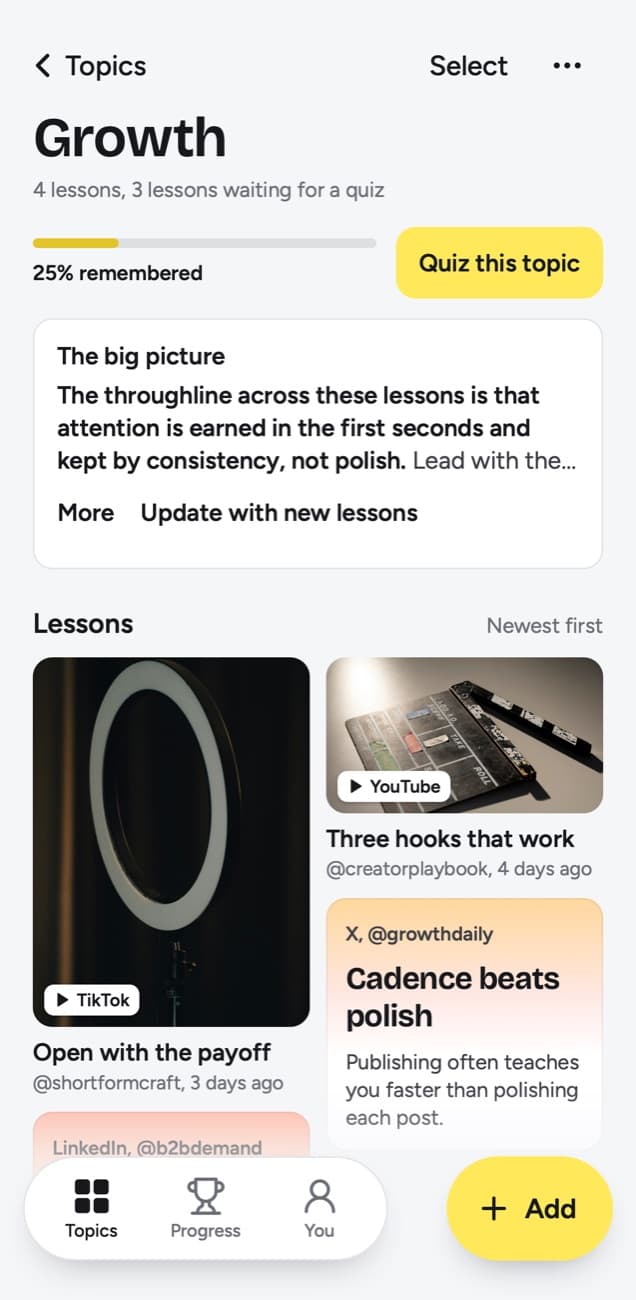
Filed under Growth
Document posts, articles and video posts
LinkedIn mixes more formats than most networks, and each one gives a different lesson. These notes are the LinkedIn side of the table further down.
- Text posts: the post text becomes the lesson. There is no minimum length, so a five-line post with one sharp rule still works.
- Document posts: the swipeable slide decks people upload as a document. The words printed on the pages are read, up to the first 20 pages, so a twelve-page guide to salary talks is read in full. A page with no printed words adds nothing.
- LinkedIn articles: long-form pieces published on LinkedIn become lessons too. A long article is read whole, so the lesson covers it from its opening to its end.
- Video posts: when the text posted with the video runs to 300 characters or more, that text is the lesson and the video is not transcribed. With a shorter text, the video is transcribed and the lesson is written from what is said; if it can't be, for example because the video is longer than 6 hours or the video has no words in it, the text makes the lesson.
- Photo posts: text printed on the image, such as a framework laid out as a table, is read. The photo itself is never described, so a photo with no printed words under a post of fewer than about 300 characters gives no lesson.
- Posts that aren't public: a post shared with connections only, or deleted since you saved it, can't be read from the link.
The table sums up the same rules across every supported platform.
| You paste | You get |
|---|---|
| A TikTok, Reel, Facebook video, Snapchat Spotlight or Twitch clip where someone talks | A transcript of what is said, a short summary and key points |
| A TikTok, Reel or Facebook video with music and no talking | Usually no lesson: it is written from what is said, and the caption is not used |
| A YouTube video or Short with captions | A transcript from the captions, a short summary and key points |
| A YouTube video or Short without captions | No lesson; it asks you to upload the video file |
| A YouTube community post | Its text and the text printed on its images; together they need about 300 characters |
| A post on X, Threads, Reddit, Bluesky, LinkedIn or a public Telegram channel | The text of the post you link, written down as a lesson; replies and comments are not read |
| A video on X, Threads, LinkedIn or Reddit | Under 300 characters of post text: a transcript of what is said (on Reddit, from its own captions), or else the post's text. 300 or more: the post's text, without the video |
| A photo post or carousel on Instagram, TikTok, X, Threads, LinkedIn or Telegram | The text printed on the images; photos are not described. On Instagram and TikTok, caption and slides together need about 300 characters |
| A Spotify or Apple Podcasts episode | The whole episode, transcribed from the show's public podcast feed; a Spotify exclusive gives only its title and description |
| A private or deleted post | No lesson; it can't be read, so upload the file if you have it |
| A link to an article or any other website | Not saved; only posts from the 15+ supported platforms, and LinkedIn articles |
Turn career advice into habits
Most of what people save on LinkedIn is advice for later: how to open a cold email, what to say when asked about salary, how to run a one-on-one. Advice like that pays off only if you remember it when the moment comes, and that is what Today's quiz is for.
Each day the quiz picks a few of your lessons and asks a question written from each one, for this example how many things should change in one ad test, and why. Think of your answer, tap Show answer, then grade yourself. Forgot returns the lesson tomorrow and restarts its schedule. Kind of brings it back in 4 days. Knew it pushes it to 14 days, and further Knew it grades stretch that to 35, 88 and 219 days, then a year.
Two features make it personal. My takeaway holds your own words on the lesson, up to 500 characters; 'use this in the Q3 hiring round' will mean more to you later than the author's summary. Things to try collects the Try this items you pick, each with a done check, so a post about follow-ups turns into a task you tick off. Each topic also has a knowledge score: among lessons that have come due, the share whose last grade was Knew it. A lesson counts as soon as you grade it or once its quiz day arrives, so quizzes you skip pull a topic toward 0%, and only a topic where no lesson has come up yet has no score.
Which LinkedIn posts make good lessons
- Posts that lay out a method with steps or numbers: an interview scorecard, a pricing test, a negotiation script.
- Document posts with words on every page. They often hold more than a long text post.
- Articles by practitioners that make their point early. Long articles are summarized from the opening, so a piece that saves its argument for the end gives less.
- Skip announcements, new-job posts and congratulations. They hold nothing to recall.
- Skip video posts with no words in the video and a single line of text: they give a thin lesson.
- Put the word you will search for in your takeaway. Search covers titles, key points, the core idea, Try this, Remember this, your takeaway, topics and creator handles.
Frequently asked questions
- Does it read LinkedIn document carousels?
- Yes. The words printed on the pages of a document post are read, up to the first 20 pages, and become the lesson. Pages with no printed words add nothing, because images are never described.
- Does it work with LinkedIn articles?
- Yes. A LinkedIn article becomes a lesson the same way a post does. Long articles are read whole, so a point made near the end can make it in too.
- Are LinkedIn videos transcribed?
- Yes, when the text posted with it is under 300 characters: then what is said in the video becomes the lesson, and if it can't be transcribed, for example because the video is longer than 6 hours or the video has no words in it, the text makes a short one. A post with 300 characters or more of text is the lesson itself, and its video is not transcribed.
- Do lnkd.in short links work?
- Yes. An lnkd.in link opens the LinkedIn post it points to, and that post is read.
- Are the replies under a post included?
- No. The lesson is written from the post itself. Replies underneath it are not read, so a good answer you found there is worth a line in My takeaway.


