The saved tab is full of workouts you never did
Fitness feeds are built for the save button. A coach demonstrates a hip hinge, a trainer lists five moves for tight shoulders, someone films a ten minute core circuit, and each one goes into Saved with the plan to try it on Monday. By the time Monday comes the collection holds three hundred clips, all with the same thumbnail of a person mid-squat, and none of them says what it was about.
The useful part of most of those clips was a sentence or two: keep the bar close to your legs, breathe out on the hard part, slow down the lowering half. That sentence is what you would carry into the gym, and it is the part a grid of thumbnails hides. A library worth having stores those sentences by subject, with the coach's name and a way back to the clip when you want to watch the movement again.
Read this first: a lesson records a coach, it does not coach you
Coaches on short video also disagree with each other, sometimes loudly. Keeping their handle on every lesson means you can see later who said what, and the link lets you watch the demonstration again before you copy it.
What a coaching clip becomes
Paste a Reel or TikTok in which the coach explains the exercise, and it comes back as a lesson, usually in under a minute. The lesson holds a transcript of what was said, a one-line core idea, a few key points with the cues and the reasons, a single marked Remember this, and the link to the post under the creator's handle. When the coach suggests something specific for your next session, the lesson adds it as Try this; a clip that only explains has none.
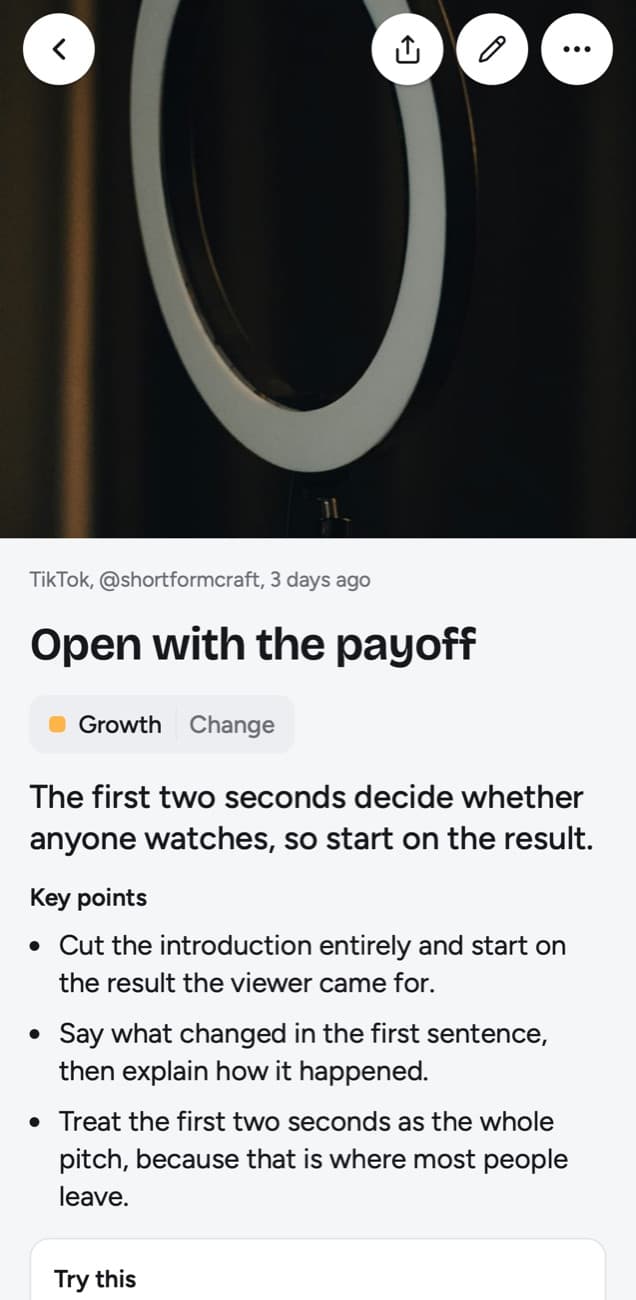
There is no workout lesson among our examples, so the one below comes from the Growth topic. It is an example of the lesson a short TikTok becomes, and the shape is the same for a coach: one idea, the points that support it, a step to test and the line worth keeping.
Open with the payoff
The first two seconds decide whether anyone watches, so start on the result.
Key points
- Cut the introduction entirely and start on the result the viewer came for.
- Say what changed in the first sentence, then explain how it happened.
- Treat the first two seconds as the whole pitch, because that is where most people leave.
Try this
Re-record only the opening line of your next video so it starts on the result.
Remember this
If the hook needs context to make sense, it is not ready.
In the quiz
Why should a short video start on the result instead of an introduction?
Filed under Growth
Picture that layout filled from a trainer explaining a split squat: the core idea in one line, key points on where the front foot goes and why the trainer wants a slow descent, and a Remember this you could repeat to yourself between sets. Nothing in it describes the trainer's movement on screen. Every word comes from what the trainer said out loud.
Which fitness posts work, and which give little
The app reads two things in a post like this: speech in a video, and text printed on the images of a photo post. It does not watch the movement, count reps from the picture or read the caption under a video. That rule sorts fitness content into clips that make strong lessons and clips that make almost none.
| The clip you saved | What comes back |
|---|---|
| A coach talking through one exercise: setup, cues, the mistake people make | A full lesson from the transcript, the best case for this kind of library |
| A YouTube workout video or Short with captions where the trainer explains as they go | A lesson from the captions, all of them on a long session too |
| A follow-along routine where the coach mostly counts, says go and switch, or cheers you on | Little or no lesson. Counting and encouragement are words, but they hold nothing to keep |
| A routine set to music with the exercise names typed into the caption | Usually no lesson. A video is read for what is said, and its caption is left out |
| A clip with the moves and rep counts shown as text over the video | No lesson from that text; only speech is transcribed, and the picture is never described |
| An Instagram carousel or TikTok photo post with each exercise and its cues printed on a slide | A lesson from the printed slide text, once it and the caption reach about 300 characters |
| A carousel of photos showing poses, with no words on the slides | No lesson. The app does not describe what a photo shows |
| A Reddit post in a fitness community with the routine written out | A lesson from the post's title and text; its photos and the replies are not read |
A quick test before you paste: turn the sound on and listen to ten seconds. If the coach is explaining, the clip will give you something to keep. If you hear a beat and a countdown, the value of that video is in watching it, and it belongs in your saved tab rather than in a library of written lessons.
Strength, mobility and running sort themselves
There is no folder to set up first. The app files each lesson into a topic named after what you keep saving, so clips about deadlifts and rows gather in one place and stretches for the hips gather in another. If a lesson lands somewhere you would not put it, Change moves it, and the same sheet has New topic for a name of your own, such as Kettlebell or Running drills. When a handful of small topics appear, the app offers to group them and leaves the choice to you.
A topic also keeps a big picture: a short summary across all of its lessons, rewritten as new ones come in. After twenty clips from different coaches, the big picture of Strength reads like the principles they agree on. Open a lesson and up to three related lessons sit below it when some are close in meaning, which is how the hinge cue from one coach can turn up beside a similar cue from another.
Cues you recall at the rack
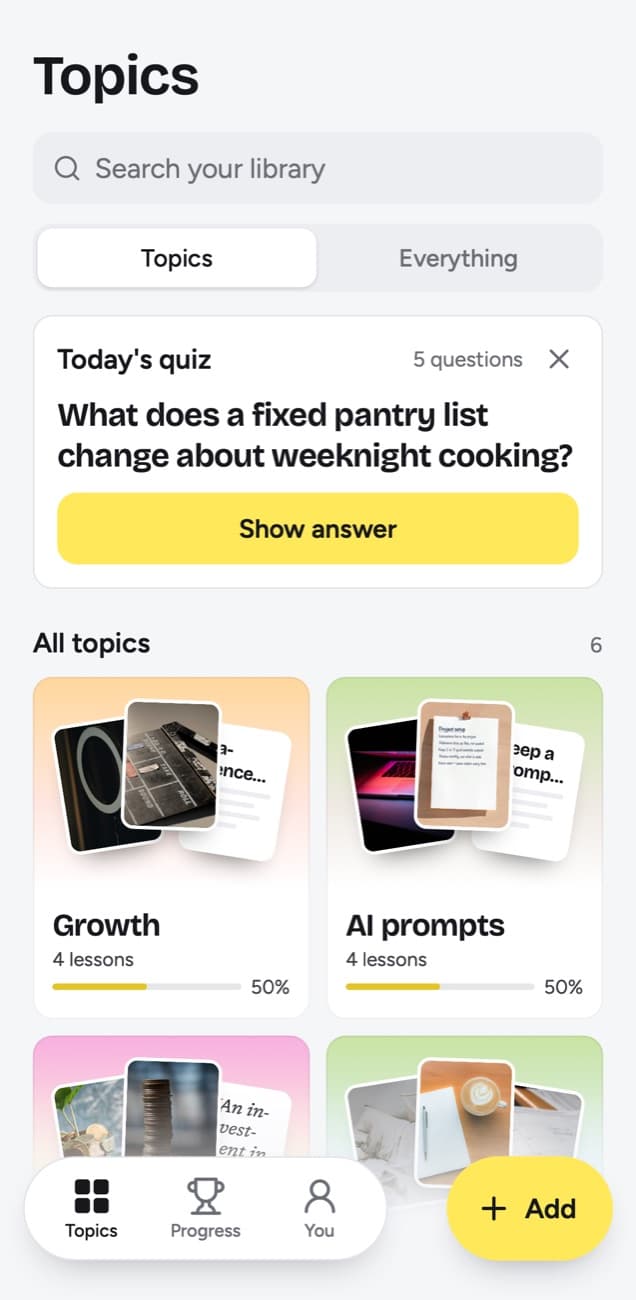
A form cue is only useful if it is in your head when the weight is in your hands. Today's quiz brings back lessons that are due, a few questions a day, each written from one lesson: what was the coach's cue for keeping the bar path straight? You think of the answer, tap Show answer and say how it went: Forgot, Kind of or Knew it.
Forgot puts the question back on tomorrow's list and resets its spacing. Kind of returns it in 4 days. Knew it moves it out to 14 days, and later reviews stretch to 35, 88 and 219 days and finally a year. The night before leg day, Quiz this topic runs one topic on its own. The knowledge score for that topic is the share you remembered of the lessons that have come up, and a lesson's quiz day counts even when you skip it, so a topic left alone for weeks can sit at 0%.
Your own training next to the coach's words
When a coach gives you something concrete to do, the lesson ends on it as Try this. Pick the ones you mean to attempt and they go into Things to try, a list where each has a done check, so a cue you wanted to test does not vanish into the feed again.
My takeaway gives each lesson up to 500 characters in your words, for what no coach could know: which variation your gym's equipment allows, the weight you started at, the cue that finally made it click. You can also correct a lesson with Edit lesson. Search looks through takeaways, titles, key points, core ideas, Try this, Remember this, topics and creator handles, and through the exact words of transcripts, so an exercise a trainer named once in passing still finds its lesson.
What it reads from workout posts
| You paste | You get |
|---|---|
| A TikTok, Reel, Facebook video, Snapchat Spotlight or Twitch clip where someone talks | A transcript of what is said, a short summary and key points |
| A TikTok, Reel or Facebook video with music and no talking | Usually no lesson: it is written from what is said, and the caption is not used |
| A YouTube video or Short with captions | A transcript from the captions, a short summary and key points |
| A YouTube video or Short without captions | No lesson; it asks you to upload the video file |
| A YouTube community post | Its text and the text printed on its images; together they need about 300 characters |
| A post on X, Threads, Reddit, Bluesky, LinkedIn or a public Telegram channel | The text of the post you link, written down as a lesson; replies and comments are not read |
| A video on X, Threads, LinkedIn or Reddit | Under 300 characters of post text: a transcript of what is said (on Reddit, from its own captions), or else the post's text. 300 or more: the post's text, without the video |
| A photo post or carousel on Instagram, TikTok, X, Threads, LinkedIn or Telegram | The text printed on the images; photos are not described. On Instagram and TikTok, caption and slides together need about 300 characters |
| A Spotify or Apple Podcasts episode | The whole episode, transcribed from the show's public podcast feed; a Spotify exclusive gives only its title and description |
| A private or deleted post | No lesson; it can't be read, so upload the file if you have it |
| A link to an article or any other website | Not saved; only posts from the 15+ supported platforms, and LinkedIn articles |
- Reels, TikToks and Facebook videos where the coach talks give the most, since cues and reasons are spoken. On YouTube, the lesson needs the video's captions; a workout video without them gives none.
- Long follow-along sessions on YouTube are often mostly counting and music, which gives a lesson little to work with, so save the explainer that comes before the session.
- On Instagram and TikTok photo posts, the printed words on the slides are read. A pose without words on the slide adds nothing, because images are never described.
- An X or Threads post with a routine typed out becomes a lesson from that one post, not from the rest of the thread or the replies.
- A private or deleted clip can't be read. Uploading the file only helps when the coach speaks in it; a clip of music and counting has nothing more to give.
What it is not: a training app
- It logs no sets, reps or weights and keeps no workout history.
- It builds no programme and plans no sessions, and it has no timer.
- It connects to no watch, fitness app or health data.
- It checks no advice and makes no claim about what is safe or effective for you.
- It has no shared space with a coach or a training partner; Share as image sends one lesson as a picture, and Export lessons downloads them as Markdown, CSV or JSON.
For logging what you lift and planning the week, a training app does that job. Use scrollandlearn for the part those apps leave out: why an exercise is done a certain way, in the coach's words, back in front of you before you forget it.
Frequently asked questions
- Does a follow-along workout video make a lesson?
- Rarely a useful one. The lesson is written from what is said in the video, so a coach who only counts, calls the next move or cheers gives little or nothing to keep, and a routine set to music usually gives no lesson. The caption under a video is not used. Save the clip where the same coach explains the exercise instead.
- Can it describe the exercise shown in the clip?
- No. The app never describes what a video or photo shows. It works from what is said in a video and from text printed on the slides of a photo post, so a movement demonstrated in silence leaves nothing to write down.
- Is a lesson from a fitness creator safe to follow?
- The app cannot tell you. A lesson only summarizes what the creator said; it does not check the advice or know anything about your health. Ask a doctor or a qualified professional if you are unsure about an exercise.
- Can it read a carousel of exercises?
- Yes, when the exercises and cues are printed on the slides of an Instagram carousel or a TikTok photo post, up to 20 slides. Slide text and caption together need about 300 characters. Slides that only show poses give no lesson.
- Can I log my sets in it?
- No. There is no workout log, programme or timer. My takeaway holds up to 500 characters of your own words on a lesson, which suits a note on how an exercise went, but it is not a training diary.
- Can I try it before paying?
- Yes. 10 lessons free, no card.


